EasyManua.ls Logo

FUJICA HALF - Manual Exposure Assistance; Using Electric Eye for Manual Settings; Adjusting for Action and Depth

Default Icon
24 pages
Print Icon
To Next Page IconTo Next Page
To Previous Page IconTo Previous Page
Loading...
Even
when
you
operate
the
camera
manually,
you
can
use
the
Computer
Electric
Eye
to
help
you
arrive
at
correct
exposu
re
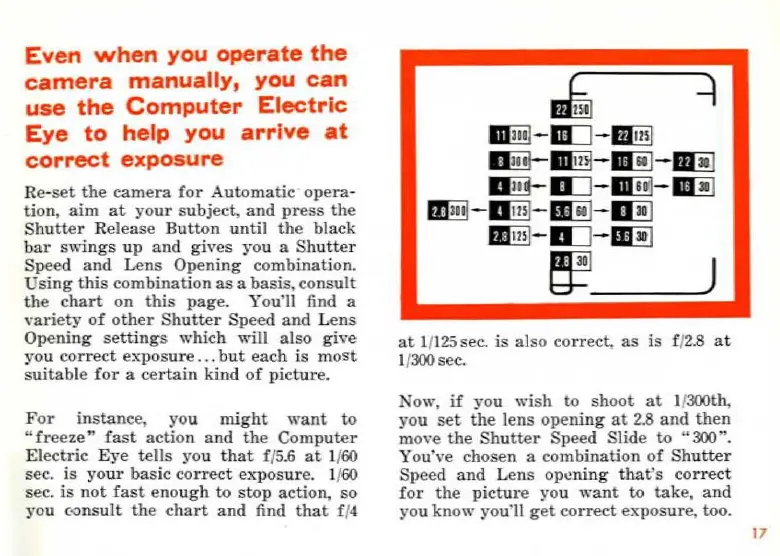
Re-set
the
camera
for
Automatic
opera-
tion,
aim
at
your
subject,
and
press
the
Sbutter
R
elease
Bu
tton
until
the
black
bar
sw
i
ngs
up
and
gives
you
a
Sh
u
tter
Speed
and
Lens
Opening
combinat
ion.
Using
this
combination
as
a
basis,
consult
the
chart
on
this
page.
You'll find a
variety
of
other
Shutter
Speed
and
L
ens
Opening
settings
which
will
also
give
yo
u
correct
exposure
...
but
each
is
most
suitable
for
a
certain
kind
of
picture.
For
instanc
e,
yo
u
might
want
to
"
fr
eez
e"
fast
action
and
the
Computer
Electric
Eye
tells
you
that
f/
5.6
at
1/60
sec
.
is
your
basic
correct
exposure.
1/60
sec.
is
not
fast
enou
gh
to
stop
action, so
you
c<>ns
u
lt
the
chart
and
find
that
f /4
at
1/125 sec.
is
a Iso
correct,
as
is
f/
2.8
at
1/300 sec.
Now
,
if
you
wish
to
shoot
at
l i300th,
you
set
the
lens
opening
at
2.8
and
then
move
the
Shutter
Speed
Slide
to
"300 ".
Y
ou"
\•e
chosen a
combination
of
Shutter
Speed
and
Lens
o
pcning
that's
correct
for
th
e
pictur
e you
want
to
take,
and
you
know
you11
get
correct
e
":-p
os
ure,
too.
17
Ce mode d'emploi est un cadeau d'un visiteur du site.

Related product manuals