EasyManua.ls Logo

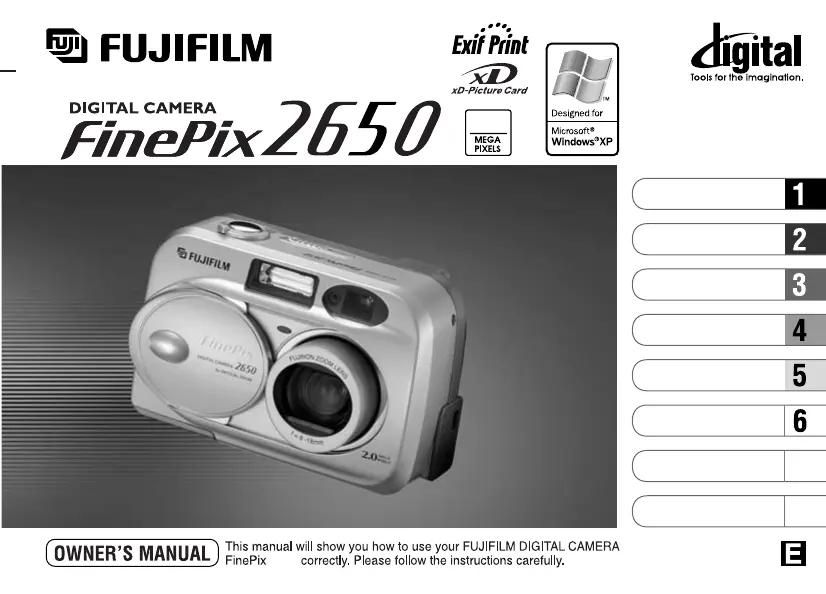
FujiFilm 2650 - User Manual

FujiFilm 2650
63 pages
Print Icon
To Next Page IconTo Next Page
Loading...
2650
BL00201-200
(
1
)
2.0
7
8
Getting Ready
Camera Connection
Using FinePixViewer
Basic Photography
Advanced Features
Photography
Advanced Features
Playback
Software Installation
Settings

Table of Contents

Questions and Answers

Summary

Warning Messages

Preface and Introduction

Camera Nomenclature Overview

Getting Ready

Loading Batteries and xD-Picture Card

Instructions for inserting batteries and the xD-Picture Card into the camera.

Basic Setup Procedures

Switching the Camera On and Off

Step-by-step guide to power the digital camera on and off.

Setting the Date and Time

Guide to configuring the camera's date and time settings.

Camera Settings and Features

Changing Date and Time Format

How to adjust the display format for the date and time.

Checking Battery Charge Status

Understanding the battery level indicator on the LCD monitor.

Power Save Functionality

Configuration and operation of the camera's power saving features.

Language and Basic Operation

Selecting the Camera Language

Procedure for changing the display language on the camera.

Basic Photography Guide

An overview of the camera's basic operational functions.

Taking Pictures in Auto Mode

Auto Mode Photography Details

Auto Mode Photography Features

Viewfinder Lamp Display Indicators

Meaning of the different light signals from the viewfinder lamp.

Subjects Unsuitable for Autofocus

Identifying subjects that may cause autofocus issues.

Auto Mode Photography Data

Number of Available Frames Display

Information on how the number of shots is displayed.

Shots per xD-Picture Card

Estimates of available shots based on card capacity and quality.

Advanced Photography Techniques

Using AF;AE Lock for Focus and Exposure

How to lock focus and exposure settings for better shots.

Using the Camera Zoom

Guide to operating the optical and digital zoom functions.

Photography Composition Aids

Framing Guideline Function

Using on-screen guides for better shot composition.

Viewing Images in Playback Mode

How to navigate and view recorded still images.

Playback Features

Multi-Frame Playback

Viewing multiple images simultaneously on the LCD screen.

Playback Zoom Functionality

How to zoom in on images during playback.

Erasing Single Frames

Advanced Photography Features

Selecting Auto or Manual Photography Modes

Choosing between automatic and manual shooting modes.

Photography Menu Operation

Navigating and using the camera's photography menu.

Photography Menu Settings

Photography Menu Options Overview

A summary of available photography settings.

Setting the Image Quality

Adjusting image resolution and compression for photos.

Flash Photography Settings

Advanced Flash and Macro Modes

Flash Modes: Suppressed and Slow Synchro

Using special flash modes for specific lighting conditions.

Macro (Close-up) Photography

Instructions for taking close-up photographs.

Self-Timer Photography

White Balance and Exposure Control

White Balance Settings

Adjusting white balance for accurate color under different lighting.

Exposure Compensation (EV)

Adjusting overall image brightness for optimal exposure.

Movie Mode Recording

Movie Recording Settings

Movie Quality Settings

Selecting quality levels for movie recordings.

Advanced Playback Features

Playing Back Movies

Instructions for viewing recorded movie files.

Playback Menu: Erasing and Formatting

Playback Menu: Erasing and Formatting Details

Playback Menu: Protecting Images

Playback Menu: Protecting Images Frame;All

Playback Menu: DPOF Print Options

Specifying DPOF Print Options

Setting print preferences for digital images.

DPOF Set Frame Management

Selecting specific frames for printing using DPOF.

DPOF Frame Setting Details

Finalizing DPOF Settings

Settings Menu Configuration

Adjusting Monitor Brightness

How to change the brightness of the LCD screen.

Using the Set-Up Menu

Accessing and configuring various camera settings.

Camera Settings Management

Set Power Save Mode

Configuring power saving options to conserve battery life.

Software Installation Overview

Introduction to the software components included with the camera.

Software Installation: Windows PC

Loading the CD-ROM into your PC

Steps to initiate software installation from the CD-ROM.

Windows PC Installation Steps

Detailed instructions for installing software on a Windows PC.

Software Installation: Windows PC Details

FinePixViewer Installation Restart (Windows)

Procedures for restarting installation after initial steps.

Software Installation: Mac OS 8.6-9.2

Mac OS 8.6-9.2 Installation Guide

Instructions for installing software on Mac OS 8.6 to 9.2.

System Software Settings Check (Mac)

Verifying system software compatibility for Mac installation.

Software Installation: Mac OS 8.6-9.2 Details

Software Installation: Mac OS X

Mac OS X Installation Guide

Instructions for installing software on Mac OS X.

FinePixViewer Installation Restart (Mac OS X)

Procedures for restarting Mac OS X installation.

Camera Connection

Using the AC Power Adapter

Guidance on using the AC power adapter for camera connection.

Camera Connection Modes

Using DSC Mode

Connecting the camera as a mass storage device (DSC mode).

Using PC-CAM Mode

Connecting the camera for PC camera functionality.

Camera Connection Procedures

Camera and PC Operation Details

Interactions during camera-to-PC data transfer.

Camera Connection Operation

Disconnecting the Camera Safely

Using FinePixViewer Software

Saving and Viewing Images with FinePixViewer

Transferring and organizing photos using the software.

FinePix Internet Service and FAQ

Using the FinePix Internet Service

Accessing online services and updates.

Frequently Asked Questions (FAQ)

Answers to common questions about FinePixViewer.

User Registration Process

Steps for registering your camera and software online.

User Registration Details

FinePixViewer Advanced Usage

Mastering FinePixViewer Features

Advanced tips and techniques for using FinePixViewer.

Uninstalling the Software

Procedures for removing the camera software from your PC.

System Expansion Options

Accessories Guide

Camera Usage and Safety

Safe Usage Environments and Handling

Guidelines for safe camera operation and avoiding damage.

Maintenance and Storage Guidelines

Tips for cleaning, storing, and using the camera overseas.

Battery and Power Supply Notes

Battery Types and Usage Recommendations

Details on compatible batteries and their proper usage.

AC Power Adapter Usage

Instructions and precautions for using the AC power adapter.

Power Supply Notes

Battery Disposal Guidelines

Information on the proper disposal of used batteries.

Rechargeable Battery Notes (Ni-MH)

Specific care instructions for Ni-MH rechargeable batteries.

AC Power Adapter Details

Further information and precautions for the AC power adapter.

xD-Picture Card Information

Card Basics and Protection

Understanding xD-Picture Card fundamentals and data protection.

Handling and PC Usage

Proper handling and PC interaction with xD-Picture Cards.

Technical Specifications

Key specifications for xD-Picture Cards.

Warning Displays

Troubleshooting Guide

Troubleshooting Camera Issues

Camera Specifications

Glossary of Terms

Safety Notes

Safety Notes and Precautions

Important Safety Notes

End User License Agreement

Summary

Warning Messages

Preface and Introduction

Camera Nomenclature Overview

Getting Ready

Loading Batteries and xD-Picture Card

Instructions for inserting batteries and the xD-Picture Card into the camera.

Basic Setup Procedures

Switching the Camera On and Off

Step-by-step guide to power the digital camera on and off.

Setting the Date and Time

Guide to configuring the camera's date and time settings.

Camera Settings and Features

Changing Date and Time Format

How to adjust the display format for the date and time.

Checking Battery Charge Status

Understanding the battery level indicator on the LCD monitor.

Power Save Functionality

Configuration and operation of the camera's power saving features.

Language and Basic Operation

Selecting the Camera Language

Procedure for changing the display language on the camera.

Basic Photography Guide

An overview of the camera's basic operational functions.

Taking Pictures in Auto Mode

Auto Mode Photography Details

Auto Mode Photography Features

Viewfinder Lamp Display Indicators

Meaning of the different light signals from the viewfinder lamp.

Subjects Unsuitable for Autofocus

Identifying subjects that may cause autofocus issues.

Auto Mode Photography Data

Number of Available Frames Display

Information on how the number of shots is displayed.

Shots per xD-Picture Card

Estimates of available shots based on card capacity and quality.

Advanced Photography Techniques

Using AF;AE Lock for Focus and Exposure

How to lock focus and exposure settings for better shots.

Using the Camera Zoom

Guide to operating the optical and digital zoom functions.

Photography Composition Aids

Framing Guideline Function

Using on-screen guides for better shot composition.

Viewing Images in Playback Mode

How to navigate and view recorded still images.

Playback Features

Multi-Frame Playback

Viewing multiple images simultaneously on the LCD screen.

Playback Zoom Functionality

How to zoom in on images during playback.

Erasing Single Frames

Advanced Photography Features

Selecting Auto or Manual Photography Modes

Choosing between automatic and manual shooting modes.

Photography Menu Operation

Navigating and using the camera's photography menu.

Photography Menu Settings

Photography Menu Options Overview

A summary of available photography settings.

Setting the Image Quality

Adjusting image resolution and compression for photos.

Flash Photography Settings

Advanced Flash and Macro Modes

Flash Modes: Suppressed and Slow Synchro

Using special flash modes for specific lighting conditions.

Macro (Close-up) Photography

Instructions for taking close-up photographs.

Self-Timer Photography

White Balance and Exposure Control

White Balance Settings

Adjusting white balance for accurate color under different lighting.

Exposure Compensation (EV)

Adjusting overall image brightness for optimal exposure.

Movie Mode Recording

Movie Recording Settings

Movie Quality Settings

Selecting quality levels for movie recordings.

Advanced Playback Features

Playing Back Movies

Instructions for viewing recorded movie files.

Playback Menu: Erasing and Formatting

Playback Menu: Erasing and Formatting Details

Playback Menu: Protecting Images

Playback Menu: Protecting Images Frame;All

Playback Menu: DPOF Print Options

Specifying DPOF Print Options

Setting print preferences for digital images.

DPOF Set Frame Management

Selecting specific frames for printing using DPOF.

DPOF Frame Setting Details

Finalizing DPOF Settings

Settings Menu Configuration

Adjusting Monitor Brightness

How to change the brightness of the LCD screen.

Using the Set-Up Menu

Accessing and configuring various camera settings.

Camera Settings Management

Set Power Save Mode

Configuring power saving options to conserve battery life.

Software Installation Overview

Introduction to the software components included with the camera.

Software Installation: Windows PC

Loading the CD-ROM into your PC

Steps to initiate software installation from the CD-ROM.

Windows PC Installation Steps

Detailed instructions for installing software on a Windows PC.

Software Installation: Windows PC Details

FinePixViewer Installation Restart (Windows)

Procedures for restarting installation after initial steps.

Software Installation: Mac OS 8.6-9.2

Mac OS 8.6-9.2 Installation Guide

Instructions for installing software on Mac OS 8.6 to 9.2.

System Software Settings Check (Mac)

Verifying system software compatibility for Mac installation.

Software Installation: Mac OS 8.6-9.2 Details

Software Installation: Mac OS X

Mac OS X Installation Guide

Instructions for installing software on Mac OS X.

FinePixViewer Installation Restart (Mac OS X)

Procedures for restarting Mac OS X installation.

Camera Connection

Using the AC Power Adapter

Guidance on using the AC power adapter for camera connection.

Camera Connection Modes

Using DSC Mode

Connecting the camera as a mass storage device (DSC mode).

Using PC-CAM Mode

Connecting the camera for PC camera functionality.

Camera Connection Procedures

Camera and PC Operation Details

Interactions during camera-to-PC data transfer.

Camera Connection Operation

Disconnecting the Camera Safely

Using FinePixViewer Software

Saving and Viewing Images with FinePixViewer

Transferring and organizing photos using the software.

FinePix Internet Service and FAQ

Using the FinePix Internet Service

Accessing online services and updates.

Frequently Asked Questions (FAQ)

Answers to common questions about FinePixViewer.

User Registration Process

Steps for registering your camera and software online.

User Registration Details

FinePixViewer Advanced Usage

Mastering FinePixViewer Features

Advanced tips and techniques for using FinePixViewer.

Uninstalling the Software

Procedures for removing the camera software from your PC.

System Expansion Options

Accessories Guide

Camera Usage and Safety

Safe Usage Environments and Handling

Guidelines for safe camera operation and avoiding damage.

Maintenance and Storage Guidelines

Tips for cleaning, storing, and using the camera overseas.

Battery and Power Supply Notes

Battery Types and Usage Recommendations

Details on compatible batteries and their proper usage.

AC Power Adapter Usage

Instructions and precautions for using the AC power adapter.

Power Supply Notes

Battery Disposal Guidelines

Information on the proper disposal of used batteries.

Rechargeable Battery Notes (Ni-MH)

Specific care instructions for Ni-MH rechargeable batteries.

AC Power Adapter Details

Further information and precautions for the AC power adapter.

xD-Picture Card Information

Card Basics and Protection

Understanding xD-Picture Card fundamentals and data protection.

Handling and PC Usage

Proper handling and PC interaction with xD-Picture Cards.

Technical Specifications

Key specifications for xD-Picture Cards.

Warning Displays

Troubleshooting Guide

Troubleshooting Camera Issues

Camera Specifications

Glossary of Terms

Safety Notes

Safety Notes and Precautions

Important Safety Notes

End User License Agreement

FujiFilm 2650 Specifications

General IconGeneral
BrandFujiFilm
Model2650
CategoryDigital Camera
LanguageEnglish

Related product manuals