EasyManua.ls Logo

FujiFilm FINEPIX 2800 ZOOM - User Manual

FujiFilm FINEPIX 2800 ZOOM
49 pages
Print Icon
To Next Page IconTo Next Page
Loading...
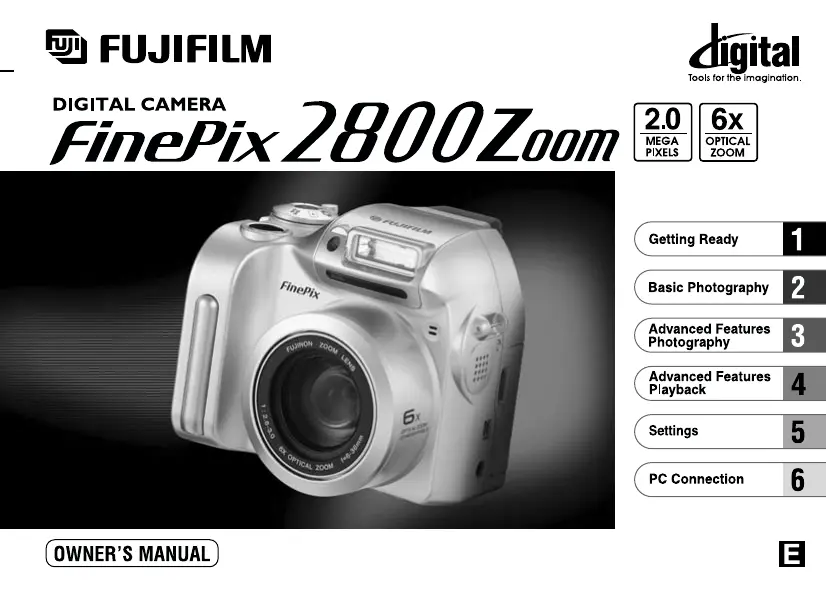
This manual will show you how to use your FUJIFILM DIGITAL CAMERA
FinePix2800 ZOOM correctly. Please follow the instructions carefully.
BL00071-200
(
1
)

Table of Contents

Questions and Answers

  • B
    Brian MccoyAug 14, 2025
    How to fix a FujiFilm Digital Camera with no power?
    • J
      Jason BaileyAug 14, 2025
      If your FujiFilm Digital Camera has no power, it could be due to an exhausted battery. Replace the batteries to solve this. Alternatively, ensure the AC power adapter is properly plugged into the power outlet.
  • B
    Brent VincentAug 17, 2025
    What to do if my FujiFilm FINEPIX 2800 ZOOM Digital Camera won't take pictures?
    • G
      George MorganAug 17, 2025
      If your FujiFilm Digital Camera doesn't take a photo when you press the shutter button, several issues could be the cause: * No SmartMedia is loaded: Load a SmartMedia. * The SmartMedia is fully recorded: Insert a new SmartMedia or erase unwanted frames. * The SmartMedia is write-protected: Remove the write-protection. * The SmartMedia is not formatted: Format the SmartMedia. * The SmartMedia contact area is soiled: Wipe the SmartMedia contact area with a clean dry cloth. * The SmartMedia is damaged: Load a new SmartMedia. * The Power Save function has switched the camera off: Switch the camera on.
  • J
    Jennifer BakerAug 21, 2025
    Why can't I use the flash on my FujiFilm FINEPIX 2800 ZOOM Digital Camera?
    • J
      Jenna MiddletonAug 21, 2025
      If you can't use the flash on your FujiFilm Digital Camera, it might be because the flash is set to Suppressed Flash mode. Change the flash setting to Auto, Red-Eye Reduction, or Forced Flash mode. Another reason could be that you pressed the shutter button while the flash was charging; wait until charging is complete before pressing the shutter button. Finally, check if the battery is exhausted and replace it if necessary.
  • R
    Richard GreeneAug 25, 2025
    Why does my FujiFilm Digital Camera battery drain so fast?
    • O
      osparksAug 25, 2025
      If the battery of your FujiFilm Digital Camera runs out quickly, especially in extremely cold conditions, try putting the battery in your pocket or another warm place to heat it before use. Also, wipe the battery terminals with a clean, dry cloth if they are soiled. If the battery is flat, replace it.
  • T
    tina69Aug 27, 2025
    How to fix blurred images on FujiFilm Digital Camera?
    • R
      Ruben SpencerAug 27, 2025
      If the image from your FujiFilm Digital Camera is blurred, try cleaning the lens. If you are in Macro mode and the lens is zoomed to telephoto, cancel Macro mode. Also, if the subject was too dark, try standing about 2 meters (6.6 ft.) from your subject to take the picture.
  • N
    Natalie GuzmanAug 31, 2025
    Why are my FujiFilm FINEPIX 2800 ZOOM Digital Camera photos too dark with flash?
    • C
      Colleen VargasAug 31, 2025
      If the playback image on your FujiFilm Digital Camera is too dark even when the flash was used, it might be because the subject is too far away; try moving closer. Alternatively, check if your fingers are obscuring the flash or flash control sensor and adjust your grip accordingly.
  • Z
    zachary78Sep 3, 2025
    Why does my FujiFilm FINEPIX 2800 ZOOM Digital Camera power off suddenly?
    • L
      Lisa StewartSep 3, 2025
      If your FujiFilm Digital Camera cuts out during operation, the battery is likely exhausted. Replace the batteries.
  • C
    Chad SmithSep 7, 2025
    Why are my FujiFilm Digital Camera flash photos faded?
    • J
      John MurphySep 7, 2025
      If the playback image from your FujiFilm Digital Camera is faded when you use the flash, there may be dust on the flash control sensor. Use an applicator such as a cotton swab to clean the flash control sensor.
  • C
    castanedatraciSep 10, 2025
    Why does my FujiFilm Digital Camera have speckling on images?
    • S
      santosjohnSep 12, 2025
      If there is speckling on the image from your FujiFilm Digital Camera, and the shot was taken with a slow shutter speed (long exposure) in a high-temperature environment, this is a characteristic of CCDs and does not indicate a camera fault.

Summary

Warning

FCC Statement

Regulatory compliance for digital devices in the USA.

Canadian Compliance

Regulatory compliance for digital apparatus in Canada.

Preface

Test Shots Prior to Photography

Performing test shots before important photography sessions.

Notes on Copyright

Guidelines regarding image copyright and usage.

Liquid Crystal

Handling precautions if liquid crystal from the display is exposed.

Notes on Electrical Interference

Warnings about potential interference in hospitals or aircraft.

Handling Your Digital Camera

Precautions for handling the camera's delicate components.

Trademark Information

List of registered trademarks relevant to the camera.

Camera Features and Accessories

Features

Overview of the camera's key specifications and capabilities.

Accessories

List of included and optional accessories for the camera.

Nomenclature

Camera Controls

Identification and explanation of the camera's buttons and parts.

Getting Ready

Preface

Introduction to the camera's operation and important notes.

Selecting the Language

How to choose the display language for the camera menus and interface.

Attaching the Lens Cap and Shoulder Strap

Instructions for attaching the lens cap and shoulder strap to the camera.

Loading the Batteries

Step-by-step guide on how to insert batteries into the camera.

Loading the SmartMedia

Procedure for inserting the SmartMedia memory card into the camera.

Removing the SmartMedia

Instructions on how to safely remove the SmartMedia memory card.

Switching On and Off

How to power the camera on and off, and check battery status.

Setting the Date and Time

Guide to configuring the camera's internal date and time settings.

Using the Optional AC Power Adapter

How to connect and use the AC power adapter for continuous power.

Basic Photography

Taking Pictures (Auto Mode)

Step-by-step guide to shooting photos using the camera's automatic mode.

Indicator Lamp Display

Explanation of the camera's status indicator lamp colors and meanings.

Number of Available Shots

Information on how many shots can be taken based on memory card and quality settings.

Using AF;AE Lock

How to lock focus and exposure for optimal shot composition.

Digital Zoom

Instructions on using the digital zoom feature to magnify images.

Framing Guideline Function

How to use on-screen gridlines for better photo composition.

Advanced Features Photography

Photography Menu Operation

How to navigate and use the camera's photography menu options.

Flash Modes

Explanation of different flash settings like Auto, Red-Eye Reduction, Forced Flash.

Macro (Close-up) Photography

Guide to using the macro mode for close-up shots.

Self-Timer Photography

How to use the self-timer for taking photos of yourself.

Voice Captioning

How to record short voice comments for images.

EV (Exposure Compensation)

Adjusting image brightness for optimal exposure.

WB White Balance (Selecting the Light Source)

Setting white balance for accurate color reproduction under different lighting.

Continuous Shooting

How to take multiple photos in quick succession.

Advanced Features Playback

Playing Back Movies

How to view recorded movie clips on the camera.

Playing Back Voice Captioning

How to listen to voice comments recorded with images.

Erasing Single · All Frames;Formatting

Procedures for deleting files or formatting the memory card.

How to Specify Print Options (DPOF)

Setting up photos for printing directly from the camera.

DPOF Date Setting

Option to include shooting date on DPOF prints.

DPOF Set Frame

Selecting specific frames for printing and setting print quantities.

Settings

Settings Overview

Introduction to camera settings available in different modes.

SET-UP Menu Options

Details on settings like Power Save, USB Mode, Date/Time, Language.

Using the Option Menu

How to navigate and select options from the camera menus.

Setting the File Size and Quality (Compression Ratio)

How to adjust image resolution and compression levels.

LCD Brightness;Volume

Adjusting screen brightness and speaker volume.

Power Save

Configuring the camera's power saving features.

PC Connection

Connecting to Your Computer

Initial setup for connecting the camera to a PC.

DSC (Mass Storage Device) Mode

Using the camera as a removable disk for file transfer.

PC-CAM (Camera) Mode

Using the camera as a webcam.

Connecting at DSC Mode

Detailed steps for connecting in Mass Storage mode.

Connecting at PC-Camera Mode

Detailed steps for connecting in PC Camera mode.

Disconnecting from the PC

Correct procedure for safely disconnecting the camera from a PC.

FujiFilm FINEPIX 2800 ZOOM Specifications

General IconGeneral
BrandFujiFilm
ModelFINEPIX 2800 ZOOM
CategoryDigital Camera
LanguageEnglish

Related product manuals