EasyManua.ls Logo

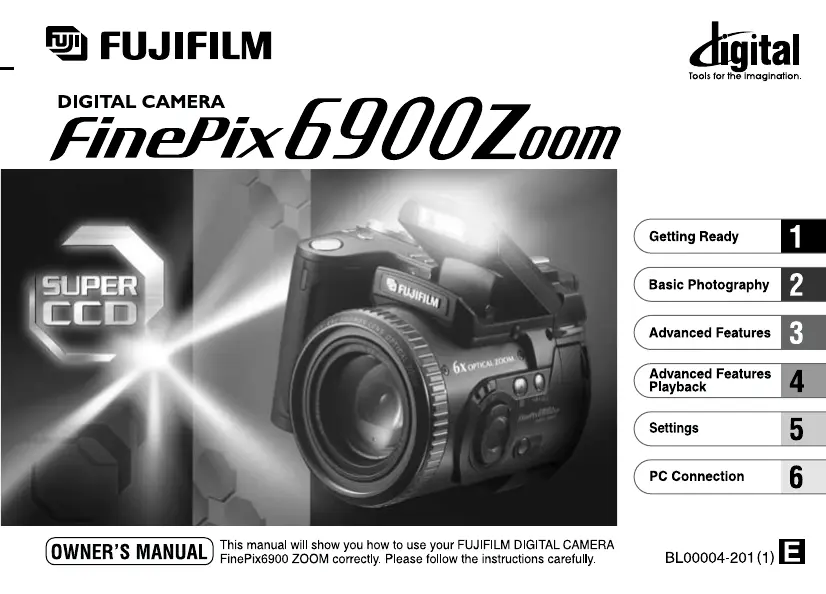
FujiFilm FINEPIX 6900 ZOOM - User Manual

FujiFilm FINEPIX 6900 ZOOM
132 pages
Print Icon
To Next Page IconTo Next Page
Loading...

Table of Contents

Questions and Answers

  • B
    Brian GoodAug 15, 2025
    How to fix FujiFilm FINEPIX 6900 ZOOM when there is no power?
    • T
      Tara JimenezAug 15, 2025
      If your FujiFilm Digital Camera shows no power, it might be due to an exhausted battery. Try loading a new, fully charged battery. Also, check if the AC power adapter plug has come out of the power outlet and plug it back in if necessary.
  • G
    gmendozaAug 18, 2025
    What to do if FujiFilm Digital Camera power cuts out during operation?
    • R
      Ronald WebsterAug 18, 2025
      If your FujiFilm Digital Camera's power cuts out during operation, it is likely that the battery is exhausted. To resolve this, load a new, fully charged battery.
  • J
    Jeffrey OrrAug 21, 2025
    Why is the flash not charging on my FujiFilm FINEPIX 6900 ZOOM?
    • J
      Jacob HowardAug 22, 2025
      If the flash on your FujiFilm Digital Camera will not charge, it could be due to several reasons. First, ensure that a compatible SmartMedia is loaded; if not, load a new one, erase a frame, or remove the write-protection. Also, check if the camera is set to Suppressed Flash mode; if so, set the flash to Auto, Red-Eye Reduction, or Forced Flash mode. Finally, the battery might be exhausted; try loading a new, fully charged battery.
  • R
    rebecca79Aug 25, 2025
    Why does the battery run out so quickly on my FujiFilm Digital Camera?
    • M
      Michael HarveyAug 26, 2025
      If your FujiFilm Digital Camera's battery runs out quickly, especially in extremely cold conditions, try putting the battery in your pocket or another warm place to heat it, and then load it into the camera just before taking a picture. Also, soiled terminals can cause this issue, so wipe the battery terminals with a clean, dry cloth. Finally, ensure the battery isn't flat by loading a new one.
  • M
    Matthew CarlsonAug 27, 2025
    Why is my FujiFilm FINEPIX 6900 ZOOM image blurred?
    • J
      Jason AllenAug 27, 2025
      If the image appears blurred on your FujiFilm Digital Camera, it could be due to a dirty lens. Clean the lens to ensure clear pictures. If you're using Macro mode with the lens zoomed to telephoto, cancel Macro mode. Also, if the photographed subject was too dark, try standing about 2 meters (6.6 ft.) from your subject to take the picture.
  • M
    Mary TaylorAug 30, 2025
    Why are my FujiFilm FINEPIX 6900 ZOOM Digital Camera playback images too dark with flash?
    • A
      Amber MahoneyAug 30, 2025
      If the playback image on your FujiFilm Digital Camera is too dark even though you used the flash, it could be because the subject is too far away. Try moving closer to the subject. Also, ensure that your finger isn't covering the flash; hold the camera correctly.
  • P
    Philip JensenSep 2, 2025
    How to enable flash on FujiFilm FINEPIX 6900 ZOOM Digital Camera?
    • T
      Theresa BartlettSep 2, 2025
      If you can’t use the flash to take pictures with your FujiFilm Digital Camera, it might be because the flash is set to Suppressed Flash mode. Pop the flash up, as the flash cannot be used in some modes. Alternatively, select a mode in which the flash can be used. Also, ensure that you wait until charging is completed before pressing the shutter button; pressing it while the flash is charging can prevent the flash from firing.
  • S
    stephanie04Sep 5, 2025
    What to do if FujiFilm FINEPIX 6900 ZOOM Digital Camera switches and dial don't work?
    • R
      ryanwashingtonSep 6, 2025
      If nothing happens when you use the camera switches and dial on your FujiFilm Digital Camera, it could be due to a camera malfunction. Try removing the battery, re-inserting it, and trying again. Also, check if the Mode switch and Mode dial have been moved to another setting and set them to the correct setting. Finally, ensure that the battery is not exhausted by loading a new, fully charged battery.
  • J
    joneslauraSep 8, 2025
    Why does ERASE ALL function not erase all frames on FujiFilm FINEPIX 6900 ZOOM?
    • C
      ccookSep 9, 2025
      If the ERASE ALL function does not erase all the frames on your FujiFilm Digital Camera, it is likely because the frame is protected. Remove the frame protection to erase the frame.
  • C
    carrolljoshuaSep 12, 2025
    Why is there no picture on the TV from my FujiFilm Digital Camera?
    • S
      Steven SantosSep 12, 2025
      If there is no picture on the TV when you connect your FujiFilm Digital Camera, ensure that the camera and TV are connected correctly. Also, make sure that the TV input is set to “Video” and not “TV”.

Summary

Getting Ready

Attaching Lens Cap and Shoulder Strap

Securing the lens cap and attaching the shoulder strap to the camera.

Battery Management

Loading, charging, and handling the camera's battery for power.

SmartMedia Operations

Loading and removing the SmartMedia for image storage.

Initial Setup: Power and Date;Time

Switching the camera on/off and setting the date and time.

Basic Photography

Taking Pictures in Auto Mode

Capturing images using the camera's automatic shooting mode.

Focus and Exposure Control (AF;AE Lock)

Using AF/AE Lock for precise focus and exposure control.

Image Playback and Management

Viewing, fast forwarding, and zooming images.

Erasing Images

Deleting individual image files from the camera.

Advanced Features

Understanding Photography Modes

Exploring AUTO, Scene Position, Programmed, Shutter-priority, Aperture-priority, Manual, and Movie modes.

Flash Photography Options

Guide to various flash modes like Auto, Red-Eye Reduction, Forced, Slow Synchro, and Suppressed.

Specialized Shooting Techniques

Using Macro, AE Lock, Exposure Compensation, Manual Focus, Digital Zoom, Continuous Shooting, Self-Timer.

Photography Menu and Settings

Navigating the photography menu for settings like White Balance, Photometry, Sensitivity, Bracketing, Sharpness, Multi-Exp.

Advanced Features Playback

Playback Modes and Options

Overview of playback modes for still images and movies.

Movie Playback

Detailed guide to playing movie files on the camera.

Image Deletion and Formatting

Erasing individual or all images, and formatting SmartMedia.

Image Protection Features

Setting and removing protection for individual or all images.

Camera Settings

Setup Menu Overview

Explanation of various camera settings available in the setup menu.

Setting File Size and Quality

Configuring image resolution and compression ratio for optimal shots.

Power Management Settings

Adjusting auto power save and sleep mode functions.

PC Connection and Data Transfer

Connecting to a Personal Computer

Step-by-step guide for establishing a USB connection.

Disconnecting from Computer

Procedures for safely disconnecting the camera from the PC.

Troubleshooting and Maintenance

Notes on Camera Usage and Environment

Guidance on camera handling, storage, and environmental precautions.

Power Supply and Battery Care

Information on using and caring for the camera's power supply and battery.

SmartMedia Handling and PC Usage

Guidelines for SmartMedia card management and PC interaction.

Warning Displays and Troubleshooting

Explanations of warnings and common troubleshooting steps.

Specifications and Safety

Camera Specifications

Detailed technical specifications of the FinePix6900 ZOOM camera.

Safety Notes and Precautions

Essential safety information and warnings for correct camera use.

FujiFilm FINEPIX 6900 ZOOM Specifications

General IconGeneral
Optical Zoom6x
ISO RangeAuto, 100, 200, 400
Storage MediaSmartMedia card
Aperturef/2.8 - f/11
Display2.0 inch LCD
BatteryNP-80 rechargeable battery
File FormatJPEG, AVI
Sensor Size1/1.7-inch
Focal Length8.3 - 49.8 mm (equivalent to 35-210mm in 35mm format)

Related product manuals