EasyManua.ls Logo

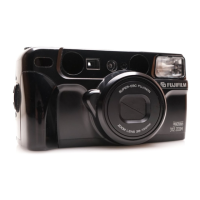
FujiFilm 38-125mm - User Manual

FujiFilm 38-125mm
51 pages
Print Icon
To Next Page IconTo Next Page
Loading...
Fujinon 38-125mm Auto Focus Zoom Lens
Sure-loading System with Automatic Pre-winding
Automatic Exposure and Automatic Flash Operation
Date/Time Imprinting
Red-Eye Reduction Flash
OWNER’S MANUAL

Questions and Answers

  • D
    dlopezAug 14, 2025
    Why is my FujiFilm 38-125mm Digital Camera picture too dark?
    • J
      Jasmine HensonAug 14, 2025
      If your FujiFilm Digital Camera picture is too dark, it might be because the subject was too far for the flash in a dark place, your finger was over the flash, or the subject was backlit. To fix this, shoot within the flash's specified distance, avoid covering the flash, or turn on mode and press the shutter release.
  • R
    Rachel SimmonsAug 18, 2025
    How to fix a blurry picture with FujiFilm 38-125mm Digital Camera?
    • A
      Amanda JonesAug 18, 2025
      If your FujiFilm Digital Camera picture isn't sharp, it could be due to several reasons: your finger might be on the AF windows, you didn't aim at the subject correctly, the lens is dirty, the camera is moving, or you've selected mode when shooting at a close distance. Try holding the camera correctly, composing the picture in the AF frame or using AF Lock, cleaning the lens, holding the camera firmly (use a tripod for slow shutter speeds), or selecting a mode other than mode.
  • N
    Nicholas WangAug 21, 2025
    What to do if the shutter release won’t trip on my FujiFilm Digital Camera?
    • A
      Anna BooneAug 21, 2025
      If the shutter release on your FujiFilm Digital Camera won’t trip, it could be due to several reasons. The “ ” symbol might be blinking, indicating a low battery (replace it). The power switch might not be on (press the POWER button). Also, “ ” might be blinking on the LCD because the flash is charging (wait until it stops). Finally, “ ” might be lit on the exposure counter, meaning you need to remove the film and load an unexposed one.
  • P
    Patrick ElliottAug 25, 2025
    Why is the exposure counter blinking on my FujiFilm 38-125mm?
    • K
      kaguirreAug 25, 2025
      If the numerals on the exposure counter of your FujiFilm Digital Camera blink after loading a film, it means you removed the film without rewinding it after you began photographing. To solve this, remove the film, take out the battery, press the POWER button to ensure the exposure counter disappears, and then reinsert the battery.
  • A
    April OrtizAug 28, 2025
    How to fix FujiFilm 38-125mm when the exposure counter is not displayed?
    • P
      Peter SmithAug 28, 2025
      If, after loading the film and closing the camera back on your FujiFilm Digital Camera, the exposure counter isn't displayed, ensure you've pulled the end of the film out to the FILM TIP mark when loading it. If not, correctly load the film by pulling the end of the film out to the FILM TIP mark.
  • C
    curtis22Aug 31, 2025
    Why did the film rewind during photographing with my FujiFilm 38-125mm Digital Camera?
    • J
      johnbentonAug 31, 2025
      If the film rewound during photographing with your FujiFilm Digital Camera, it's likely that you moved the camera back lock while a film was loaded. Avoid moving the camera back lock while film is loaded. When removing the film, ensure the motor has stopped and that “ ” is displayed before opening the camera back.
  • L
    Lynn GraySep 3, 2025
    How to correct the printed date/time on my FujiFilm Digital Camera?
    • Z
      Zachary BrownSep 4, 2025
      If the printed date/time on your FujiFilm Digital Camera photos is incorrect, it's likely because you didn't set the correct date and time after replacing the battery. To fix this, set the date and time after replacing the battery.
  • J
    Jerome AndersonSep 6, 2025
    Why the self-timer cannot be set on my FujiFilm 38-125mm?
    • B
      Brenda BurkeSep 7, 2025
      If the self-timer cannot be set on your FujiFilm Digital Camera, it might be because the date correction mode is on. Cancel the date correction mode.
  • A
    Amy AcostaSep 10, 2025
    Why is the date not printing correctly on my FujiFilm 38-125mm?
    • A
      anthony86Sep 10, 2025
      If the date is not printed on the front, or not printed clearly on your FujiFilm Digital Camera photos, it could be because “- - - - - -” was selected before taking pictures, or there is something light-colored (white, yellow, orange) where the date appears. Select a date mode other than “- - - - - -” before taking pictures. Also, try to arrange that there is nothing light-colored where the date appears.

Summary

Camera Part Identification

Liquid Crystal Display Guide

Viewfinder Guide

Preliminary Steps

Attaching the Strap

How to attach the camera strap to the strap lug.

Inserting the Battery

Instructions for inserting the camera's battery.

Turning On Your Camera

Steps to power on and off the camera.

Checking Your Battery

How to check the battery capacity indicator on the LCD.

Setting the Date and Time

Instructions for setting the year, month, day, hour, and minute.

Selecting the Date Mode

Choosing how the date and time are imprinted on photos.

Using Your Camera

Loading the Camera

Instructions for loading 35mm film into the camera.

Operating the Camera

How to hold and operate the camera for taking pictures.

Using Auto-Focus Lock

How to lock the focus on a subject.

Unloading or Mid-Roll Film Removal

How to unload film or remove it before completion.

Advanced Techniques

Selecting Exposure Mode

Choosing from six different exposure modes for various situations.

Effective Flash Range

Chart showing flash distance based on film speed.

Using the Self-Timer

Using the Remote Controller

Trouble Shooting

Common Sense Camera Care

Specifications

Important Safety Notice

FujiFilm 38-125mm Specifications

General IconGeneral
BrandFujiFilm
Model38-125mm
CategoryDigital Camera
LanguageEnglish

Related product manuals