EasyManua.ls Logo

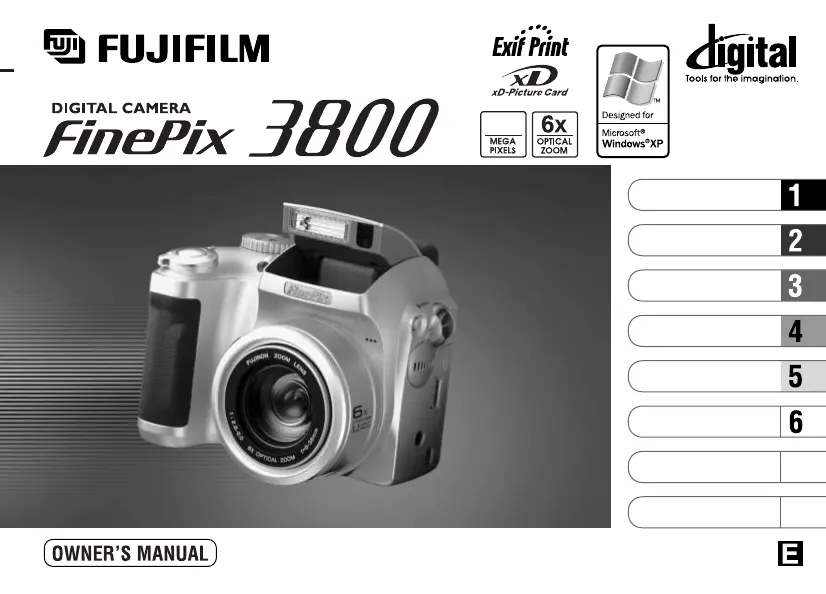
FujiFilm FinePix 3800 - User Manual

FujiFilm FinePix 3800
136 pages
Print Icon
To Next Page IconTo Next Page
Loading...
This manual will show you how to use your FUJIFILM DIGITAL CAMERA
FinePix 3800 correctly. Please follow the instructions carefully.
BL00199-200
(
1
)
7
8
Getting Ready
Camera Connection
Using FinePixViewer
Basic Photography
Advanced Features
Photography
Advanced Features
Playback
Software Installation
Settings
3.2

Table of Contents

Other manuals for FujiFilm FinePix 3800

Questions and Answers

  • R
    robertodavisSep 23, 2025
    Why does the Frame function not erase the frame on my FujiFilm FinePix 3800 Digital Camera?
    • J
      judith65Sep 23, 2025
      If the Frame function on your FujiFilm Digital Camera does not erase the frame, it could be due to a couple of reasons. First, DPOF settings might be specified for some frames; cancel these settings and try again. Second, some frames may be protected; remove the protection before attempting to erase the frame.
  • C
    Cody RichmondAug 25, 2025
    Why my FujiFilm Digital Camera has no power?
    • S
      seth71Aug 25, 2025
      If your FujiFilm Digital Camera has no power, here are a few things to check: * **Batteries are exhausted:** Replace them with new, fully charged batteries. * **AC power adapter is unplugged:** Ensure the adapter is securely plugged into the power outlet. * **Batteries are loaded incorrectly:** Make sure the batteries are inserted in the correct direction.
  • H
    heathersmithAug 25, 2025
    What to do if my FujiFilm FinePix 3800 no longer works correctly?
    • E
      Erin BowmanAug 26, 2025
      If your FujiFilm Digital Camera is not working correctly due to an unforeseen problem, try briefly removing the batteries or disconnecting the AC power adapter. Then, reload the batteries or reconnect the AC power adapter and try again.
  • K
    Kristen TurnerAug 26, 2025
    How to fix a FujiFilm Digital Camera with no power?
    • D
      Douglas GrahamAug 27, 2025
      If your FujiFilm Digital Camera isn't turning on, there are a few potential causes. First, the batteries may be exhausted, so try loading new, fully charged batteries. Second, check if the AC power adapter plug has come out of the power outlet and plug it back in if necessary. Finally, ensure that the batteries are loaded in the correct direction.
  • R
    Ryan VasquezAug 27, 2025
    What to do if FujiFilm Digital Camera power cuts out during operation?
    • T
      Tonya HobbsAug 27, 2025
      If your FujiFilm Digital Camera is losing power during operation, the most likely cause is that the batteries are exhausted. Try loading new, fully charged batteries to resolve this issue.
  • M
    Mathew BonillaSep 14, 2025
    What to do if prints were specified for more than 1000 frames in the DPOF frame settings of my FujiFilm Digital Camera?
    • K
      Kathleen FloydSep 14, 2025
      The maximum number of frames for which prints can be specified on the same xD-Picture Card is 999. Copy the images for which you want to order prints onto another xD-Picture Card and then specify the DPOF settings.
  • C
    Courtney Smith MDSep 12, 2025
    Why does the shot image appear on the camera's LCD when my FujiFilm FinePix 3800 Digital Camera is connected to a PC?
    • N
      navarroalexanderSep 12, 2025
      If the shot image appears on the camera’s LCD monitor when connected to a PC: * **Incorrect USB cable connection:** Ensure the special FinePix S304 USB cable is correctly connected to both the computer and camera. * **PC not switched on:** Switch the PC on.
  • K
    kaylalyonsSep 13, 2025
    Why is there speckling on the image taken with my FujiFilm FinePix 3800 Digital Camera?
    • L
      Laurie WarnerSep 13, 2025
      If there is speckling on the image taken with your FujiFilm Digital Camera, this is a characteristic of CCDs when a shot is taken with a slow shutter speed (long exposure) in a high-temperature environment, and does not indicate a camera fault.
  • J
    johnloganSep 4, 2025
    Why can’t I format the xD-Picture Card in my FujiFilm FinePix 3800 Digital Camera?
    • A
      Angelica GilmoreSep 5, 2025
      If you can't format the xD-Picture Card in your FujiFilm Digital Camera, it's likely because the card is write-protected. Remove the write-protection by peeling off the write-protect sticker.
  • J
    jordanelizabethSep 2, 2025
    Why are my FujiFilm FinePix 3800 Digital Camera photos dark even when using the flash?
    • D
      Donald MorganSep 2, 2025
      If your FujiFilm Digital Camera photos are dark even when using the flash: * **Subject too far:** Move closer to the subject, within the effective flash range, before taking the shot. * **Obstructed flash:** Ensure your finger isn't covering the flash or flash control sensor.

Summary

Warning

FCC Statement

US regulatory compliance statement for the digital device.

Preface

Important Notes and Precautions

Covers handling, copyright, liquid crystal, electrical interference, and trademarks.

Nomenclature

Camera Controls and Diagram

Identifies camera parts and their locations.

Screen Display Information

Explanation of icons and text displayed on the camera screen.

Getting Ready

Attach the lens cap, strap and adapter ring

Instructions for attaching external accessories to the camera.

Attaching the Lens Cap

Steps for properly fitting the lens cap onto the camera.

Loading the Battery and xD-Picture Card

Steps for inserting batteries and the xD-Picture Card into the camera.

Switching On and Off

Procedure for powering the camera on and off.

Setting the Date and Time

Guide to setting the camera's date and time accurately.

Selecting the Language

Choosing the display language for the camera menus.

Basic Photography

Taking Pictures (Auto Mode)

Step-by-step guide for taking photos using the camera's auto mode.

Indicator Lamp Display

Explanation of camera indicator lamp states and their meanings.

Number of Available Frames

Information on how the number of shots is displayed and card capacity.

Using AF;AE Lock

Technique for locking focus and exposure for better shots.

Framing Guideline Function

Using on-screen guidelines to improve photo composition.

Digital Zoom

Explanation of how to use digital zoom for magnification.

Flash Operations

Guide to using the camera's flash modes and settings.

Advanced Features Photography

Photography Mode Specifications

Overview of available photography modes and their settings.

Auto Mode

Using the camera's simplest and most versatile photography mode.

Manual Mode

Detailed control over settings for advanced photography.

Scene Position

Selecting pre-set modes for specific shooting scenes.

Movie (Video) Recording

Instructions for shooting videos with sound.

Setting Quality Mode

Adjusting image resolution and file size for photos and videos.

Self-Timer Photography

Using the self-timer for delayed shots.

EV (Exposure Compensation)

Adjusting exposure levels for brighter or darker images.

White Balance

Setting the correct color balance for different light sources.

Flash (Flash Brightness Adjustment)

Controlling flash intensity for optimal lighting.

Sharpness

Adjusting image sharpness for outlines and detail.

Aperture-Priority Auto

Controlling depth of field by setting the aperture.

Advanced Features Playback

Playing Back Movies (Video)

How to view recorded video files.

Erasing Single and All Frames;Format

Deleting individual photos, all photos, or formatting the memory card.

Protecting Images Frame;All

Preventing accidental deletion of selected or all images.

How to Specify Print Options (DPOF)

Setting print specifications for images using Digital Print Order Format.

Recording Voice Memos

Adding voice notes to still images.

Playing Back Voice Memos

Listening to recorded voice notes.

Settings

LCD Brightness;Volume

Adjusting screen brightness and speaker volume.

Using Set-Up

Accessing and configuring camera settings via the Set-Up menu.

Software Installation

The Software Components

Overview of the software included on the CD-ROM.

Installation on a Windows PC

Step-by-step guide for installing software on Windows operating systems.

Installation on a Mac OS 8.6 to 9.2

Instructions for installing software on older Mac OS versions.

Installation on a Mac OS X

Guide for installing software on Mac OS X.

Camera Connection

DSC (Mass storage device) Mode

Connecting camera as a removable drive for file transfer.

PC CAM (PC Camera) Mode

Using the camera as a webcam for video conferencing.

Using the optional AC Power adapter

Guide to using the AC adapter for continuous power.

Use at DSC mode

Detailed steps for connecting the camera in Mass Storage mode.

Use at PC-CAM mode

Detailed steps for connecting the camera in PC Camera mode.

Disconnecting the Camera

Proper procedures for safely disconnecting the camera from a computer.

Using FinePixViewer

Saving Images on Your Computer

Transferring photos from camera to PC using FinePixViewer.

Making a FinePix CD Album

Creating CD albums and video CDs using ImageMixer software.

Using the FinePix Internet Service

Accessing FUJIFILM's online services and support.

User Registration

Registering for online services and updates.

Mastering FinePixViewer

Advanced features and help resources for FinePixViewer.

Uninstalling the Software

Procedures for removing installed software from your computer.

FujiFilm FinePix 3800 Specifications

General IconGeneral
Optical Zoom6x
Digital Zoom3.2x
LCD Screen Size1.8 inches
Storage MediaSmartMedia Card
Sensor TypeCCD
Image Sensor1/2.7 inch CCD
Battery Type4 x AA batteries
Image Resolution1600 x 1200 pixels

Related product manuals