
 To Next Page

J
Joanne CampbellAug 18, 2025
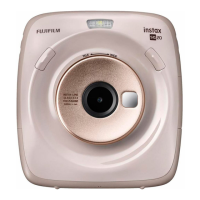
What to do if my FujiFilm instax mini LiPlay Digital Camera won't turn on?
- VVincent RobertsAug 18, 2025
If your FujiFilm Digital Camera won't turn on, please ensure that you charge the camera.

What to do if my FujiFilm instax mini LiPlay Digital Camera won't turn on?
If your FujiFilm Digital Camera won't turn on, please ensure that you charge the camera.
What to do if my FujiFilm instax mini LiPlay Digital Camera does not work properly?
If your FujiFilm Digital Camera is not working properly, it may be due to a temporary malfunction. Please press the reset button. Also, ensure that the battery is charged.
Why does my FujiFilm instax mini LiPlay Digital Camera power cut off during use?
If the power of your FujiFilm Digital Camera cuts off during use, it may be due to a low battery level. Please charge the camera.
What to do if I cannot shoot when I press the shutter button on my FujiFilm Digital Camera?
If you cannot shoot when you press the shutter button on your FujiFilm Digital Camera, check the following: * Make sure that the power is on. * If the battery level is low, please charge the camera. * If the internal memory or memory card is full, insert a new memory card or delete unnecessary images. * Use a memory card formatted with this unit. * If the contact surface of the memory card (gold part) is dirty, wipe it with a soft, dry cloth. * Please insert a new memory card.
Why is my FujiFilm instax mini LiPlay image blurry?
If your FujiFilm Digital Camera image is blurry, consider the following: * If the lens has fingerprints on it, clean the lens. * Make sure that the AF Frame is green before taking a photo. * Ensure you hold the camera steady, especially in dark environments.
Why is my FujiFilm instax mini LiPlay Digital Camera image dark even though the flash fired?
If your FujiFilm Digital Camera image is dark even though the flash fired: * Make sure that you are within the flash range. * Hold the camera correctly so that you do not obstruct the flash with your fingers.
What to do if my FujiFilm instax mini LiPlay is not charging?
If your FujiFilm Digital Camera is not charging, ensure that the USB power adapter plug is properly connected to the power outlet. Also, turn off the camera when charging it; the camera will not charge if it is powered on.
Why is my FujiFilm Digital Camera flash not firing?
If the flash on your FujiFilm Digital Camera is not firing, check if Suppressed Flash is selected in the Flash Settings. If it is, select a setting other than Suppressed Flash.
What to do if my FujiFilm Digital Camera self-timer lamp flashes while charging?
If the self-timer lamp on your FujiFilm Digital Camera flashes while charging, charge the battery in a temperature range of +5 °C to +40 °C (+41 ºF to +104 ºF).
What to do if the film pack does not load or does not load smoothly in my FujiFilm instax mini LiPlay?
If the film pack does not load or does not load smoothly in your FujiFilm Digital Camera: * Use FUJIFILM INSTAX® Mini Instant Film (other films cannot be used). * Align the yellow mark on the film pack with the camera alignment mark (yellow) and load it.
Step-by-step instructions for inserting a new film pack into the camera.
Describes the fundamental steps for taking a photograph with the camera.
Guides on how to record sound and attach it to an image while taking a photo.
Step-by-step guide for inserting a micro SD card into the camera.
How to record sound and print it as a QR code on images.
Control camera settings and shoot remotely using the smartphone app.
 General
| Film size | 86 x 54 mm |
|---|---|
| Picture size | 62 x 46 mm |
| Product color | White |
| Focus adjustment | Auto |
| Self-timer delay | 2, 10 s |
| Built-in microphone | Yes |
| Printing time (min) | 12 s |
| Normal focusing range | 10 - ∞ m |
| Compatible memory cards | MicroSD (TransFlash) |
| Image formats supported | JPEG |
| Maximum aperture number | 2 |
| Display type | LCD |
| Display diagonal | 2.7 \ |
| Battery recharge time | 3 h |
| Battery life (film packs) | 10 |
| USB connector type | Micro-USB B |
| Cables included | USB |
| Flash modes | Flash off, Flash on, Suppressed |
| Flash range | 0.5 - 1.5 m |
| Fastest camera shutter speed | 1/8000 s |
| Slowest camera shutter speed | 0.25 s |
| Light exposure correction | ± 2EV (1/3EV step) |
| Operating temperature (T-T) | 5 - 40 °C |
 Weight and Dimensions
| Depth | 36.7 mm |
|---|---|
| Width | 82.5 mm |
| Height | 122.9 mm |
| Weight | 255 g |