EasyManua.ls Logo

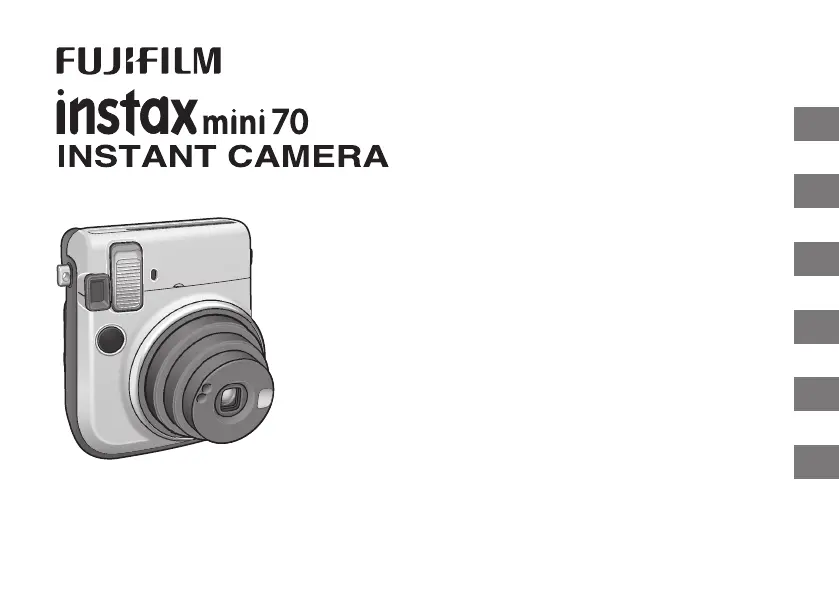
FujiFilm instax mini70 - User Manual

FujiFilm instax mini70
154 pages
Print Icon
To Next Page IconTo Next Page
Loading...
EN
DE
FR
ES
TW
KO
CPL7B105-200
APPAREIL PHOTO INSTANTANÉ
User’s Guide/Trouble shooting/Safety precautions
Bedienungsanleitung/Fehlerbehebung/Sicherheitsmaßnahmen
Guide d’utilisation/Guide de dépannage/Précautions de sécurité
Manual de instrucciones/Solución de problemas/Precauciones de seguridad
使用說明書/現象、可能的原因及解決措施/安全注意事項
사용설명서/문제 해결/안전을 위한 주의사항
BO-7_6lang.indb 1 2015/7/14 8:47:55

Table of Contents

Questions and Answers

  • Y
    ybairdAug 19, 2025
    Why does the finished print look under exposed (dark) with my FujiFilm instax mini70?
    • J
      John DixonSep 12, 2025
      If your FujiFilm Digital Camera's finished print looks under exposed (dark), several factors could be the cause. First, if the ambient temperature is high (above +40°C/+104°F), keep the camera and film away from excessive heat. If you took the picture facing the light, try taking pictures with the light behind you or use Fill-in Flash Mode. Make sure the flash lampface, AE light sensor window, or flash sensor window isn't covered. If the background is too bright compared to the subject, use Hi-Key Mode. Ensure the flash light reaches the subject by taking pictures closer than 2.7 m. Also, avoid taking pictures at an angle facing a mirror or window glass to prevent flash reflection.
  • M
    Mr. Jerry OrtizAug 21, 2025
    Why the finished print looks over exposed (white) with my FujiFilm Digital Camera?
    • K
      kimlauraAug 21, 2025
      If the finished print from your FujiFilm Digital Camera looks overexposed (white), it could be due to a low ambient temperature (below +5°C/+41°F). Try placing your camera in a warm place to bring it to room temperature before taking pictures. Also, ensure that the AE light sensor window or flash sensor window is not blocked.
  • D
    Debra RamirezAug 23, 2025
    How to fix out of focus picture with my FujiFilm instax mini70?
    • D
      Dr. Jennifer Brown MDAug 23, 2025
      If the picture from your FujiFilm Digital Camera is out of focus, it could be due to several reasons. Ensure that the shooting distance is appropriate for the selected shooting mode. If the lens is not clean, please contact a FUJIFILM authorized distributor. Also, camera shake can cause blurriness, so hold your camera firmly and gently press the shutter release button. When shooting indoors or in dark conditions, it's recommended to stabilize the camera using a table or tripod, or use Fill-in Flash Mode.
  • W
    William MillerAug 26, 2025
    Why does the battery become exhausted quickly in my FujiFilm instax mini70?
    • A
      Alicia MorenoAug 26, 2025
      If the battery in your FujiFilm Digital Camera becomes exhausted quickly, it may be because the batteries are not the same type. Replace both batteries with new CR2 lithium batteries of the same brand and type.
  • J
    Jennifer PooleAug 27, 2025
    Why part or whole finished print is white with my FujiFilm instax mini70?
    • A
      amitchellAug 27, 2025
      If part or the whole finished print from your FujiFilm Digital Camera is white, it's likely because the back cover was opened before all the film was used. Avoid opening the back cover until you have used up the film; otherwise, the remaining film will be exposed and ruined.
  • R
    Ryan SimsAug 30, 2025
    What to do if the shutter release won’t trip on my FujiFilm Digital Camera?
    • A
      Anthony WallaceAug 30, 2025
      If the shutter release on your FujiFilm Digital Camera won’t trip, several factors could be at play. First, ensure your batteries aren't low by replacing them with new ones. Next, check that the batteries are correctly inserted. If an icon is flashing on the LCD display, or the self-timer lamp is rapidly flashing, the flash is charging, so wait until the icon turns off. Also, if the exposure counter shows a “ ” sign, unload the current film pack and load a new one. Finally, ensure the power is on by pressing the POWER button.
  • A
    Ashley VargasSep 1, 2025
    How to load film pack into FujiFilm instax mini70 Digital Camera?
    • R
      Raymond PottsSep 1, 2025
      If your FujiFilm Digital Camera's film pack won’t load or doesn’t load smoothly, it might be due to using the wrong type of film. Ensure you are using only FUJIFILM INSTAX mini film, as no other films are compatible. Also, check that you are loading the film pack correctly by matching the yellow line on the film pack with the yellow positioning mark in your camera. Refer to the INSTAX mini film pack instructions for guidance.
  • A
    alan36Sep 3, 2025
    Why does the LCD look black on my FujiFilm instax mini70?
    • K
      kimberlygonzalezSep 3, 2025
      If your FujiFilm Digital Camera's LCD looks black, it may be because the camera is too hot. Try placing the camera in a cool place, and the LCD should return to normal once it cools down.
  • G
    Guy Carter Jr.Sep 5, 2025
    What to do if “E” is flashing on the film counter of my FujiFilm instax mini70?
    • J
      Jesse JacksonSep 5, 2025
      If “E” is flashing on the film counter or all icons on the LCD display are flashing on your FujiFilm Digital Camera, the camera may have some trouble. Try removing the batteries and reinserting them while observing the LCD display. If the issue persists, contact a FUJIFILM authorized distributor.
  • N
    Nicole GeorgeSep 7, 2025
    How to fix the lens on my FujiFilm instax mini70?
    • J
      Joseph PrinceSep 7, 2025
      To solve the issue of the lens not working when the power is switched on for your FujiFilm Digital Camera, replace both CR2 batteries with new lithium batteries of the same brand and type.

Summary

Camera Front Parts Identification

Front View Components

Identifies and labels the front components of the camera.

Camera Rear Parts Identification

Rear View Components

Identifies and labels the rear components of the camera.

Attaching Camera Straps

Hand Strap Attachment

Instructions for attaching the camera's hand strap for secure carrying.

Shoulder Strap Attachment

Steps to attach the shoulder strap, including using a clip tool.

Inserting Camera Batteries

Loading Film Pack

Taking Pictures

Unloading Film Pack

Using the Self Timer

One Shot Self Timer

Instructions for using the self-timer function for delayed shots.

Continuous Photo Self Timer

2 Continuous Photo Mode

How to use the self-timer for taking two consecutive photos.

Shooting Modes Overview

Selecting a Shooting Mode

How to cycle through and select different camera shooting modes.

Shooting Mode Descriptions

Explains the effects and uses of Macro, Landscape, Fill-in Flash, and Hi-Key modes.

Self Portrait (Selfie Mode)

Camera Specifications

Troubleshooting Common Problems

Important Safety Notice

General Safety Warnings

Critical safety warnings and precautions to prevent injury or damage.

Product Compliance and Precautions

Safety Precautions & Compliance

Further safety warnings, compliance information (CE, FCC), and usage cautions.

Common Sense Camera Care

Instax Film and Print Care

FujiFilm instax mini70 Specifications

General IconGeneral
TypeInstant camera
Focus Range0.3m - ∞
Exposure ControlAutomatic
Flash Charging Time0.2 - 6 sec
Flash Range0.3 m - 2.7 m
FilmFujifilm Instax Mini Film
Film Size86 x 54 mm
Picture Size62mm x 46mm
Lens60mm, f/12.7
Shutter Speed1/2 to 1/400 sec
FlashBuilt-in
Self-Timer10 sec
Power Supply2 x CR2 Lithium Batteries

Related product manuals