Brief description of mainbo ard
Installing/removing main memory
Technical data
Technology
DDR2 667 / 800 unbuffered DIMM modules 240-Pin; 1.8V; 64 Bit, no
ECC
Total size
128 Mbytes to 8 Gbyte DDR2
Module si ze
128, 256, 512, 1024 or 2048 MByte
for one socket
A current list of the memory modules recommended for this m ainboard is available
on the Internet at: "
www.fujitsu-siemens.com/mainboards".
At least o ne memory modu le must be insta lled. Memory modu les with different
memory capacities can be combined.
You may use only unbuffered 1.8 V memory modules without ECC.
DDR2-memory modules must meet th e PC2-5300U or PC2-6400U specification.
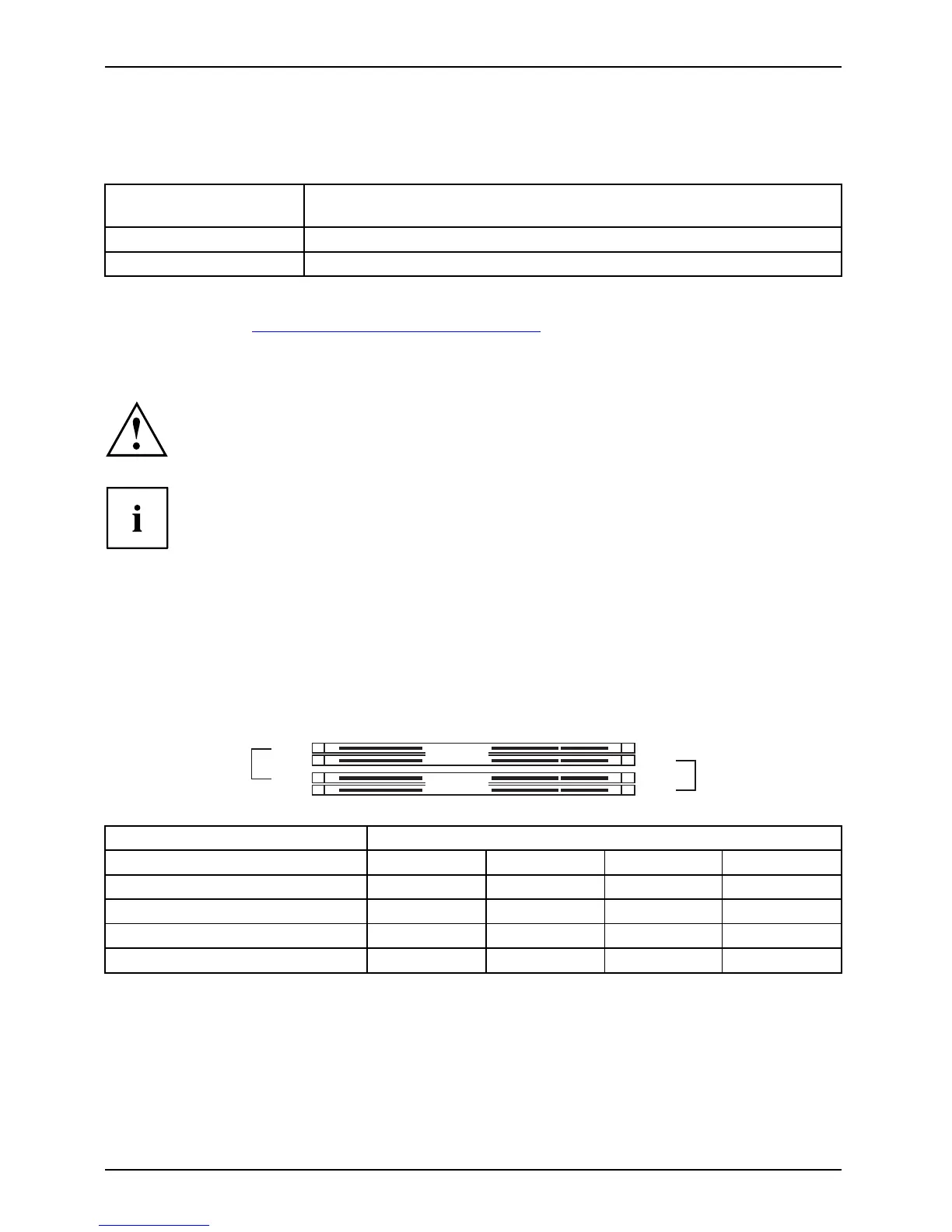
If you use more than one memory module, make sure to distribute the
memory modules over both memory channels. By doing this you use the
performance advantages of the dual-cha nnel mode.
Maximum system performance is a chieved when the same memory size
is used in Channel A and Channel B.
To simplify equipping, the slots are colour coded. Wh en inserting the memory
modules, start with the slot furthest away from the processor (slot 4).
To simplify equipping, the slots are colour coded.
With a memory configuration o f 8 Gbytes the visible and usable ma in memory can
be reduced down to 7 Gbytes (depending on the system configuration).
Channel B
slot 4
slot 2
Channel A
slot 3
slot 1
Number of memory mod ule s inserte d
Slot to be used 1 2 3 4
Channel A, Slot 1
xxxx
Channel B, Slot 2
xxx
Channel A, Slot 3
xx
Channel B, Slot 4
x
The installation/removal is described in the "Basic information on mainboard" manual.
4 - English A26361-D2764-Z 110-1-7419, edition 1



 To Next Page