32 Technical Manual D2759 (TX150 S7)
Connectors and indicators Features
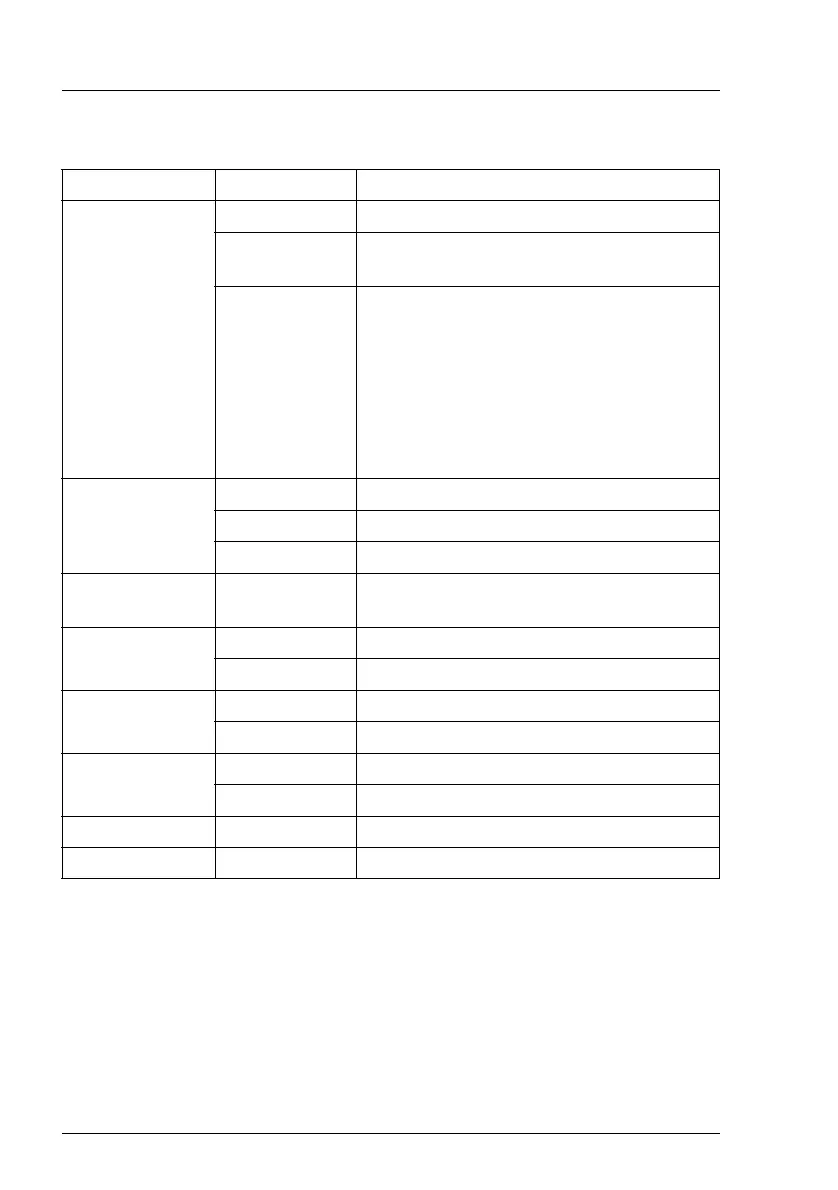
The LEDs have the following meaning:
LED Indicator Meaning
A - GEL
(Global Error
LED)
off no error (non CSS component)
orange on indicates a prefailure (non CSS
component)
orange flashing indicates a failure of a non CSS
component.
Reasons for a failure may be:
- over temperature measured by one of the
sensors
- sensor is defective
- CPU error
- software detected an error
B - CSS
(Customer Self
Service)
off no error (CSS component)
yellow on indicates a prefailure (CSS component)
yellow flashing indicates a failure (CSS component)
C - Identification blue on server is identified via the ServerView
Operations Manager
D - memory off memory module running
orange on memory module failure
E - system
fans
off fan running
orange on fan failure
F - PCI card off PCI card okay
orange on PCI card failure
G - AUX power yellow on all aux voltages okay
H - iRMC green flashing iRMC S2 is okay


 To Next Page