Security Menu - Security features
► If you do not want to initialise any further SmartCards, press
Esc
and remove the
Admin S martC ard. Never write the PIN or PUK on the SmartCa rd!
Keep the SmartCard and PIN/PUK in a safe place and protect from unauthorised access.
Adding systems to a user group
SystemLock2
► Start the PC.
► Op en BIOS Setup and select the SmartCard Sys tem L ock page from the Security menu.
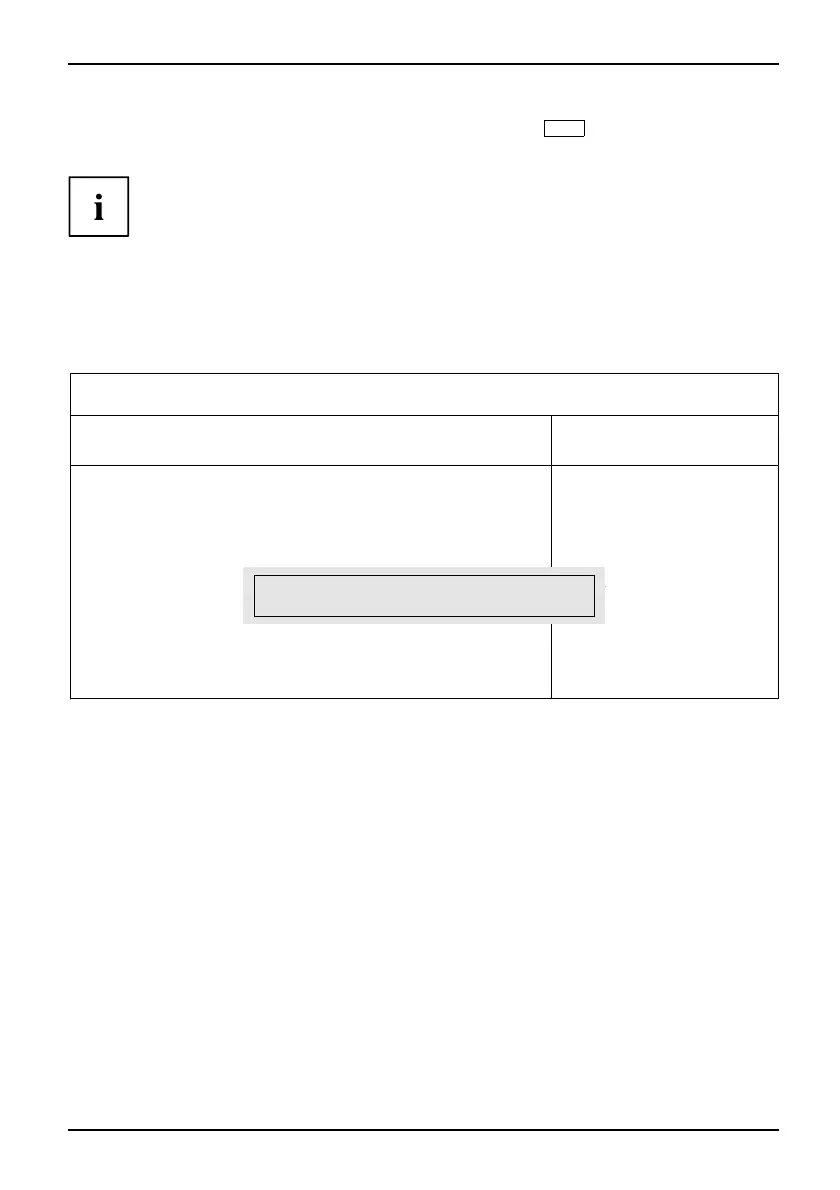
The following Smart C ard SystemLock menu w ill be displayed:
Security
SmartCard SystemLock Item Specific Help
SmartCard SystemLock Not Installed
Install Single PC [Enter]
Install Group PC [Enter]
Installs the security
from a SystemLock Admin
SmartCard into this PC
without modifying any
data on the SmartCard.
A correct SmartCard is
required for a
permanent installation.
Enter PIN: [ ]
► Insert the Admin SmartCard for the user group.
Enter PIN:
► Enter the PIN.
The follo
wing message will be displayed:
• ACCESS DENIED = You have confirmed the PIN incorrectly. You will then be requested
to re-enter the new PIN and reconfirm. After three failed attempts, the SmartCard will
be blocked and can then only b e activated again by en tering the PUK.
Enter th
ePUK:
Fujitsu Technology Solutions 49



 To Next Page