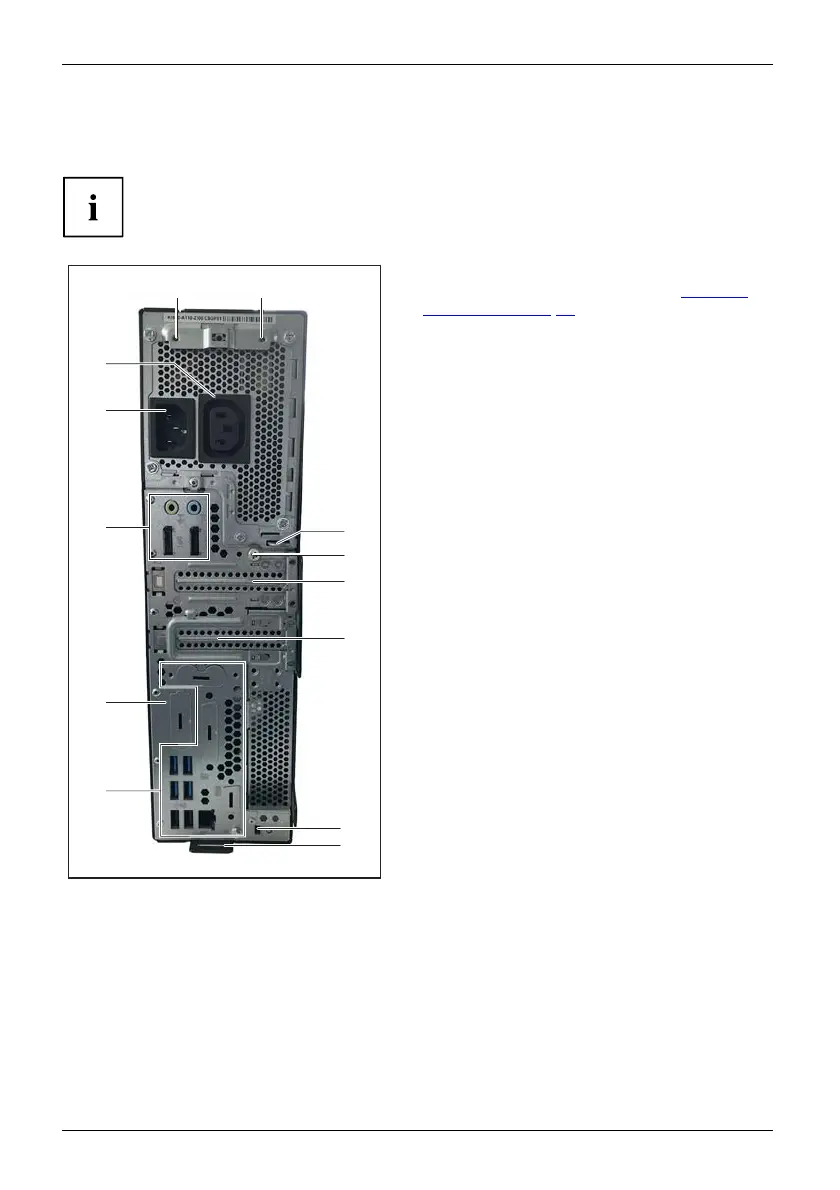
Device ov erview
For example: FUJITSU Desktop ESPRIMO D7010, D901 0 and FUJITSU Workstation
CELSIUS J5010 w ith two low-profile slots and a Flex I/O USB type C:
The connections on the device depend on the ordered variant and its configuration
level, and can therefore defer fro m the example below.
3
1
6
7
10
1
4
2
11
5 5
8
9
1 = connections, depending on the device
variant and configuration level (see "
Ports on
the device", Page 21)
2 = Flex I/O (in the example: USB type C )
3 = Alternating voltage socket (AC IN)
4 = Monitor socket (optional)
5 = Screw holes for cable cover
6 = Eye for padlock (diameter 6 mm)
7 = Knurled thumb screw (to open the cover)
8 = Low-pro file slot for modules or interfa ce
expansions
9 = Low-profile or full-height slot or empty
(depending on the device, in the example:
low-profile slot)
10 = Device for a security lock
11 = Eyelet to secure the cable cover
10 Fujitsu








 To Next Page