EasyManua.ls Logo

Fujitsu Inverter ASTA07JEC - User Manual

Fujitsu Inverter ASTA07JEC
16 pages
Print Icon
To Next Page IconTo Next Page
Loading...
08H307_9317433068_En 2008.8.29, 13:211

Questions and Answers

  • L
    Lisa HoAug 12, 2025
    Why is my Fujitsu Inverter ASTA07JEC Air Conditioner cooling so poorly?
    • T
      Theresa ThomasAug 12, 2025
      Poor cooling performance can occur due to several reasons: * A dirty air filter. * Blocked intake grille or outlet port. * Incorrect room temperature settings. * Open windows or doors. * Bright sunlight entering the room during Cooling operation (close the curtains). * Presence of heating apparatus, computers, or too many people in the room during Cooling operation. * The unit being set for SUPER QUIET operation.
  • A
    Amy WilsonAug 16, 2025
    What to do if my Fujitsu Inverter ASTA07JEC Air Conditioner doesn't operate at all?
    • K
      Kyle LawsonAug 16, 2025
      If your Fujitsu Air Conditioner doesn't operate at all, check the following: 1. Ensure the Power Supply Plug is properly connected to the outlet. 2. Check for any power failures in your area. 3. Inspect for blown fuses or tripped circuit breakers. 4. Verify if the timer is currently in operation.
  • T
    Tracy PriceAug 19, 2025
    Why doesn't my Fujitsu Inverter ASTA07JEC Air Conditioner operate immediately after turning it on?
    • C
      Charles BrownAug 19, 2025
      If your Fujitsu Air Conditioner doesn't operate immediately after being turned on, it could be due to a built-in protection mechanism. The compressor might not start for about 3 minutes to prevent fuse blowouts. Also, if the Power Supply Plug was recently disconnected and reconnected, the protection circuit might prevent operation for about 3 minutes.
  • J
    John Stephenson Jr.Aug 23, 2025
    Why is the airflow weak or stopping on my Fujitsu Inverter ASTA07JEC?
    • M
      Michael CareyAug 25, 2025
      Weak airflow or complete stops in your Fujitsu Air Conditioner can be normal during certain operations. The fan may operate at very low speed during Dry operation, when the unit is monitoring the room’s temperature, during SUPER QUIET operation or in the monitor AUTO operation.
  • M
    Mrs. Penny BradfordAug 27, 2025
    What to do if Fujitsu Inverter ASTA07JEC operates differently from the Remote Control Unit’s setting?
    • P
      Pamela SandersAug 27, 2025
      If your Fujitsu Air Conditioner unit operates differently from the Remote Control Unit’s setting, check if the Remote Control Unit’s batteries are dead or loaded properly.
  • D
    Daniel MendozaAug 31, 2025
    Why is there noise coming from my Fujitsu Air Conditioner?
    • W
      Wendy PhillipsAug 31, 2025
      The sounds you hear in your Fujitsu Air Conditioner are likely normal. You might hear water flowing during and after operation. A coolant flowing sound may be noticeable for 2-3 minutes after starting. A slight squeaking can occur due to temperature changes causing expansion and contraction of the front cover.
  • D
    Danny SmithSep 3, 2025
    Why is my Fujitsu Inverter ASTA07JEC Air Conditioner emitting mist or steam?
    • H
      Holly DelgadoSep 4, 2025
      The mist or steam emitted from your Fujitsu Air Conditioner during Cooling or Dry operation results from the rapid cooling of room air, leading to condensation. This is normal.
  • P
    Paul CurrySep 7, 2025
    Why does my Fujitsu Air Conditioner smell?
    • N
      nancymasonSep 7, 2025
      The smell from your Fujitsu Air Conditioner could be due to room odors like furniture or tobacco being drawn into the unit.

Summary

SAFETY PRECAUTIONS

FEATURES AND FUNCTIONS

INVERTER

Explains high power start for quick cooling, then low power for efficiency.

AUTO CHANGEOVER

Switches modes (cooling/dry) automatically to maintain set temperature.

PROGRAM TIMER

Allows setting ON/OFF timers in sequence within a 24-hour period.

SLEEP TIMER

Gradually adjusts thermostat and turns unit off at set time.

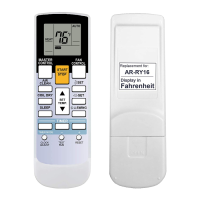
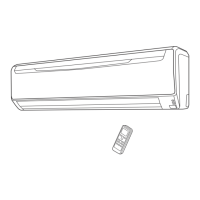
WIRELESS REMOTE CONTROL UNIT

Enables convenient control of the indoor unit from a distance.

SWING OPERATION

Automatically swings louvers up/down for air circulation.

REMOVABLE INTAKE GRILLE

Indoor unit's intake grille can be removed for easy cleaning.

MILDEW-RESISTANT FILTER

Filter treated to resist mildew growth for cleaner use.

SUPER QUIET OPERATION

Reduces airflow for quieter operation when QUIET mode is selected.

POLYPHENOL CATECHIN AIR CLEANING FILTER

Cleans air particles, dust, and suppresses bacterial growth.

NEGATIVE AIR IONS DEODORIZING FILTER

Produces negative ions to deodorize and absorb peculiar smells.

PREPARATION

Turn on the Power

Connect the power supply plug or turn on the circuit breaker.

Load Batteries

Load two AAA batteries into the remote control unit's compartment.

Set the Current time

Adjust the remote control's clock to the current time using buttons.

To Use the Remote Control Unit

Ensure remote is pointed at signal receiver within operating range.

OPERATION

To Select Mode Operation

Start unit and select desired mode (AUTO, COOL, DRY, FAN).

To Set the Thermostat

Adjust the desired temperature using the SET TEMP. buttons.

To Set the Fan Speed

Select fan speed (AUTO, HIGH, MED, LOW, QUIET).

SUPER QUIET Operation

Enables quieter operation by reducing airflow.

To Stop Operation

Press the START/STOP button to stop the air conditioner.

About AUTO CHANGEOVER Operation

Unit automatically selects mode based on room conditions.

About Mode Operation

Details on Cooling, Dry, and Fan modes and their operations.

TIMER OPERATION

To Use the ON timer or OFF timer

Set a specific time for the unit to turn ON or OFF.

To Use the Program timer

Sequence ON/OFF timer operations within a 24-hour period.

About the Program timer

Integrates OFF and ON timer operations in a single sequence.

SLEEP TIMER OPERATION

To Use the SLEEP Timer

Set timer to adjust thermostat and turn unit off after a period.

To Change the Timer Settings

Modify the set time for the SLEEP timer.

About the SLEEP Timer

Explains how the SLEEP timer modifies thermostat settings.

MANUAL AUTO OPERATION

How To Use the Main Unit Controls

Operate the unit directly from the main unit panel.

ADJUSTING THE DIRECTION OF AIR CIRCULATION

Vertical Air Direction Adjustment

Adjust up-down airflow direction using the SET button.

Right-Left Adjustment

Manually adjust left-right louvers for airflow direction.

SWING OPERATION

Automatically swings louvers for wider air distribution.

CLEANING AND CARE

Cleaning the Intake Grille

Instructions on how to remove and clean the intake grille.

Cleaning the Air Filter

Steps to clean air filter by vacuuming or washing.

Air Cleaning Filter Installation

Replacing dirty Air cleaning filters

Guide for replacing used air cleaning filters with new ones.

About the Air Cleaning Filters

POLYPHENOL CATECHIN AIR CLEANING FILTER

Disposable filter for cleaning particles and suppressing bacteria.

Negative air ions deodorizing filter

Filter to be exchanged every three years for deodorizing effect.

Maintenance of Deodorizing Filters

TROUBLESHOOTING

NORMAL FUNCTION

Checks for symptoms like no operation, noise, smells, or weak airflow.

CHECK ONCE MORE

Checks for issues like unit not operating or poor cooling.

OPERATING TIPS

AUTO Restart

Unit restarts in previous mode after power interruption.

Temperature and Humidity Range

Recommended operating temperature and humidity ranges.

Fujitsu Inverter ASTA07JEC Specifications

General IconGeneral
BrandFujitsu
ModelInverter ASTA07JEC
CategoryAir Conditioner
LanguageEnglish

Related product manuals