Troubleshooting and tips
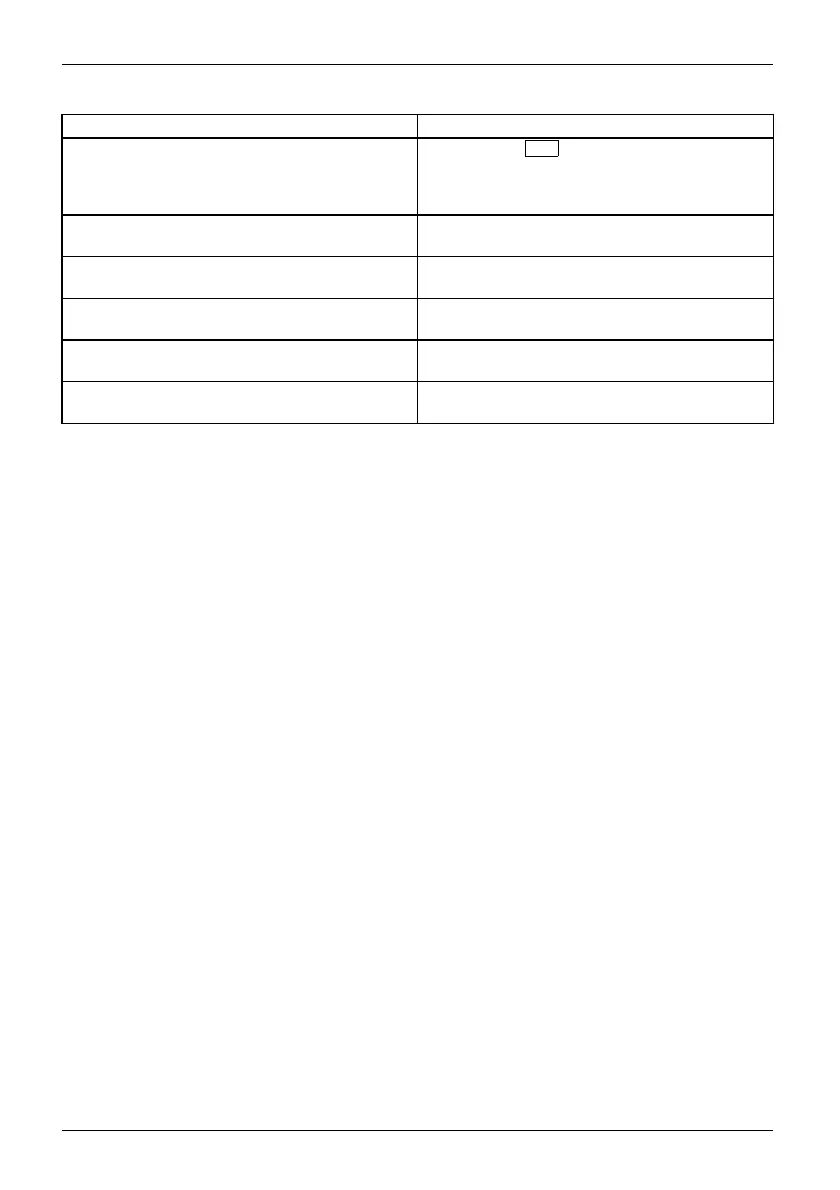
Error message/cause Resolution
Previous boot incomplete - Default configuration
used D ue to an error during the previous system
boot, defau lt values were used for c ertain
settings. Check the settings in the BIOS Setup.
► Press the
F1
function key when prom
pted
to do so.
Real time clock error
► Contact your sales outlet or
our cust omer
service centre.
nnnnK Shadow RAM failed a
t offset: xxxx Fa ilin g
Bits: zzzz
► Contact your sales outlet or our customer
service centre.
System battery is dead - Replace and run SETUP
► Contact your sales outlet or our customer
service centre.
System cache error - Cache disabled
► Contact your sales out
let or our customer
service centre.
System timer error
► Contact your sales outlet or our customer
service centre.
82 Fujitsu




 To Next Page