This convenient guide will lead you through the start-up
process and will also offer some valuable tips.
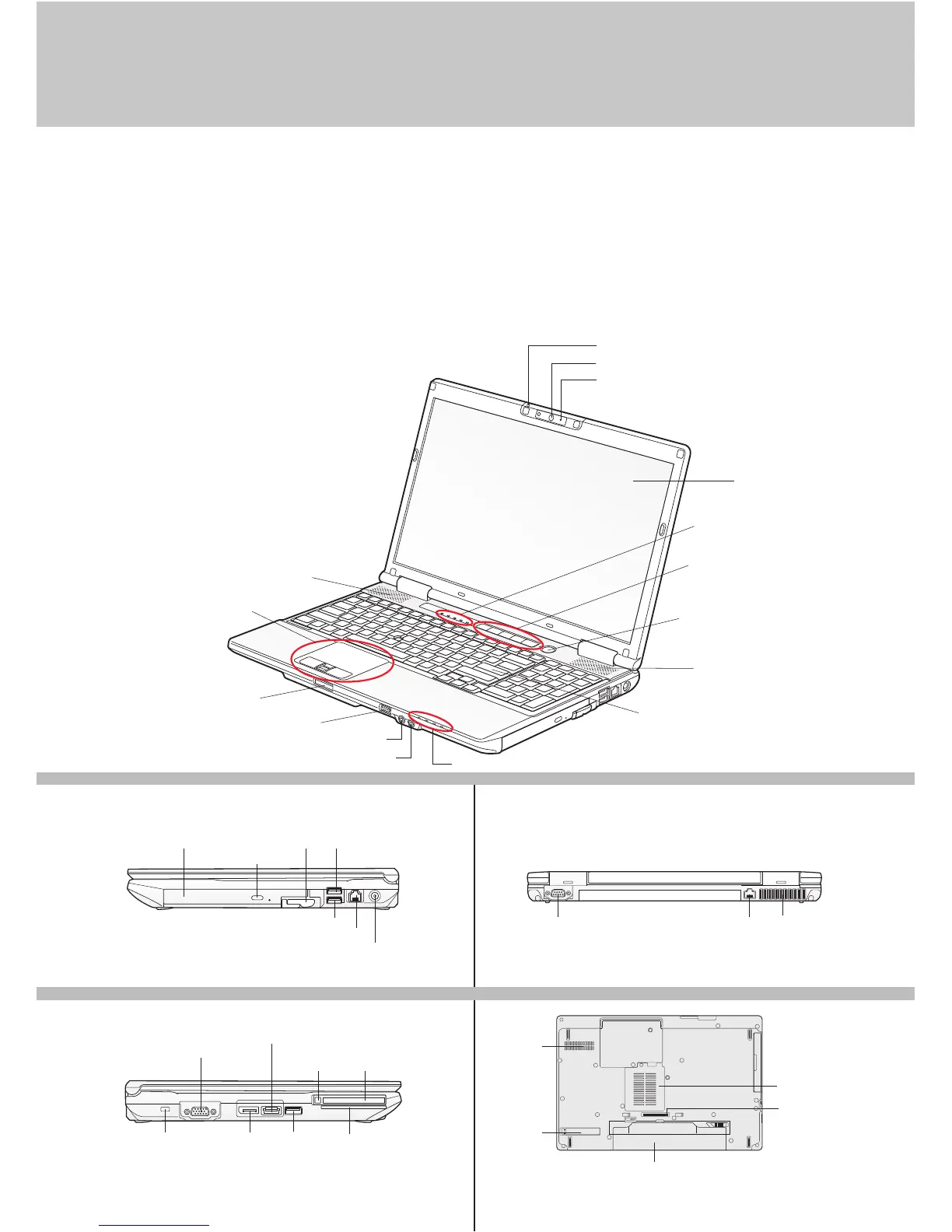
LEFT PANEL
BOTTOM PANEL
RIGHT PANEL BACK PANEL
Controls, Connectors,
and Access Points
What’s in the Box
Check to see that all of the following items are in the box:
o LIFEBOOK notebook
o Lithium ion battery, pre-installed
o AC adapter with power cord
Depending upon your configuration, the following items may also be shipped with your notebook:
o Additional Lithium ion battery
o Modular bay battery
o Modular bay weight saver
o Modular bay optical drive (depending on configuration:
Dual-layer DVD writer or Blu-ray drive)
Keyboard (depending on configuration)
- Standard Keyboard
- Anti-microbial Keyboard
- Standard Keyboard with Stickpoint
and Separate 10-key Keypad
Status Indicator Panel
Touchpad Pointing Device
Display Panel
Stereo Speaker
Modular Bay Release Latch
Optical Drive Release Button
USB 2.0 PortModular Bay
Anti-Theft
Lock Slot
Display Port
Smart Card SlotUSB 3.0/2.0
Port (depending
on configuration)
Serial Port
Memory Stick/SD Card Slot
Wireless Device Switch
Headphone Jack
Microphone Jack
LIFEBOOK Security/Application Panel
Power/Suspend/Resume Button
Status Indicator Panel
Stereo Speaker
ExpressCard
Slot
ExpressCard
Eject Button
External Video Port
eSATA/USB 2.0 Combo Port
Lithium ion Battery Bay
DC Power Jack
Modem (RJ-11) Jack
USB 2.0 and Anytime Charge Port
Port Replicator
Connector
Memory Upgrade
Compartment
Air Vents
Embedded
Dust Filter
Air Vents
Gigabit LAN (RJ-45) Jack
Web Camera (depending on configuration)
Indicator glows blue when camera is on
Digital Microphone
2







 To Next Page