Appliance Functions
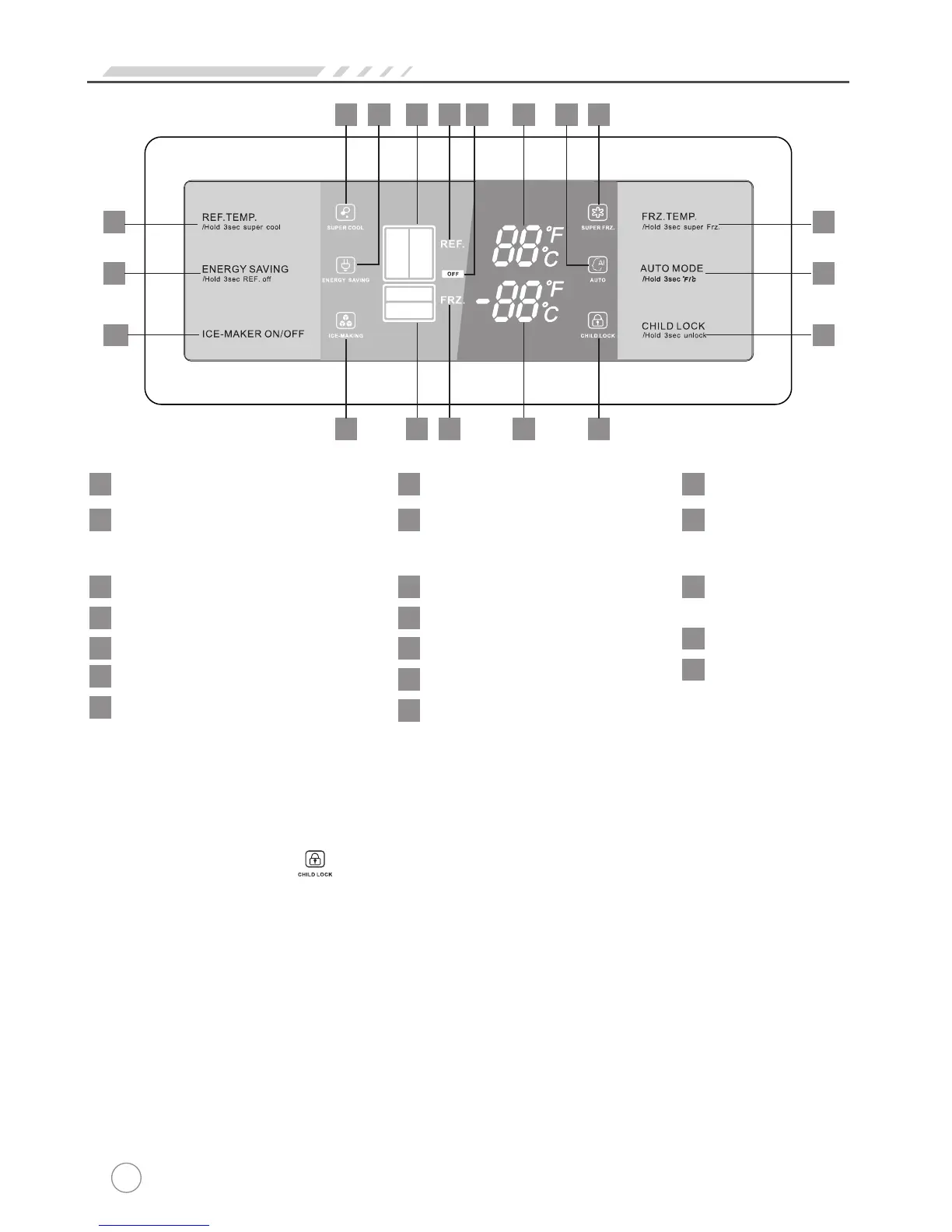
Control buttons
1
Refrigerator temperature control
Freezer temperature control
2
Energy saving mode
3
Auto mode
4
Ice-making switch
5
Child Lock
6
Display items
7
Fast-cooling icon
Fast-freezing icon
8
Energy-saving icon
9
Freezer compartment icon
14
Refrigerator
indicator
15
Freezer
indicator
16
Auto icon
10
Ice-making icon
11
Locked icon
12
Refrigerator compartment icon
13
Off icon: means refrigerator
shut down
17
Refrigerator temperature
18
Freezer temperature
19
Initial power-on status
All on
Locking and unlocking
When the“LOCK”icon on the display screen is not illuminated, the door
is not locked. In order to activate the child-proof lock, press the CHILD LOCK
button.The“LOCK”icon will illuminate and the door will be locked.To unlock,
press and hold the CHILD LOCK button for three seconds. The “LOCK” icon
will go out and the door will be unlocked. If no other keys are pressed within
25 seconds of the door being unlocked, it will automatically re-lock.
The below functions can be performed while in the “Unlocked”status.
1
3
5
7 9 13 15 17 81018
1
1
1214 16 19
2
4
6
21


 To Next Page