Edge Cleaning
The edge cleaning feature provides improved cleaning near walls and stationary furniture� For
maximum edge cleaning, place the left side of the nozzle against the wall or stationary furniture�
Automatic Carpet Height Adjustment
Your Fuller Brush vacuum is designed with an automatic, self-adjusting nozzle� No manual adjustments
are required� The height of the nozzle is instantly and automatically adjusted to the flooring surface�
This self-adjusting feature allows the nozzle to float evenly over all flooring surfaces�
Bare Floor Cleaning
Your Fuller Brush vacuum comes equipped with a squeegee on the bottom of the vacuum to improve its
effectiveness in cleaning bare floors� (figure 6)
When cleaning tile, hardwood, linoleum, etc�, use the On setting, as opposed to the maximum power
setting for best results�
Fig. 1
Fig. 2
Fig. 3
Fig. 4 Fig. 5
5
How to Assemble the Vacuum
Vacuum Features
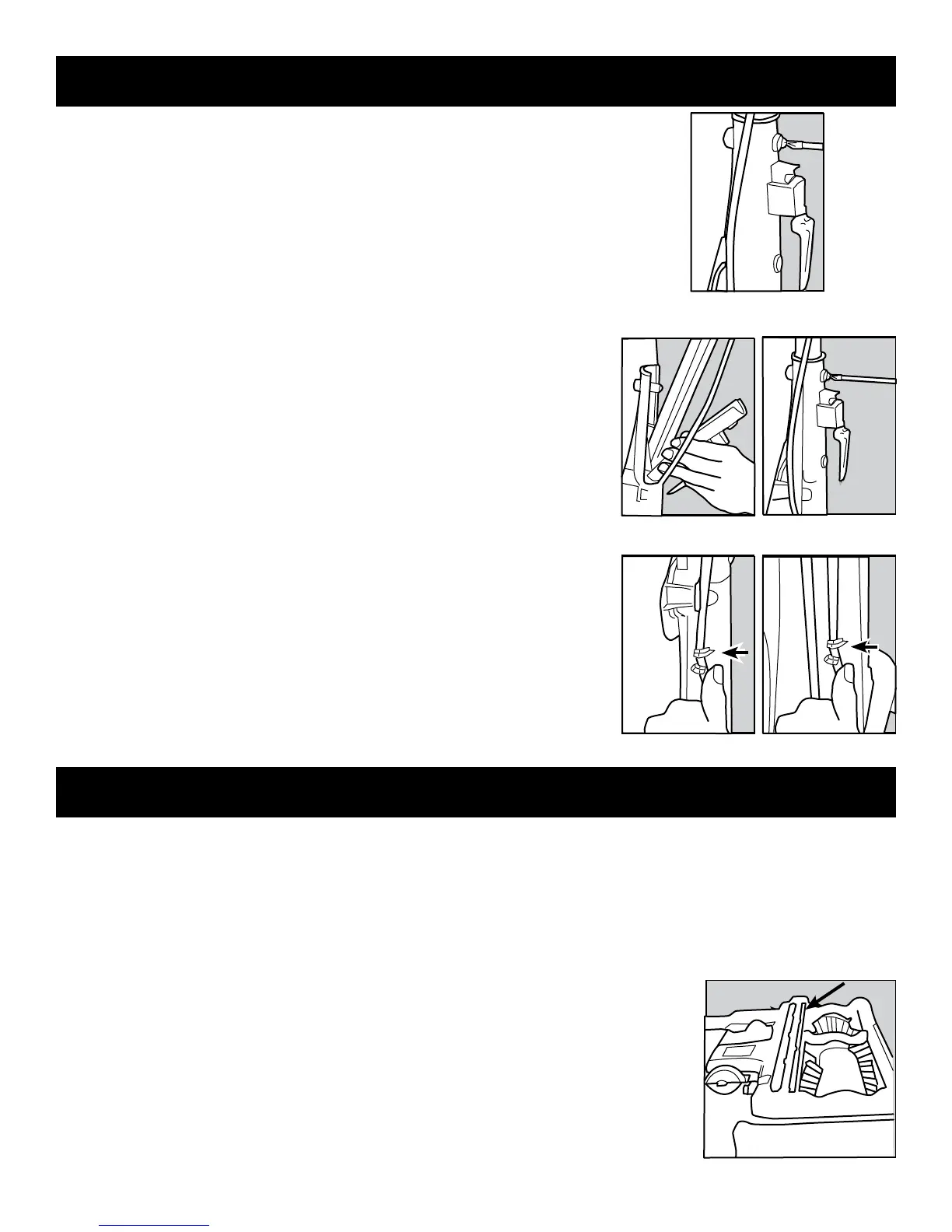
The vacuum cleaner handle is packed as a separate component that requires assembly�
1� Release the handle bracket from the handle tube by removing the two screws (figure
1)�
2� Place handle onto the handle tube, aligning holes with pegs (figure 2)�
3� Place the handle bracket back into position (figure 3)�
4� Secure with two screws removed in step 1�
5� Thread cord through cord guides and proceed with wrapping the cord (figures 4 &
5)�
6� Wrap the cord clockwise around the top and bottom cord hooks� Fasten the plug to
the wrapped cord using the channel on the plug� When not in use, store the vacuum
indoors in a clean, dry area where it cannot be damaged or cause injury�
On/Off Switch
The switch, located on the vacuum handle, is a three-way switch� The middle position
is the Off setting, the rear position is the On setting and the forward position is for
maximum power�
Use the maximum power setting for carpet cleaning and the On setting for cleaning bare
floors and throw rugs�
Pull the switch backward to turn the vacuum on� Push the switch halfway back to turn the
vacuum off� Push the switch all the way forward to use the maximum power setting�
The vacuum cleaner should be turned off before returning the handle to its full upright
position� Always turn the vacuum cleaner off before unplugging it from the electrical
outlet�
Fig. 6


 To Next Page