–
10
–
EN
DVD FUNCTIONS
DVD FUNCTIONS
Please note :
• Most instructions in this manual refer to remote control use.
• This unit will automatically turn on the screen saver after 5 minutes of inactivity and into the standby mode after 25 minutes of
inactivity.
Playback
Before:
Turn on the TV, amplifier and any other device which are
connected to this unit. Make sure the TV and audio receiver
(not supplied) are set to the correct channel.
(
on page 11
)
Note:
• When you play back a DVD or CD-RW/-R with JPEG les, refer
to details on page 11.
• “ This operation is not available” may appear at the top-left
on the TV screen when the operation is prohibited by the disc
or this unit.
• Some DVD may start playback from title 2 or 3 due to speci c
programs.
• During the playback of a 2-layered disc, pictures may stop for
a moment. This happens while the 1st layer is being switched
to the 2nd layer. This is not a malfunction.
• You can change the on-screen language in “OSD” setting.
(Refer to page 17.)
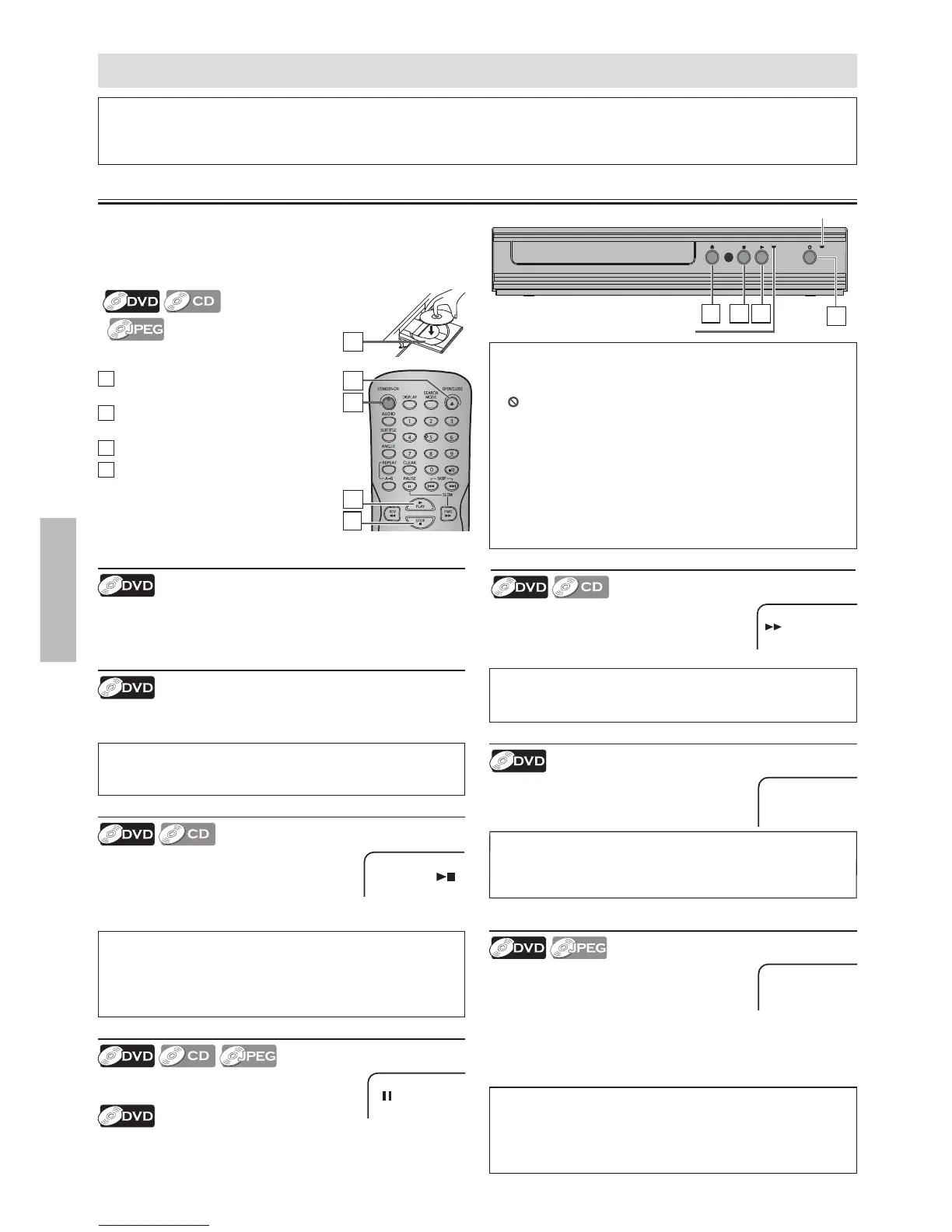
1
Press [STANDBY-ON] to turn on this
unit.
2
Press [OPEN / CLOSE A ] and insert a
disc with label facing up.
3
Press [ PLAY B ] to start playback.
4
Press [ STOP C ] to stop playback.
Lights up when power is on.
Note:
• Slow forward speed is di erent depending on the disc.
Approximate speed is ×1/2, ×1/4 and ×1/8.
Slow Forward Search
Press [ FWD g ] repeatedly in the pause
mode to select the required forward speed.
To continue playback, press [ PLAY B ].
Fast Forward / Reverse Search
Use [ FWD g ] or [ REV h ] repeatedly
during playback to select the required
forward or reverse speed.
To continue playback, press [ PLAY B ].
Paused and Step-by-Step Playback
Press [ PAUSE F ] during playback.
To continue playback, press [ PLAY B ].
The disc goes forward by one frame each time [ PAUSE F ]
is pressed in the pause mode.
To continue playback, press [ PLAY B ].
Note:
• Menu operations may vary depending on the disc.
Refer to the manual accompanying the disc for more details.
Resume Playback
Press [ STOP C ] during playback. Resume
icon will appear at the top-left on the TV
screen. Press [ PLAY B ], playback will resume
from the point at which playback was
stopped.
Note:
• To cancel resume, press [ STOP C ] one more time in the stop
mode.
• The resume playback information stays on even when the
power is turned o , as long as the disc stays in the unit.
Note:
• Fast forward or reverse search speed is di erent depending on
the disc. Approximate speed is ×2, ×4, ×8 and ×20.
Note:
• Zooming function does not work while the disc menu is
displayed.
• Some part of the picture may not be zoomed depending on
the disc or playback status.
Disc Menu
Some discs contain menus which allow you to customize DVD
playback. Use [K / L / s / B] to select an item, then press
[ENTER] or [ PLAY B ].
2
Zoom
1) Press [ZOOM] repeatedly during playback
to select the required zoom factor:
×1.5, ×2 or ×2.5.
2) Use [K / L / s / B] to slide the zoomed
picture across the TV screen.
3) To exit zoom function, press [ZOOM] repeatedly to select
“ZOOM 1”(Off).
Calling Up a Menu Screen during Playback
• Press [MENU] to call up the disc menu.
• Press [TOP MENU] to call up the title menu.
4
3
1
2
Lights up when disc is played back.
2 4 3
1



 To Next Page