10
English
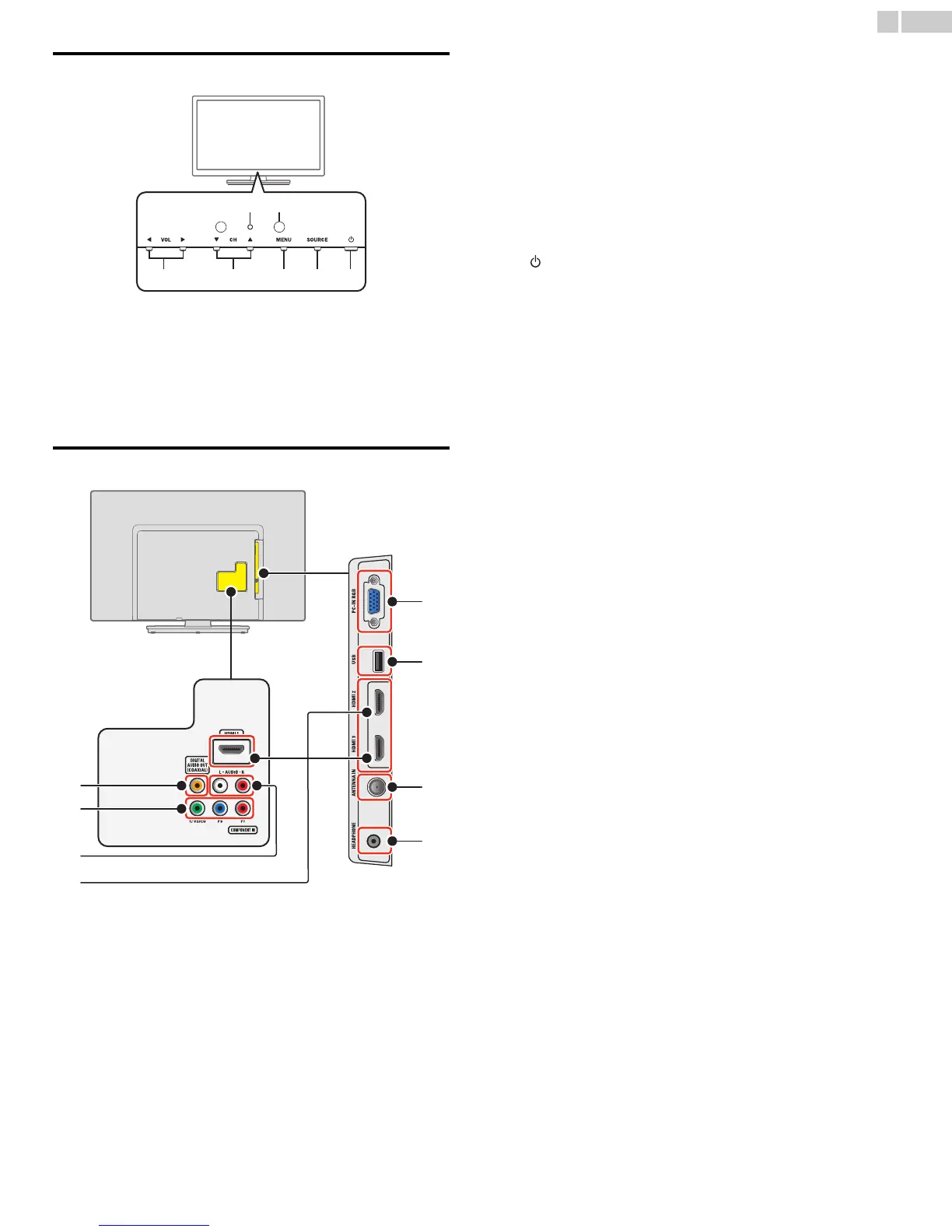
Control Panel
a VOL ◄/►
Adjusts the Volume.
VOL ◄ : Volume Down
VOL ► : Volume Up
In the Menu screen, moves the Cursor Left (◄) / Right (►).
b CH ▲/▼
Selects a Channel. In the Menu screen, moves the Cursor Up (▲) /
Down (▼).
c MENU
Opens the Main On-screen Menu.
d SOURCE
Selects Connected devices.
e (POWER)
Turns the TV On and Off.
f Remote Control Sensor
Receives IR signal from Remote control.
g Power On / Standby Indicator
(On : no light, Standby : red)
Te r m i n a l s
h Digital Audio Output jack
Digital Audio (S/PDIF) Output to home theaters and other Digital
Audio systems.
i Component (Y/Pb/Pr) / Composite Video (VIDEO) Input jacks
for VIDEO
Composite Video Input (VIDEO) jack is a shared jack with
Component Video Input (Y) jack.
j Analog Audio (L/R) Input jacks
Connect Analog Audio signals from;
– HDMI-DVI / Analog Audio (L/R) jacks signal
– Component Video / Analog Audio (L/R) jacks signal
– Composite Video / Analog Audio (L/R) jacks signal
– PC Connection / Analog Audio (L/R) jacks signal with Stereo mini
3.5mm plug Audio cable on PC
k HDMI Input jack(s)
Digital audio and video Input from high definition Digital devices
such as DVD / Blu-ray disc players, cable / satellite set-top boxes
PC’s.
l PC Input jack
VGA cable connection for PC.
m USB terminal
Data Input from USB Memory Stick only.
Do not connect any device to this terminal such as; Digital camera,
keyboard, mouse, etc.
n 75 ohm Cable / Antenna connection
Signal Input from an antenna or cable / satellite set-top boxes.
o Headphone Audio Output jack
Headphone 3.5mm stereo jack for personal listening.



 To Next Page