EasyManua.ls Logo

FUTABA BR-4000 - User Manual

FUTABA BR-4000
14 pages
Print Icon
To Next Page IconTo Next Page
Loading...
Instruction Manual
1M23Z09302
Question and Answer IconNeed help?

Do you have a question about the FUTABA BR-4000 and is the answer not in the manual?

Summary

Warnings and Safety Notes

Explanation of Symbols

Explains safety symbols like Danger, Warning, Caution, and Fire Hazard used in the manual.

General Safety Precautions

Lists crucial safety guidelines for using the product, including handling batteries and avoiding hazards.

Product Specifications

Battery Care and Recycling

Provides guidelines for battery pack maintenance, usage, and proper disposal procedures.

Nomenclature and Ports

Connectivity Ports

Details the XT60i and XH 2.54 balance ports for battery connection and data transfer.

Controls and Indicators

Identifies the device's buttons, LED indicator, and USB ports for operation and updates.

System Function Settings

Navigating System Functions

Explains how to use the menu buttons to navigate and select functions like language settings.

Available System Functions

Details various functions such as language, backlight, power save, volume, system information, and receiver testing.

Measurement and Display Modes

Battery Connection Display

Shows how the display presents total voltage and cell voltages when connected via XT60i or balance port.

BEC Power Supply Display

Explains how the device displays BEC output voltage when connected to the XT60i or balance port.

Cell Balancing Operations

Starting Cell Balance

Details the procedure to initiate cell balancing via button presses or menu selection.

Ending Cell Balance

Describes how to identify the completion of cell balancing and its indicators.

Stopping Cell Balance

Explains how to manually stop the cell balancing process and return to the connection screen.

USB Charging Functionality

Starting USB Charging

Guides users on how to begin charging a USB device using the battery as a power source.

USB Charging Details and Stops

Provides information on compatible USB devices and conditions under which USB charging will automatically stop.

Stopping USB Charging

Explains the procedure to manually stop the USB charging operation and remove the battery.

Receiver Signal Testing

PWM Signal Testing

Details how to test RC control signal PWM, including frame rate and pulse width.

S.Bus Signal Testing

Explains how to test S.BUS signals, displaying servo control data for up to 18 channels.

Overview

The Futaba BR-4000 is a versatile device designed for RC enthusiasts, offering comprehensive monitoring and management of battery packs. It displays total battery voltage, remaining capacity via a bar graph and percentage, and individual cell voltages for lithium battery packs equipped with a balance connector. While primarily for RC use, Futaba explicitly states it accepts no liability for damage or injury resulting from its use, emphasizing the importance of reading the user manual.

Function Description

The BR-4000 serves as a multi-functional tool, providing:

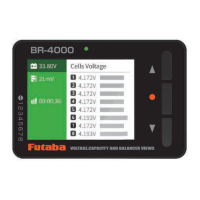
  • Voltage, Capacity, and Balancer Views: The core function is to display real-time battery information. For any connected battery, it shows the total voltage. For lithium batteries with a balance connector, it further breaks down the voltage for each individual cell and the maximum voltage difference between cells.
  • Cell Balancing: When a lithium battery with a balance port is connected, the BR-4000 can perform cell balancing. This process equalizes the voltage across all cells in the pack, which is crucial for battery longevity and performance. The device indicates the balancing status, with the left side of the screen turning green during operation and orange highlighting the cell being prepared. Upon completion, the screen turns blue, and an alarm sounds.
  • USB Charging: The BR-4000 can act as a power source to charge other USB-compatible devices (e.g., batteries) when a main battery is connected to its XT60i port. It supports QC 2.0/3.0 and BC1.2 protocols, with a maximum output of 12V/2A. The display shows the USB port output voltage, charging current, power output, and an alarm voltage for the XT60i input.
  • Receiver Signal Testing: With an optional DSC cable (for T7PX / 10PX), the BR-4000 can connect to a receiver's channel or S.BUS connector to test RC control signals. It can detect PWM output frame rate (cycle) and pulse width, and for S.BUS, it displays up to 18 channels of servo control data, useful for checking signal positions during F/S (failsafe) operation.
  • System Function Screen: A menu system allows users to configure various settings, including language, backlight intensity, power save mode, volume, battery type, low voltage alarm thresholds, and to initiate or stop cell balancing and USB charging.

Important Technical Specifications

  • Input Voltage:
    • XT60i connector: 5.0V-15V
    • XH 2.54 Balance port (1S): MAX 15V
    • XH 2.54 Balance port (2-8S): MAX 4.8V per cell
  • Voltage Measurement Accuracy: ±0.005V @ 4.2V
  • Balancing Cells Accuracy: <0.005V
  • Supported USB Charging Protocols: QC 2.0/3.0, BC1.2
  • Maximum USB Output: 12V / 2A
  • Supported Battery Types:
    • LiHv (1-8S)
    • LiPo (1-8S)
    • LiFe (1-8S)
    • Lilon (1-8S)
    • NiMH/Cd (3-10S)
  • Dimensions: 80 X 55 X 19 mm
  • Weight: 59g
  • Operating Temperature: 0-40°C
  • Operating Humidity: 10%-90%RH (No condensation)
  • Storage Temperature: -20-60°C
  • Storage Humidity: 5%-90%RH (No condensation)

Usage Features

  • Intuitive Interface: The device features an OLED display and three buttons (Up, Down, Menu) for navigation and setting adjustments.
  • Connectivity: It includes an XT60i port for main battery connection and an XH 2.54 balance port for lithium battery balancing and signal testing. A USB Micro B port is provided for firmware updates.
  • Power Save Mode: This feature automatically turns off the display after 2 minutes of inactivity to conserve power. During balancing or USB charging, the backlight turns off after 20 seconds of no operation, with an LED blinking to indicate ongoing activity (green for balancing, purple for USB charging).
  • Customizable Alarms: Users can set low voltage alarm thresholds. For XT60i connections, it's a fixed voltage (5-30V), while for balanced port connections, it's a single-cell voltage (2.5-3.9V). The alarm tone can be set to Off, Single (once), or Repeat (every minute).
  • Battery Type Selection: The device allows manual selection of the battery type (LiHV, LiPo, Lilon, LiFe) for accurate monitoring and balancing.
  • Firmware Updates: The USB Micro B port enables firmware updates, ensuring the device remains current with new features or improvements.
  • BEC Power Supply Connection: The BR-4000 can display the BEC output voltage when a BEC power supply is connected to either the XT60i or balance port.

Maintenance Features

  • Battery Pack Care Guidelines: The manual provides essential advice for battery pack care, including discharging and storing according to the battery's manual, avoiding over-discharge (keeping capacity above 20%), and using specified chargers.
  • Battery Recycling: Emphasizes the importance of insulating battery terminals and disposing of used batteries at a recycling center.
  • Safety Precautions: Extensive warnings and safety notes are provided, covering:
    • Danger: Procedures that could lead to death or serious injury (e.g., sparks when connecting/disconnecting batteries near flammable materials).
    • Warning: Procedures that could cause serious injury or physical damage (e.g., incorrect settings, pinching/shorting battery cords, leaving batteries connected for too long).
    • Caution: Procedures with a small risk of injury or physical damage (e.g., using near heat/humidity, connecting batteries exceeding operating voltage, getting the device wet, leaving within reach of children).
  • Post-Operation Actions: Users are instructed to immediately stop cell balancing or USB charging and remove the battery after completion to prevent over-discharge, which can lead to fire or battery deterioration.
  • Environmental Considerations: Advices to keep the product away from heat sources and humid environments, ensuring proper ventilation and heat dissipation. It also warns against getting the device wet, as its internal electronic circuits are precise and susceptible to malfunction. If wet, it should be sent for repair.

FUTABA BR-4000 Specifications

General IconGeneral
BrandFUTABA
ModelBR-4000
CategoryMeasuring Instruments
LanguageEnglish