5
You can review these at any time by Pressing and holding the
OK button for 3 seconds and then pressing the Number 1 or
Number 3 key to scroll through your address book
A NOTE ABOUT CALLING 911: If you want to call 911 using
the hand’s free option, you will need to program it into your
address book.
Additional Features
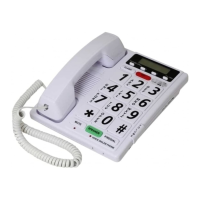
The Totally Voice Activated Dialer also works as a standard
telephone. You can pick up the handset to answer or place a
call. Additionally, calls can be made by hands free by pressing
the green SPEAKER button located on the bottom of the base.
The Totally Voice Activated Dialer is call – waiting enabled.
Pressing the FLASH key located near the top of the base will
allow you to switch between calls.
The red 911 key enables you call 911 immediately when
pressed. No need to pick up the handset.
The P/REDIAL key located on the bottom of the unit allows you
to redial the last number called.
Making a Call, Answering a Call, Ending a Call with Total
Voice Dialing
Making a call:
Say your “Lead Voice” phrase.
The Totally Voice Activated Dialer will answer you
“I ‘am ready who would you like to talk to?
Say a name from your address book. Totally Voice
Activated Dialer will then say ok the name is ________
and then states the number being called
You then can have a conversation through the speaker
phone on the base
NOTE: If you don’t record a lead voice, and still want to
use the call by voice feature simply press the “OK” key


 To Next Page