Need help?
Do you have a question about the Future Call FC-1204 and is the answer not in the manual?
Connects the phone cord to the line and wall jacks for basic operation.
Powers the unit via a DC jack connected to a wall outlet.
Instructions for mounting the phone using pre-drilled screw holes.
Guide to setting up voice commands for dialing and answering calls.
Instructions on programming the 911 feature into the address book for hands-free calling.
Using the phone with the handset or speakerphone for calls.
Explanation of the Flash, P/Redial, and Speaker buttons.
How to program the current date and time on the device using the keypad.
Resets the device to factory settings, requiring re-programming of voice commands and contacts.
Configures the maximum call duration before the dialer automatically hangs up.
Allows customization of the number dialed when the red 911 key is pressed.
Adjusts the delay for switching between calls when receiving another incoming call.
Configures the duration of tones generated when pressing a key.
Allows pre-setting an area code for automatic dialing when activated.
Steps to review, delete, or add caller ID information to the phone book.
How to call back a displayed number from the CID list using the handset or speakerphone.
Essential safety guidelines for using the telephone equipment, including electrical and environmental warnings.
Contact information for technical assistance, inquiries, and warranty service.
Details of the limited warranty, coverage, exclusions, and legal rights.
 General
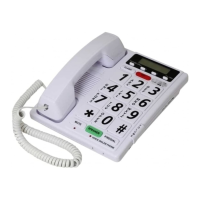
| Type | Corded Phone |
|---|---|
| Speakerphone | Yes |
| Caller ID | Yes |
| Hearing Aid Compatible | Yes |
| Extra Loud Ringer | Yes |
| Amplified Volume | Yes |
| Call waiting | Yes |
| Redial | Yes |
| Ringer volume control | Yes |
| Handset volume control | Yes |
| Backup battery | Yes |
| Color | White |
| Power source | AC adapter |

 To Next Page