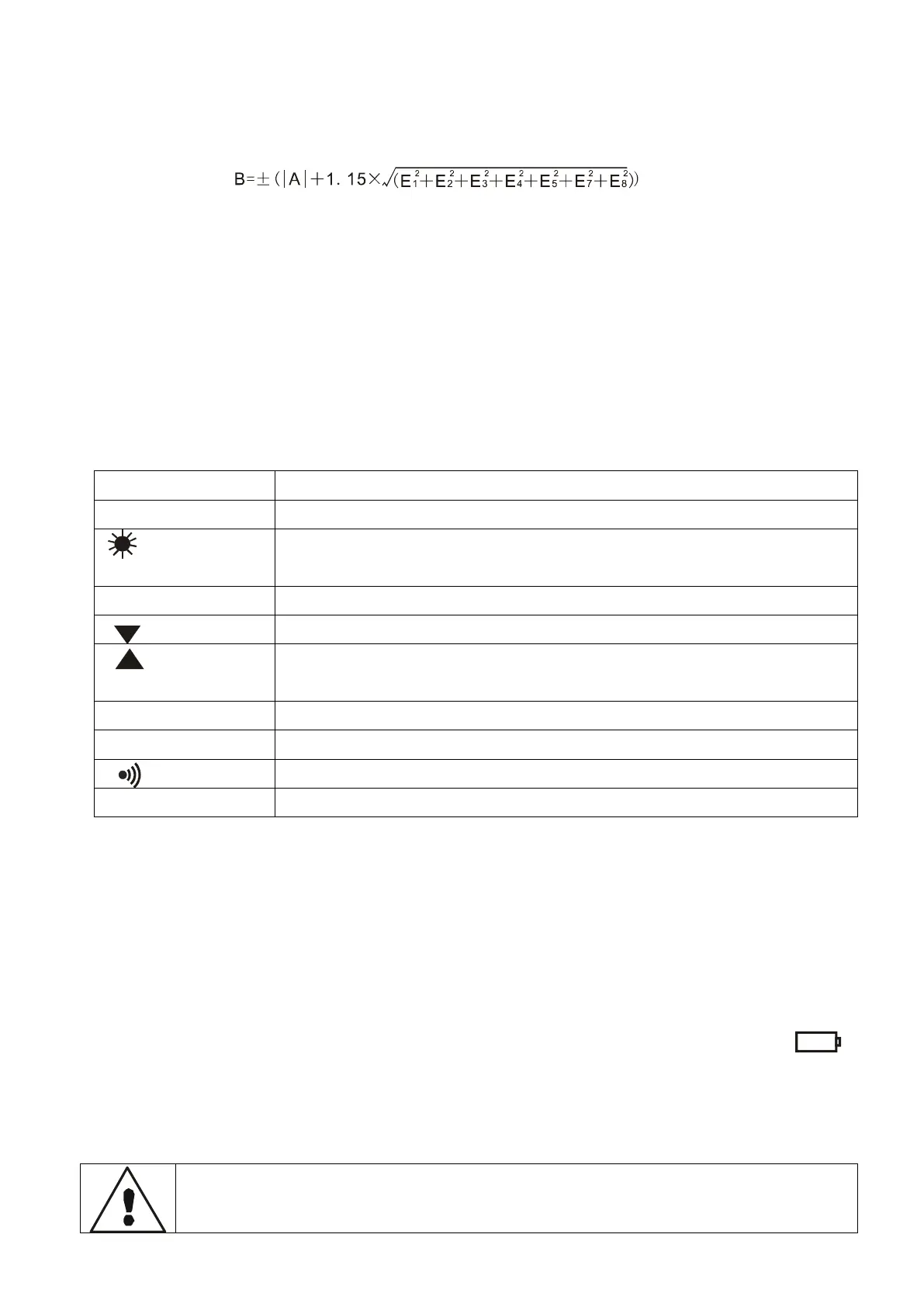
3.The working error (B) is the error within the rated operating conditions,
which is calculated from the inherent error (A) and variation error (Ei) of
the existing instrument.。
A: inherent error E1:Changes due to location changes
E2:Changes due to power supply voltage changes
E3:Changes due to temperature changes
E4:Changes due to disturbance voltage variations
E5:Changes due to contact electrode resistance
E7:Changes due to system frequency changes
E8:Changes due to system voltage changes
VII. Functional Quick Check
Data browsing/value setting
Delete data measurement selection
Wire resistance check/delete data measurement
selection
Set alarm value/delete data
Alarm function start/alarm threshold setting
VIII.Operation
1.Switch on/off
Press the POWER button to switch on and off. After turning on the machine,
the lower corner shows "APO" and it will automatically shut down after 15
minutes when it is not operating.
2.Battery Voltage Check
After powering on, if the LCD shows a low battery voltage symbol “ ”,
it indicates that the battery is running low. Please charge it in time. The
battery power is sufficient to ensure the accuracy of the measurement. When
the battery power decreases, the power indicator bar decreases.
3.Ground Voltage Measurement
Before measuring, please make sure that the plug of the test line
is fully inserted into the corresponding interface of the meter.


 To Next Page