25
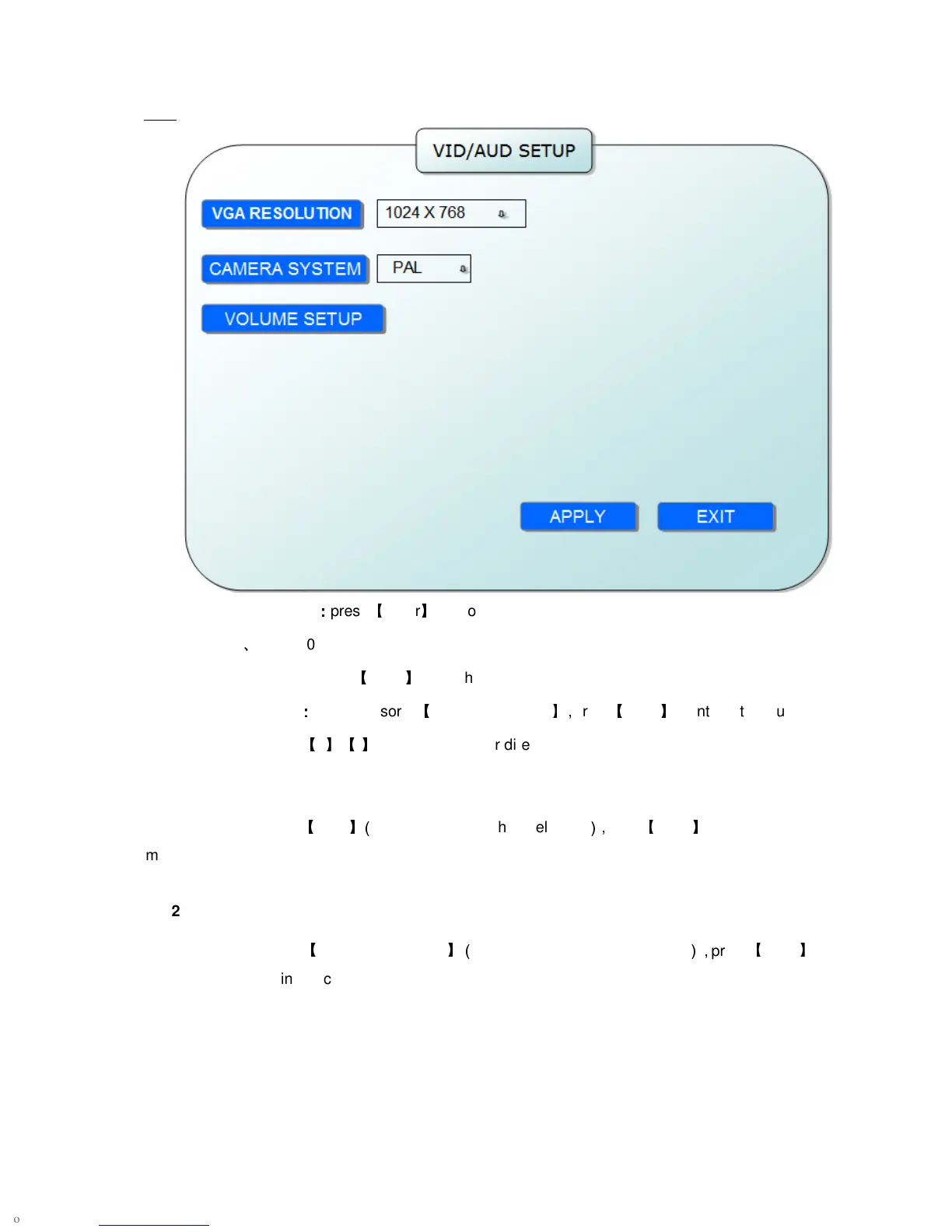
VGA RESOLUTION
:
::
:
press
【
Enter
】
key to setup the VGA resolution, there are
1024*768
、
800*600 and 600*480 three options.
CAMERA SYSTEM: press
【
Enter
】
to switch camera system, has PAL and NTSC two options
VOLUME SETUP
:
::
:
move cursor to
【
VOLUME SETUP
】,
press
【
Enter
】
to enter into volume
setup interface, press
【
+
】【
-
】
or number keys or directly drag the cursor to adjust volume.
2.2.2.4.6 EXIT
Move the cursor to
【
EXIT
】(
Icon highlighted when selected
),
press
【
Enter
】
to back to main
menu.
2.2.2.5 ADVANCE SETUP
Move the cursor to
【
ADVANCE SETUP
】(
Icon highlighted when selected
),
press
【
Enter
】
to enter into setting interface.


 To Next Page