®
Overview of the Drive
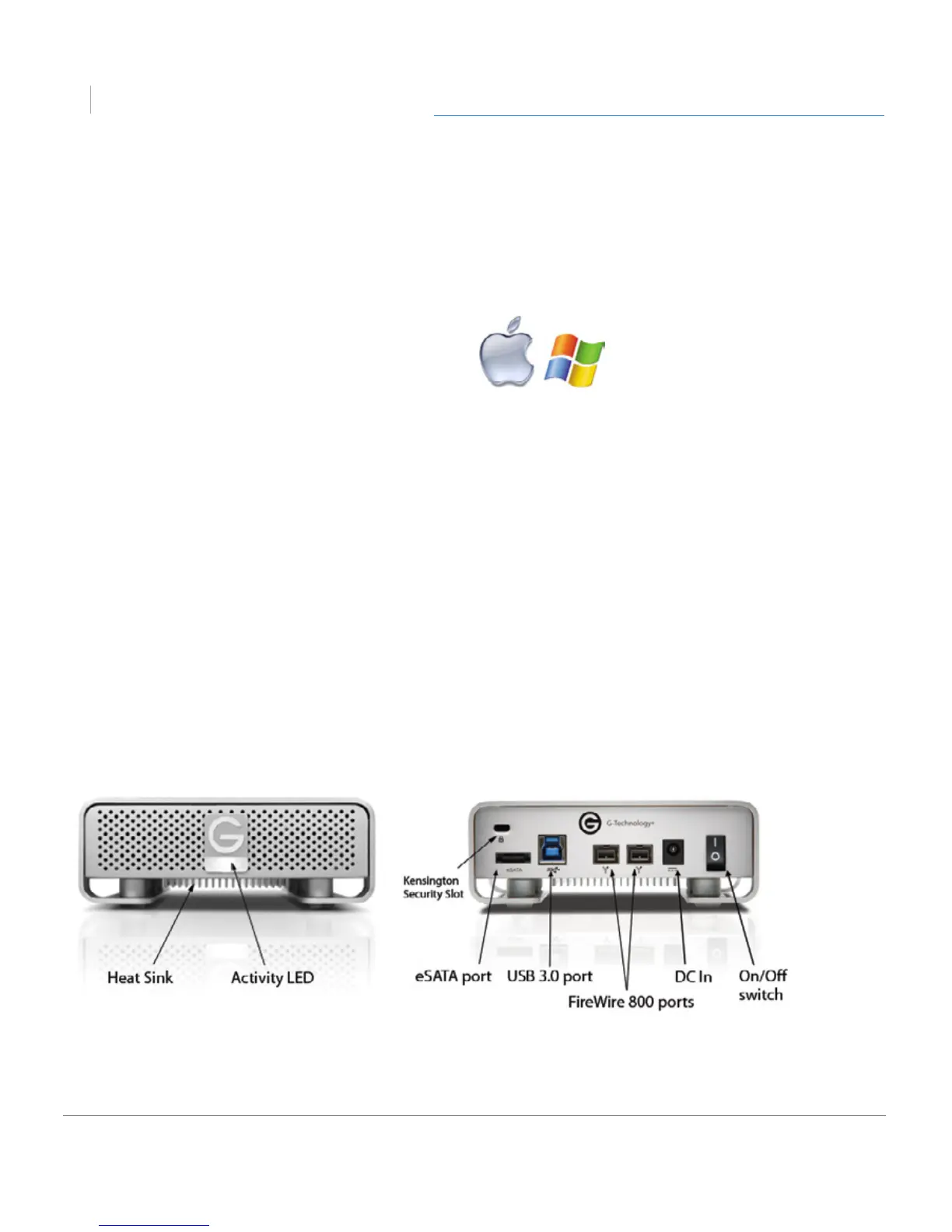
This diagram shows the helpful features of your G-DRIVE. There is a Power & Activity LED
on the front of the unit and a Heat Sink beneath it. The activity LED will glow when the
unit is switched on. It will ash brighter as data is transferred to or from the hard drive.
On the rear of the unit is a Kensington™ security slot, a USB 3.0 port, a eSATA port, two
FireWire 800 ports, a DC Power In and an On/O Switch.
System Requirements
G-DRIVE supports the folllowing Operating Systems. The drive is set up at the factory
for use with Mac OS® systems, and formatted as ‘HFS+ with Journaling’.
• Mac OS 10.6 +
• Windows 8, 7, Vista and XP®
NOTE: G-DRIVE models larger than 2TB are not supported by Windows XP and older
32-bit operating systems. These OS’s are limited to a maximum volume size of 2.2TB.












 To Next Page