16
BEVERAGE PROGRAMMING
The following page describes how to program coffee beverages; the settings to program each beverage may differ
depending on the type of beverage.
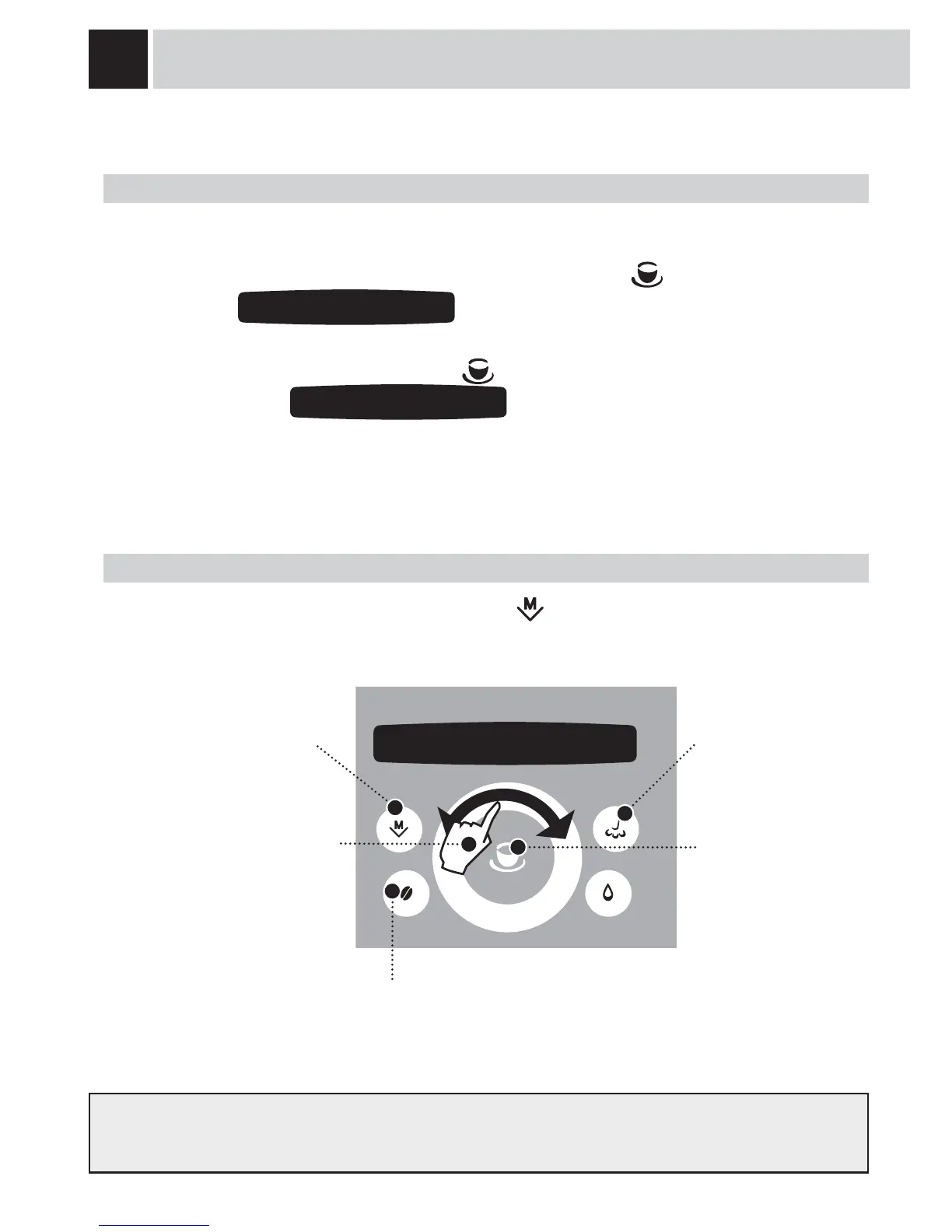
2. PROGRAMMING FROM THE “BEVERAGE SETTINGS” MENU
To adjust the settings for preparing beverages: press the button and select “beverage settings” by
navigating the click wheel with your fi nger.
In this phase you can:
exit the programming mode.
(see page 18)
by navigating the click wheel with
your fi nger you can change the
settings for:
- the quantity of coffee to be
brewed;
- the coffee temperature;
- prebrewing the coffee.
- select the quantity of coffee to be ground (opti-dose)
or
select the function to set:
- the coffee temperature;
- coffee prebrewing.
restore factory settings
save the new settings.
Every beverage can be programmed according to your individual tastes.
1. PROGRAMMING FOR SELF-LEARNING
You can program the quantity of coffee and/or milk you wish to be dispensed into the cups when you press the
button for any beverage.
Select the type of beverage you want to program, then press and hold the
button until the display shows
(for example):
The machine dispenses coffee.
When the required amount is reached, press the
button again.
The display shows:
The dispensed quantity of coffee and/or milk is memorized and replaces any previous settings.
programming
espresso coffee
saved
espresso coffee
1 beverage settings




 To Next Page