Page 8
3E4288 Gallagher T10 Reader | Edion 11 | March 2023
Copyright © Gallagher Group Limited
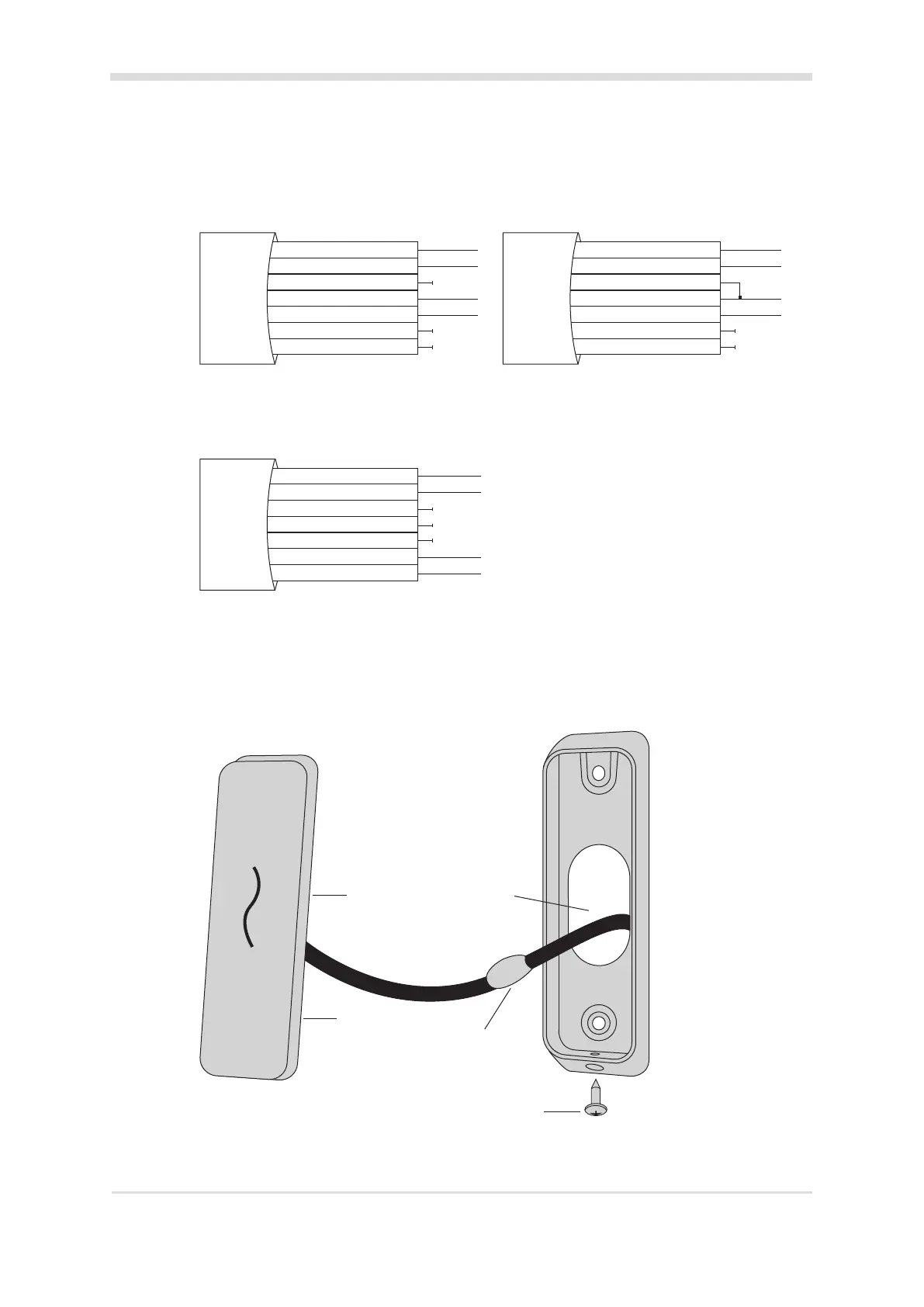
A Cardax IV Reader connects to a Gallagher Controller 6000, Gallagher 4R/8R Module (aached
to a Controller 6000) or a Gallagher GBUS Universal Reader Interface (Gallagher GBUS URI).
HBUS Reader connecon: HBUS Reader terminated:
Posive Red
Negave Black
HBUS Terminaon Orange
HBUS A Green
HBUS B Brown
CDXIV TX White
CDXIV RX Blue
HBUS Reader
Posive Red
Negave Black
HBUS Terminaon Orange
HBUS A Green
HBUS B Brown
CDXIV TX White
CDXIV RX Blue
HBUS Reader
Note: To terminate an HBUS Reader, connect the Orange (HBUS Terminaon) wire to the Green
(HBUS A) wire.
Cardax IV Reader connecon:
Posive Red
Negave Black
HBUS Terminaon Orange
HBUS A Green
HBUS B Brown
CDXIV TX White
CDXIV RX Blue
Cardax IV Reader
5. Fit the facia assembly into the bezel by clipping the small lip, into the top of the bezel and holding
the top, press the boom of the facia assembly down into the bezel.
6. Insert the M3 Torx Post Security screw (using a T10 Torx Post Security screwdriver) through the
hole at the boom of the bezel to secure the facia assembly.
Note: The Torx Post Security screw needs only to be lightly ghtened.
Fit screw to secure facia to bezel
Facia
Reader tail
Connecon
Building cable
7. Removal of the facia assembly is a simple reversal of these steps.



 To Next Page