© 2021 GAME GOLF by Game Your Game, Inc. All rights reserved.
ON-COURSE SETUP
GET STARTED SETUP TROUBLESHOOT UPDATE SMART CADDIE
12
PLAYING WITH NO INTERNET CONNECTION
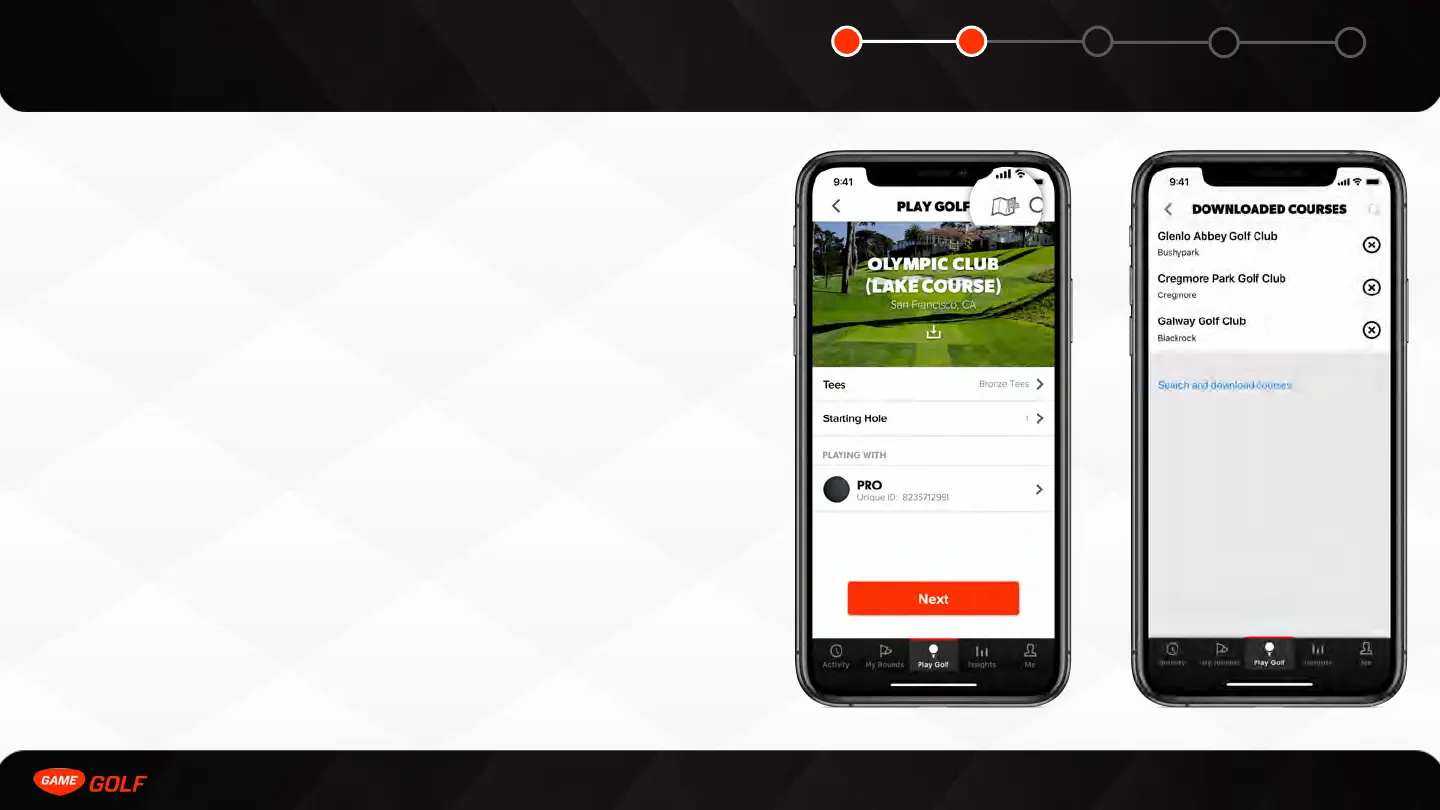
An internet connection is not required for playing a round with GAME GOLF PRO.
You can download the course before your round by searching a course, selecting that
course, and tapping the cloud icon to download that course before playing. Downloaded
courses stay cached for about 10-14 days. You can download up to 10 golf courses at one
time.
You can upload your round without internet too. The process is the same as online
upload. The next time you connect to the internet you need to re-sync your offline round
to the GAME GOLF servers. To do this you need to do the following:
Go to “My Rounds” tab and select the sync icon next to the round score. Your round will
then sync to the server in the background. It can take 3-5 minutes depending on the
strength of internet connection.
You can also play without your phone if you wish, learn more on page 17.



 To Next Page