EasyManua.ls Logo

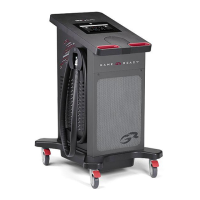
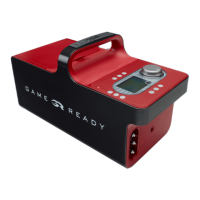
Game ready 550450 - User Manual

Game ready 550450
21 pages
Print Icon
To Next Page IconTo Next Page
Loading...
VETERINARY CONTROL UNIT
User’s Manual
MODEL 550450
Users Manual also available online at
www.gamereadyveterinary.com

Other manuals for Game ready 550450

Questions and Answers

  • V
    vasqueztiffanyAug 15, 2025
    What to do if Game Ready Control Unit detects a dry pump?
    • K
      Kristen ContrerasAug 16, 2025
      If the Game Ready Control Unit detects a dry pump, which stops therapy to prevent damage, ensure there is water in the ice box and the ice box filter isn't clogged. Also, check for kinks in the Wrap or Connector Hose. Try turning the Control Unit off and on again, and disconnect then reconnect the hose. You can also prime the wrap by selecting 'No Pressure', attaching the largest wrap, laying it open, and running the system for 1 minute. As another solution, you can prime the system by disconnecting the hose, pushing the white prong on the top valve (make sure you are not fully covering the opening in the prong), pushing start, and checking if water squirts out, and then restarting the system.
  • J
    John ThomasAug 18, 2025
    What to do if Game Ready Control Unit shows low flow?
    • A
      Alexandria PaulAug 19, 2025
      If the Game Ready Control Unit detects an interruption in the water flow ('Low Flow' error), check all hose connections, ensure there is water in the ice box, and verify that the ice box filter is not clogged. Also, make sure there are no kinks in the Wrap or Connector Hose. Try turning the Control Unit off and on again, and disconnect and reconnect the hose from the Control Unit and the Wrap.
  • K
    Kevin SmithAug 22, 2025
    What to do if Game Ready Control Unit displays pump performance error?
    • A
      Arthur BrownAug 22, 2025
      If the Game Ready Control Unit detects that the fluid pump may be working too hard, turn the unit off and back on again. Check to see if the filter is clogged. If the problem persists, turn the Control Unit off for 20 minutes to allow the pump to cool down before trying again.
  • L
    lauraryanAug 25, 2025
    How to fix Game Ready Control Unit that will not turn on?
    • K
      Kristen GarciaAug 26, 2025
      If the Game Ready Control Unit won't turn on, first check that the AC Adapter is securely plugged into a working electrical outlet. Press the power button again. If the orange LED is illuminated, call 1.888.426.3732 (from the U.S.) or 001.510.868.2100 (outside the U.S.). If no light is illuminated, ensure the electrical outlet has power.
  • M
    mharrisAug 27, 2025
    What to do if Game Ready Control Unit shows over pressure?
    • J
      Joseph RichAug 27, 2025
      If the Game Ready Control Unit has exceeded the target pressure, turn the unit off and back on. Try applying the same Wrap more tightly or use a different Wrap.
  • D
    davidsonjustinAug 31, 2025
    What to do if Game Ready Control Unit displays self-test error air pump?
    • T
      Tiffany MercadoAug 31, 2025
      If the Game Ready Control Unit detects an electronic problem in the air circuit on start-up, disconnect the Wrap from the Control Unit. Then, turn the Control Unit off and on again without a Wrap connected.
  • A
    Amanda AshleySep 2, 2025
    How to fix deflation error on Game Ready Control Unit?
    • B
      bdiazSep 2, 2025
      If the Game Ready Control Unit detects that the Wrap has not properly deflated, turn the unit off. If there's air in the Wrap, disconnect it from the Connector Hose and manually deflate it. Reconnect the Hose to the Wrap, reapply the Wrap, and turn the Control Unit on, then press play/pause.
  • T
    Thomas WareSep 6, 2025
    What to do if Game Ready Control Unit displays self-test error fluid circuit?
    • S
      smithlisaSep 6, 2025
      If the Game Ready Control Unit detects an electronic problem in the fluid circuit on start-up, disconnect the Wrap from the Control Unit. Turn the Control Unit off and on again without a Wrap connected.
  • B
    Brandon HoSep 8, 2025
    Why does my Game Ready Control Unit show an air pressure sensor error?
    • C
      Claire MartinSep 9, 2025
      If the Game Ready Control Unit detects a problem calibrating the pneumatic compression circuit on start-up, especially after restarting with an inflated Wrap, detach the Wrap and try again.
  • M
    Matthew JordanSep 12, 2025
    What to do if Game Ready Control Unit shows under pressure?
    • B
      bburchSep 12, 2025
      If the Game Ready Control Unit can’t reach its target maximum compression, ensure the Wrap is tightly applied. Try using a different Wrap and Hose to isolate the problem.

Summary

The Game Ready Difference

Register Your Product

Instructions for product warranty registration online.

Indications for Use

General Warnings and Precautions

Warnings

Critical safety advisories regarding tissue damage and monitoring.

Precautions

Important user cautions for safe operation and handling.

Device Classification

Protection against electric shock

Classification regarding electrical safety standards.

Protection against harmful ingress of water

Classification for water ingress protection.

Degree of safety in flammable anesthetics;oxygen environments

Suitability for use in specific environmental conditions.

Electromagnetic interference

Compliance with medical device EMC standards.

Description of Device

Game Ready System Components

Lists the essential items included with the system.

Manual Mode Operation

Details on how to adjust time and pressure settings manually.

Program Mode Operation

Explains selecting pre-set treatment programs.

Buttons

Power and Program Controls

Describes the function of power and program selection buttons.

Time and Pressure Adjustment

How to modify treatment time and pressure settings.

Temperature Control

How to adjust the therapy temperature using the knob.

Display

Status Bar and Mode Indicators

Explains icons for volume, mode, and unit status.

Error and Battery Indicators

Describes icons for errors, sleep mode, and battery level.

Temperature Readouts

Details on average and coldest wrap temperature displays.

Using Your Game Ready System

System Requirements and Warnings

Essential items needed and safety warning for placement.

Filling the Ice Box

Connecting Components

Final Setup and Operation

Mode Selection and Starting Treatment

Cleaning

Control Unit and Connector Hose Cleaning

Procedures for cleaning the main unit and hose.

Wrap and Carry Bag Cleaning

Instructions for cleaning wraps and the carrying bag.

Maintenance

Storage

Specifications

Accessories

Troubleshooting

Pressure and Air Circuit Errors

Solutions for pressure sensor, pump, and over-pressure issues.

Wrap and Flow Issues

Troubleshooting for wrap application and fluid flow problems.

Power and Connectivity Errors

Addresses issues with fluid circuit self-test and power.

Warranty

Limited Warranty Coverage

Details on warranty terms, exclusions, and limitations.

Obtaining Warranty Service

Procedures for requesting and receiving warranty service.

Warranty Registration and Extended Options

Guide to registering the product and purchasing extended warranties.

Game ready 550450 Specifications

General IconGeneral
BrandGame ready
Model550450
CategoryMedical Equipment
LanguageEnglish

Related product manuals