GANSHORN Medizin Electronic GmbH Service Manual Ref.No. 03 140 0 046
PowerCube-Ergo-CASE_ENG_rev.02, 23.11.2012 Chapter 5, software, page 4 of 4
Allocation of External Ergospirometry Parameters
For the input of external parameters into the LF8-program it is necessary to define the source, i.e. the
device sending measured data to the LF8 program.
As there are different possibilities, these parameters have to be allocated depending on the complete
system. For these settings, go into the “Ergospirometry-configuration” of the measurement program
“ergospirometry”
=> Instruction Manual PowerCube-Ergo,
Chapter 6.6, Ergospirometry
From the measurement program “Ergospirometry” click on edit
Perform the desired settings
=> Appendix A: Allocation of Ergospirometry-Parameters
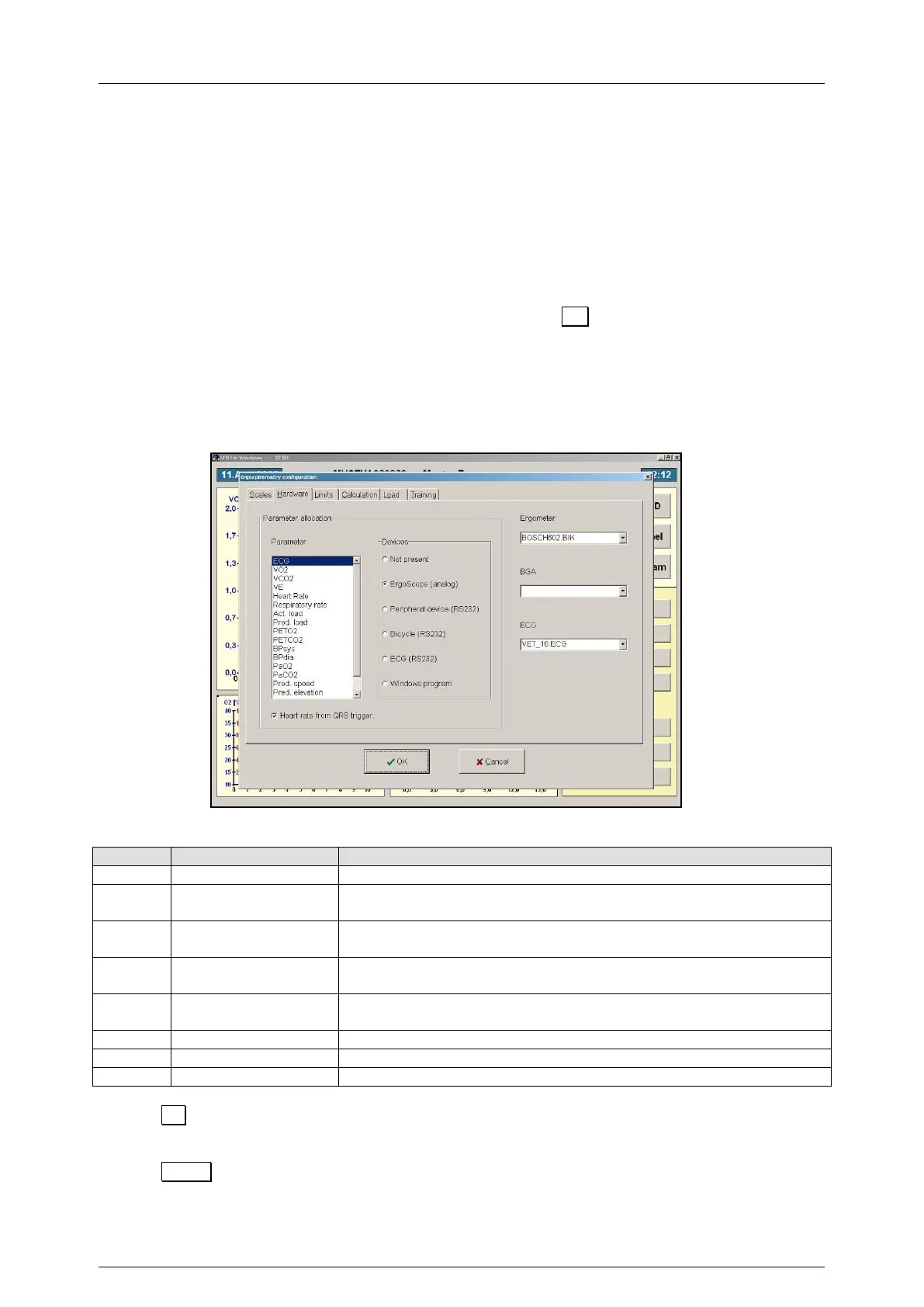
In the column “Parameter allocation” select the desired parameter and allocate the data source
for this parameter in the column “Devices”
Pict. Ergospirometry configuration, register card ”Hardware”
Allocation of the individual parameters for each device (Data source)
List of all Ergospirometry parameters that are available for device
allocation (devices)
List of all devices available as data source for the corresponding
parameter
- Heart rate from
QRS trigger
For setting whether the signal for the “Heart rate” parameter should
be generated by the QRS trigger or not
Selection of the corresponding device driver for connection of
ergometer, BGA- and/or ECG system via the serial interface
Selection of the corresponding device driver for the ergometer
Selection of the corresponding device driver for the BGA system
Selection of the corresponding device driver for the ECG system
Click on OK
= The modifications are stored
= The program switches back to the Ergospirometry program
Click on Cancel
= The modifications are not stored
= The program switches back to the Ergospirometry program


 To Next Page
 Loading...