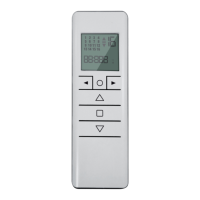
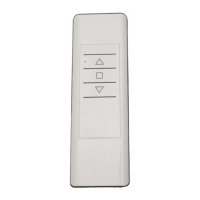
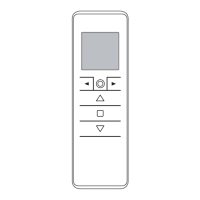
The Gaposa Emitto Smart 16 is a series of 16-channel handheld display remotes designed for controlling various automated systems, likely including motors for blinds, awnings, or shutters. The series includes two models: the QCTZ16Y, a standard 16-channel handheld display remote, and the QCTZ16SY, which adds a timer function to the 16-channel handheld display remote. Both models operate on a frequency of 434.15 MHz.
Function Description:
The Emitto Smart 16 transmitters are designed to provide comprehensive control over multiple channels or groups of channels. Users can program and manage individual channels, create and customize groups of channels, and set various operational parameters. The QCTZ16SY model further enhances functionality with a built-in clock and scheduling capabilities, allowing for automated control of connected devices based on time.
Important Technical Specifications:
- Battery: 3V, CR2450 model.
- Channels: 16.
- Encoding: RC Gaposa.
- Battery Life: 2 years.
- Frequency: 434.15 MHz.
- Radiated Power: 0.150 mW.
- Protection Rate: IP40.
- Coverage (int/ext): 65 ft / 656 ft.
- Working Temperature: 23°F / 104°F (approximately -5°C / 40°C).
Users are advised to read the guide carefully before installation and use. Any use outside the defined application sphere by Gaposa is prohibited, as it invalidates the warranty and discharges Gaposa of liability. Compatibility with associated equipment and accessories should be checked before installation.
To prevent damage to the product, avoid impacts, dropping it, spraying or immersing it in liquids, and keep it out of reach of children. Do not use abrasive products or solvents for cleaning; a soft, damp cloth is recommended.
A crucial note for users is to avoid using motors with remote controls in areas with high risks of radio disturbances (e.g., airports or radio repeaters). These units may also be affected by telecommunication and/or transceiver systems operating on the same frequency.
Usage Features:
The remote features several pushbuttons for intuitive operation:
- UP (▲): Moves the motor upwards.
- STOP (■): Stops the motor.
- DOWN (▼): Moves the motor downwards.
- Select Channel (◄►): Navigates through channels or groups.
- SYNC (A): Programs the transmitter.
- LIMIT (B): Sets the limit switch.
- Circle Button (O): Switches between single channel mode and group control mode.
Selecting a Channel/Group:
- Pressing the circle button sequentially switches between single channel control mode and group control mode.
- In Single Channel Control Mode, use the arrow buttons (◄►) to scroll through channels, each identified by a number.
- In Group Control Mode, the first group displayed is "ALL CHANNELS." Use the arrow buttons (◄►) to scroll through pre-made groups, each identified by a number. Only previously created groups will appear.
Customization of Groups:
- Enter group control mode by briefly pressing the circle button.
- To create a group, press both arrow buttons (◄ + ►) for 2 seconds. "SEL" will appear, and channel 1 will flash.
- Use the arrow buttons (◄►) to scroll to the desired channel.
- Press both arrow buttons (◄ + ►) for 2 seconds to select the channel. Repeat to add more channels.
- To confirm the group, press the UP, STOP, or DOWN button. The group will be assigned the first available number from 1 to 8. Up to 8 groups can be created.
Deleting Groups:
- Enter the group screen by pressing the circle button.
- Press and hold the circle button until "DEL G" appears, then press STOP to enter delete groups mode.
- Use the arrow buttons (◄►) to navigate through saved groups.
- Once the desired group is selected, press STOP to confirm deletion.
- Exit delete groups mode by pressing the circle button again.
Hiding Channels:
- Enter the channel screen by pressing the circle button.
- Press and hold the circle button until "HIDE" appears, then press STOP to enter hide channel mode.
- Select the channels to be hidden.
- Press STOP to confirm. The numbers on the screen will blink quickly.
- Channels can be unhidden using the same process by deselecting them.
Programming Transmitter:
- Caution: When installing multiple motors with receivers, power up only one motor at a time during the initial programming to avoid interference.
- Power up the motor to be programmed.
- Press and hold the SYNC button (A) until the motor starts moving.
- Check the motor's rotation direction, then release SYNC (the motor will stop).
- Within 5 seconds, press the corresponding UP or DOWN button to synchronize the motor's rotation. The transmitter is now programmed.
Adding Transmitter:
- Press and hold the SYNC button (A) of an already paired transmitter until the motor starts moving.
- Check the motor's rotation, then release the SYNC button (the motor will stop).
- Within 5 seconds, press the corresponding UP or DOWN button on the new transmitter being added. The new transmitter will be programmed and synchronized.
Checking/Changing Direction:
- Important: Direction changes must be performed before setting limits, otherwise limits must be reset.
- Press UP or DOWN. If the motor does not move in the desired direction, proceed to change it.
- Press and hold the SYNC button (A) until the motor starts moving.
- Press STOP. The motor will make a brief jog, and its direction will be reversed.
Erasing Transmitter:
- Simultaneously push the SYNC button (A) and STOP button until the motor makes a brief movement in both directions. Only the transmitter used for this procedure will be deleted from motor memory.
Reset Motor Memory:
- Option 1 (Using an already programmed transmitter): Press and hold both the SYNC button (A) and STOP button until the motor makes a brief jog, followed by a second, long jog. The motor memory is now empty.
- Option 2 (Without an already programmed transmitter):
- Switch the motor power supply OFF, then switch it ON.
- Within 8 seconds, using any Gaposa transmitter, press and hold both the SYNC button (A) and STOP button until the motor makes a long jog. The motor memory is now empty.
Transmitter Factory Reset:
- A factory reset will un-hide any hidden channels and delete all custom groups.
- Remove the battery.
- Press and hold the circle button while reinserting the battery. Once "RESET" appears on the screen, release the circle button.
- After about 3 seconds, the transmitter will start up with all channels un-hidden and all groups deleted.
Limit Switch Setup (for motors with electronic limit switch):
- Attention: Always set the UP limit first.
- Push the LIMIT button (B) until the motor makes a brief jog. Note: during "programming mode," operations are in "deadman control."
- Press and hold the UP button and run the motor to the desired UP limit position.
- Press STOP to set the UP limit position. The motor will make a brief jog.
- Press and hold the DOWN button and run the motor to the desired DOWN limit position.
- Press STOP to set the DOWN limit position. The motor will make a brief jog.
- Note: For accurate limit setting, press the LIMIT button a second time when moving UPWARD or DOWNWARD. The motor will then move slowly in steps. Always press STOP to set the limit position.
Automatic Setting of the Limits (for motors with torque sensor):
- For limits set with a torque sensor (mechanical stop of shutters or cassette awnings/shades), press and hold the UP button until the bottom bar hits the cassette or shutter box. A short jog indicates that the UP position has been memorized.
- The same procedure can be followed for the DOWN limit, but only for roller shutters.
- Intermediate Position Setup:
- Stop the shutter/awning in the desired intermediate position.
- Press simultaneously the UP and DOWN buttons until the motor makes a brief movement in both directions. The intermediate position is now set.
- Recalling the Intermediate Position:
- Keep the STOP button pressed for at least 3 seconds.
- Erasing the Intermediate Position:
- Press simultaneously both the UP and DOWN buttons until the motor makes a brief movement in both directions.
Timer Functions (QCTZ16SY model only):
- From the channels or groups screen, press and hold the circle button until "HIDE" or "DEL G" appears. Press the circle button again, and the timer/clock screen will appear.
- Press the STOP button to enter the menu.
- Set the hour using the UP/DOWN buttons and press STOP to confirm.
- Set the minutes using the UP/DOWN buttons and press STOP to confirm.
- Select the day of the week using the arrow buttons (◄►) and press STOP to confirm. The clock is now set.
- "OFF" will appear. Use the arrow buttons (◄ + ►) to toggle between "OFF" and "ON" to choose whether the clock is displayed in stand-by mode.
- Note: During operation, the clock is shown only in Automatic Mode or Random Mode.
Creating or Editing a Schedule:
- After setting the clock, from either the channels or groups screen, press and hold the circle button until "HIDE" or "DEL G" appears. Press the circle button two more times until the "PROG" screen is reached. Press STOP to enter the menu.
- Select one of the 6 available schedules using the arrow buttons (◄►) and press STOP to confirm.
- Use the arrow buttons (◄►) to select the day of the week (Su Mo Tu We Th Fr Sa).
- Use the UP/DOWN buttons to select or deselect days. When a day is blinking slow, it's not selected; when blinking fast, it is selected. Press STOP to confirm.
- Use the UP/DOWN buttons to select the hour and press STOP to confirm.
- Use the UP/DOWN buttons to select the minutes and press STOP to confirm.
- Choose the command (UP, DOWN, or Intermediate Position) using the UP/DOWN buttons and press STOP to confirm.
- Choose the channels to add to the schedule. Use the arrow buttons (◄►) to move between channels, and the UP/DOWN buttons to select or deselect channels. When a channel is blinking slow, it's not selected; when blinking fast, it is selected. Press STOP to create the schedule. The schedule is now created.
Schedule Deletion:
- From the channels or groups screen, press and hold the circle button until "HIDE" or "DEL G" appears. Press the circle button three more times until "DEL P" appears.
- Press the STOP button to enter the menu.
- Select the schedule to be deleted and press STOP to confirm. The schedule is now deleted.
Changing the Operational Mode:
The remote has three operational modes:
- Automatic Mode [AUT]: The transmitter operates with manual control and automatically executes schedules.
- Random Mode [ ]: The transmitter operates with manual control, and all schedules execute with a delay of 0-30 minutes (e.g., an 8:00 schedule might go off between 8:00 and 8:30).
- Manual Mode [no icon]: The transmitter only sends UP, STOP, and DOWN commands manually.
- To change modes, quickly press the arrow buttons (◄►) simultaneously. Each press cycles through manual, automatic, and random modes. In automatic and random modes, the clock will appear instead of channel/group lettering.
Maintenance Features:
Battery Substitution:
- Remove the back cover.
- Remove the exhausted battery.
- Insert the new battery, ensuring correct polarity.
- Important: Batteries contain polluting substances. After removal, dispose of them at designated collection points.

 Need help?
 General

 To Next Page