EasyManua.ls Logo

Garmin EDGE 520 PLUS - Page 32

Garmin EDGE 520 PLUS
57 pages
Print Icon
To Next Page IconTo Next Page
To Previous Page IconTo Previous Page
Loading...
EDGE®
520
PLUS
Quick
Start
Manual
Introduction
A
WARNING
See
the
Important
Safety
and
Product
Information
guide
in
the
product
box
for
product
warnings
and
other
important
information
.
Always
consult
your
physician
before
you
begin
or
modify
any
exercise
program.
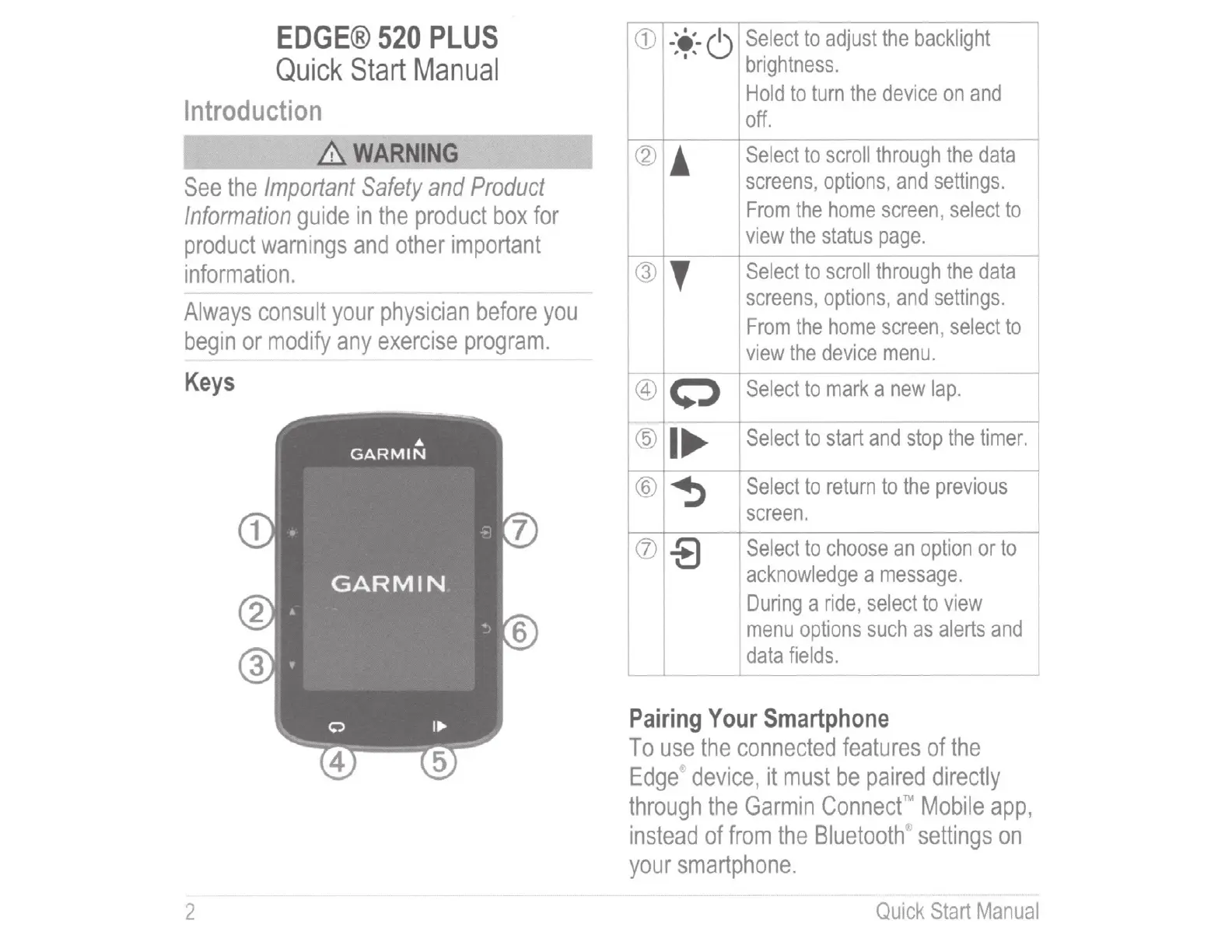
Keys
2
(j)
-'e;-6
Select
to
adjust
the
backlight
;
I'
brightness.
Hold
to
turn
the
device
on
and
off.
-
@
!
Select
to
scroll
through
the
data
screens
,
options
,
and
settings.
From
the
home
screen,
select
to
view
the
status
page.
®
'
Select
to
scroll
through
the
data
screens
,
options
,
and
settings.
From
the
home
screen
,
select
to
view
the
device
menu.
@
0
Select
to
mark
a
new
lap
.
@
I~
Select
to
start
and
stop
the
timer.
®
~
Select
to
return
to
the
previous
screen.
(j)
-8
Select
to
choose
an
option
or
to
acknowledge
a
message.
During
a
ride
,
select
to
view
menu
options
such
as
alerts
and
I
data
fields.
I
Pairing
Your
Smartphone
To
use
the
connected
features
of
the
Edge
,
device
,
it
must
be
paired
directly
through
the
Garmin
Connect
Mobile
app,
instead
of
from
the
Bluetooth
;o;
settings
on
your
smartphone
.
Quick
Start
Manual

Table of Contents

Related product manuals