Using the Map Page
The Map Page shows where you are (the animated figure)
and provides a picture of where you are going. As you travel, the
animated figure ‘walks’ and leaves a ‘trail’ or ‘track log’. Waypoint
names and symbols are also shown on the map.
Map Page
To use the Map Page while moving around:
1. Press the PAGE button until the Map Page is displayed.
Press the
DOWN button to zoom in for a more detailed view
of the map. Press the UP button to zoom out for a view of a
larger map area.
2. Walk or drive around for a few minutes, make a right or left
turn, then continue for a few more minutes and stop.
Marking a Waypoint
Waypoints are locations or landmarks worth recording and stor-
ing in your GPS. These are locations you may later want to return
to, such as check points on a route or significant ground features
like your campsite or a favorite fishing spot.
Waypoints may be defined and stored in the unit manually by
taking coordinates for the waypoint from a map or other refer-
ence. This can be done before ever leaving home. Or more usually,
waypoints may be entered directly by taking a reading with the unit
at the location itself, giving it a name, and then saving the point.
To mark your current location as a waypoint:
1. Press and hold the ENTER/MARK button for two seconds
to display the Mark Waypoint Page. Your current location is
marked as a waypoint and assigned a three-digit number.
2. The ‘OK’ button is highlighted so press the
ENTER/MARK
button again to save the Waypoint.
Navigating to a Location
Basic navigation with your Foretrex requires only three steps:
mark, move, and return. Mark your location as a waypoint, move
a distance away, and then return after choosing one of several meth-
ods, such as using a GoTo or following a virtual breadcrumb trail.
To return to a waypoint using the GOTO button:
1. Press the GOTO button to display the GoTo Waypoint Page.
2. Use the
UP and DOWN buttons to select the desired tab and
press ENTER.
3. Use the
UP and DOWN buttons to select the waypoint you
would like to route to and press
ENTER.
The Navigation Page automatically displays to lead you to the
waypoint.
Using the Navigation Page
The Navigation Page helps guide you to a destination: Just follow
the arrow in the center of the compass.
To use the Navigation Page to get to a destination:
1. With a destination already selected and a navigation started,
press the PAGE button repeatedly until the Navigation Page is
displayed, if it is not already.
2. The Navigation Page displays a
Pointer indicating the direction
to go. Because you cannot
always travel in a straight line,
refer to the Pointer from time
to time. As you move, turn in
the direction the Pointer directs
until it points straight up. At
which time, travel forward until
you arrive at your destination.
3. To stop navigating, press the
ENTER button while on either
the Map or Navigation page. Use the
UP/DOWN buttons
to highlight ‘STOP NAVIGATION’, and then press the ENTER
button.
Using Tracks
The Foretrex 101 automatically draws an electronic breadcrumb
trail or ‘track log’ on the Map Page as you travel. Tracks are marked
BEGIN and END. The Foretrex 101 uses the Track Log to allow you
to navigate using the saved track or using the TracBack feature.
TracBack guides you to where you started by following the track
log that you left behind, allowing you to return along a traveled path
without marking any waypoints. You can retrace your track in both
directions. If you want to keep a record of a certain track log or use
the ‘TracBack’ feature, clear the Track Log before you start traveling.
To navigate using TracBack:
1. Press the PAGE button to access the Main Menu.
2. Use the
UP and DOWN arrows to highlight ‘TRACKS’ and press
ENTER to open the Tracks Menu Page.
3. Use the
UP and DOWN arrows to highlight ‘PAN & TRACBACK’
and press ENTER.
4. Use the
UP and DOWN arrows to pan the track log. Press
ENTER to display the Pan Options.
Panning the Track Log
5. Use the UP and DOWN arrows to select ‘TRACBACK’ and press
ENTER.
6. The Navigation Page displays a Pointer indicating the direction
to go. Follow the arrow as you would for a normal navigation.
To clear the track log:
1. From the Map Page, press ENTER to access the Map Page
Options. Use the
UP and DOWN buttons to select ‘CLEAR
TRACK LOG’ and press ENTER
Or From the Main Menu, press ENTER when ‘TRACKS’ is
highlighted to open the Tracks Menu Page. Use the
UP and
DOWN arrows to highlight ‘CLEAR TRACK’ and press ENTER.
2. Use the
UP and DOWN arrows to highlight ‘YES’ on the pop-
up window and press ENTER to clear the track log.
Foretrex
™
101
Using Routes
Route navigation allows you to create a sequence of waypoints to
lead you to your final destination.
To create a route:
1. From the Main Menu Page press the UP or DOWN button to
highlight ‘
ROUTES’, then press the ENTER button.
2. Select ‘CREATE NEW
’ and press ENTER. Press ENTER to
display the ‘ADD POINT TO ROUTE PAGE’.
3. Use the
UP/DOWN and ENTER buttons to select the desired
waypoint and press
ENTER. Repeat until all of the desired
waypoints are in the route.
Route Page
The route is automatically named with the first waypoint and
the last waypoint, such as Camp-Dock. Press PAGE to exit the
Route Page and return to the Route Menu. Use the UP and DOWN
buttons to highlight ‘DELETE’ and press ENTER to delete the entire
route. Use the UP and DOWN buttons to highlight ‘FOLLOW’ and
press ENTER to follow the route.
Using the Timer
After the Timer Page is enabled and a count down time is
entered, you can use the timer for a variety of applications, such as
running and sailboat racing. The synchronization and quick reset
capabilities make the Foretrex an extremely handy timer.
To stop and start the timer:
1. Press the PAGE button until the Timer Page is displayed.
2. To start the timer, press the
ENTER button when ‘START’ is
displayed along the bottom of the page.
3. To stop the timer, press the
ENTER button when ‘STOP’ is
displayed along the bottom of the page.
Step-by-Step Instructions
to Get You Started
(Turn this page and begin with Step 1)
*Flip this Quick Start
Guide over for a
detailed explanation
of the Foretrex 101
buttons.
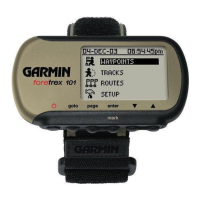
Waterproof
Case
LCD Display
(with Backlight)
Built-in GPS
Antenna
Power Button
(Backlight)
Up/Down
Buttons
Part Number 190-00360-01 Rev B
Foretrex 101 Features Foretrex 101 Features Foretrex 101 Features Foretrex 101 Features
Navigation Page
QUICK START GUIDE

 Need help?
 General
 Weight and Dimensions










 To Next Page