
 Need help?
Do you have a question about the Garmin HRM-PRO and is the answer not in the manual?
How to correctly wear the HRM-Pro on your skin for optimal performance and snug fit.
Instructions for pairing the HRM-Pro with ANT+ and Bluetooth compatible devices for initial setup.
Explains the advanced running metrics measured by the HRM-Pro accessory and how to interpret them.
Details on how the HRM-Pro records and stores heart rate data during swimming activities.
How the HRM-Pro monitors daily activity metrics like steps and heart rate, and syncs data.
How to start a timed activity and store heart rate data when away from the paired device.
Connecting the HRM-Pro to compatible fitness equipment via ANT+ or Bluetooth for data display.
Solutions for common issues like erratic heart rate data or missing running dynamics data.
Step-by-step guide for safely replacing the battery in the HRM-Pro module.
Instructions on how to clean and maintain the HRM-Pro to ensure accurate data reporting.
Technical specifications of the HRM-Pro, including battery type, water resistance, and wireless frequency.
Information regarding the standard limited warranty that applies to the HRM-Pro accessory.
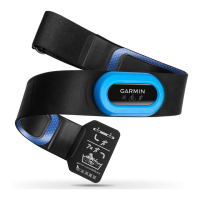
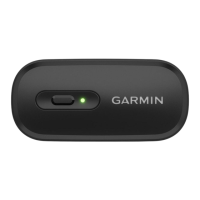
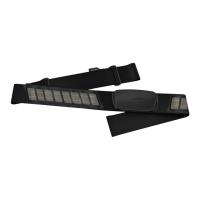
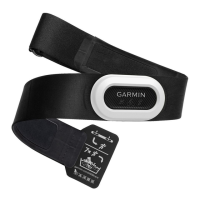
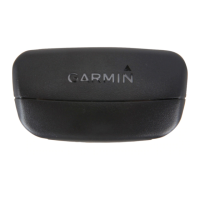
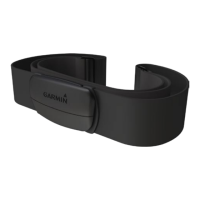
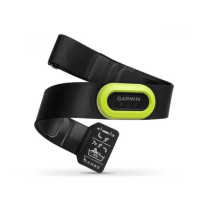
The Garmin HRM-Pro is a heart rate monitor designed to provide real-time heart rate data and advanced running dynamics metrics. This device is worn directly on the skin, just below the sternum, and is designed to be snug enough to stay in place during various activities.
The primary function of the HRM-Pro is to accurately measure and transmit heart rate data. It uses electrodes on the back of the monitor to create a strong connection with the chest. The device supports both ANT+ and Bluetooth technology, allowing it to pair with a wide range of compatible Garmin devices, smartphones, tablets, smartwatches, and fitness equipment.
Beyond basic heart rate monitoring, the HRM-Pro offers advanced running dynamics. It incorporates an accelerometer to measure torso movement, which is used to calculate six key running metrics:
The HRM-Pro is also capable of recording and storing heart rate data, particularly useful during swimming or other activities where a paired device might be out of range. When swimming, the heart rate monitor records data, which can be viewed later on a compatible Garmin device once out of the water and within range. For timed activities, the monitor stores up to 18 hours of heart rate data, automatically uploading it to the paired Garmin device when the activity is saved. If the memory is full, the oldest data is overwritten.
Additionally, the HRM-Pro includes activity tracking features. When worn, it monitors daily activity metrics such as step count, calories burned, intensity minutes, and all-day heart rate. This data is sent to the Garmin Connect account when the monitor is awake and within range of a paired smartphone. The TrueUp feature ensures that activity tracking data is synced across all compatible Garmin devices.
To use the HRM-Pro, it must first be put on correctly. The device should be worn directly on the skin, just below the sternum, with the Garmin logo facing right-side up. The electrodes on the back of the monitor should be wet to ensure a strong connection. The loop and hook connection should be on the right side of the chest.
Pairing:
Swimming: The HRM-Pro is designed for open water swimming but can be used for pool swimming. It should be worn under a swimsuit or triathlon top to prevent it from sliding down. Heart rate data is recorded underwater and uploaded to the paired Garmin device when the activity is saved and the monitor is out of the water and within range.
Timed Activities: Users can start a timed activity on their paired Garmin device, and the HRM-Pro will record heart rate data even if they move away from the device. This is useful for fitness activities or team sports where wearing a watch might not be feasible. The stored data is automatically sent to the Garmin device when the activity is saved.
Accessing Stored Data: If a timed activity is saved before the stored heart rate data is uploaded, users can manually download the data from the HRM-Pro device via the History menu on their Garmin device.
Linking to Fitness Equipment: The HRM-Pro can connect to compatible fitness equipment using ANT+ or Bluetooth technology, allowing users to view their heart rate on the equipment console. Look for the ANT+LINK HERE logo or the Bluetooth logo on compatible equipment.
Troubleshooting Erratic Data: If heart rate data is erratic or missing, users can try reapplying water to the electrodes, tightening the strap, warming up for 5-10 minutes, wearing a cotton shirt, thoroughly wetting both sides of the strap, and moving away from sources of electromagnetic interference. Synthetic fabrics can sometimes create static electricity that interferes with signals.
Troubleshooting Missing Running Dynamics Data: Ensure a running dynamics accessory (like the HRM-Pro) is being used, the Garmin device supports running dynamics, and the pairing is done via ANT+ (not Bluetooth). If data shows zeros, verify the accessory is worn right-side up. Ground contact time and balance are only calculated while running, not walking.
Caring for the Heart Rate Monitor:
Battery Replacement: The HRM-Pro uses a user-replaceable CR2032, 3V battery. To replace it:
 General
| Stopwatch | - |
|---|---|
| Product color | Black |
| Measuring type | Breast |
| Bluetooth range | 3 m |
| Waterproof up to | 5 m |
| Strap adjustment range | 600 - 1060 cm |
| Heart rate data transfer | Bluetooth/ANT+ |
| Bluetooth Low Energy (BLE) | Yes |
| Operating temperature (T-T) | -10 - 50 °C |
| Battery life | 1 year(s) |
| Battery type | CR2032 |
 Weight and Dimensions
| Depth | 12 mm |
|---|---|
| Width | 30 mm |
| Height | 142 mm |
| Weight | 59 g |






 To Next Page