EasyManua.ls Logo

Garmin HRM-PRO PLUS - User Manual

Garmin HRM-PRO PLUS
12 pages
Print Icon
To Next Page IconTo Next Page
Loading...
HRM-PRO
PLUS
Owner’s Manual
Question and Answer IconNeed help?

Do you have a question about the Garmin HRM-PRO PLUS and is the answer not in the manual?

Summary

Heart Rate Monitor Instructions

Putting On the Heart Rate Monitor

Wear the heart rate monitor directly on your skin, below your sternum, snug enough to stay in place.

Pairing and Setup

Connect your HRM-Pro Plus to ANT+ devices, Bluetooth devices, or the Garmin Connect app.

Running Dynamics

Provides real-time feedback on running form using an accelerometer to measure torso movement.

Running Pace and Distance

Calculates running pace and distance using user profile and motion sensor, even without GPS.

Heart Rate While Swimming

Records and stores heart rate data underwater; transmits average/max HR during rest intervals.

Activity Tracking

Monitors daily metrics like step count, calories, and all-day heart rate when worn.

Heart Rate Storage for Timed Activities

Records heart rate data during timed activities, even away from the paired device.

Linking to Fitness Equipment

Connects to compatible fitness equipment using ANT+ or Bluetooth for console display.

Device Information

Replacing the Heart Rate Monitor Battery

Step-by-step instructions for safely replacing the battery in the heart rate monitor module.

Troubleshooting

Tips for resolving issues with erratic heart rate data and missing running dynamics.

Caring for the Heart Rate Monitor

Guidelines for cleaning and maintaining the heart rate monitor to ensure accuracy and longevity.

HRM-Pro Plus Specifications

Technical details including battery type, water resistance, operating temperature, and wireless frequency.

Limited Warranty

Information on the standard limited warranty provided by Garmin for the accessory.

Summary

Heart Rate Monitor Instructions

Putting On the Heart Rate Monitor

Wear the heart rate monitor directly on your skin, below your sternum, snug enough to stay in place.

Pairing and Setup

Connect your HRM-Pro Plus to ANT+ devices, Bluetooth devices, or the Garmin Connect app.

Running Dynamics

Provides real-time feedback on running form using an accelerometer to measure torso movement.

Running Pace and Distance

Calculates running pace and distance using user profile and motion sensor, even without GPS.

Heart Rate While Swimming

Records and stores heart rate data underwater; transmits average/max HR during rest intervals.

Activity Tracking

Monitors daily metrics like step count, calories, and all-day heart rate when worn.

Heart Rate Storage for Timed Activities

Records heart rate data during timed activities, even away from the paired device.

Linking to Fitness Equipment

Connects to compatible fitness equipment using ANT+ or Bluetooth for console display.

Device Information

Replacing the Heart Rate Monitor Battery

Step-by-step instructions for safely replacing the battery in the heart rate monitor module.

Troubleshooting

Tips for resolving issues with erratic heart rate data and missing running dynamics.

Caring for the Heart Rate Monitor

Guidelines for cleaning and maintaining the heart rate monitor to ensure accuracy and longevity.

HRM-Pro Plus Specifications

Technical details including battery type, water resistance, operating temperature, and wireless frequency.

Limited Warranty

Information on the standard limited warranty provided by Garmin for the accessory.

Overview

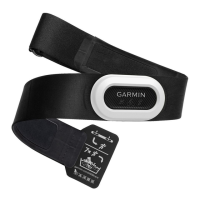
The HRM-Pro Plus is a heart rate monitor designed to provide comprehensive data for various activities, including running, swimming, and general activity tracking. It offers real-time feedback and stores data for later analysis, making it a versatile tool for athletes and fitness enthusiasts.

Function Description

The primary function of the HRM-Pro Plus is to accurately measure and transmit heart rate data. It achieves this by being worn directly on the skin, just below the sternum, ensuring a strong connection between the electrodes and the chest. The device is active and begins sending data as soon as it is put on.

Beyond basic heart rate monitoring, the HRM-Pro Plus excels in providing advanced running dynamics. Equipped with an accelerometer, it measures torso movement to calculate six key running metrics:

  • Cadence: The total number of steps per minute (right and left combined).
  • Vertical oscillation: The amount of bounce in your running stride, measured in centimeters.
  • Ground contact time: The duration of time spent on the ground during each step, measured in milliseconds. This metric is not available while walking.
  • Ground contact time balance: The left/right balance of your ground contact time while running, displayed as a percentage (e.g., 53.2 with an arrow indicating direction).
  • Stride length: The distance covered from one footfall to the next, measured in meters.
  • Vertical ratio: The ratio of vertical oscillation to stride length, displayed as a percentage. A lower number typically indicates better running form.

The heart rate monitor also calculates running pace and distance, even when GPS is unavailable (e.g., during treadmill running), by using your user profile and the motion measured by its sensor on every stride. This data can be viewed on compatible Garmin devices or third-party training apps.

For swimming, the HRM-Pro Plus records and stores heart rate data underwater. While heart rate data is not transmitted in real-time to paired Garmin devices while submerged, it is stored internally. During rest intervals out of the water, the monitor sends average and maximum heart rate for the previous interval, along with real-time heart rate, to your Garmin device. After a timed swim activity is saved, the stored heart rate data is automatically uploaded to your Garmin device and can be reviewed in the device history and on your Garmin Connect account.

Furthermore, the HRM-Pro Plus functions as an activity tracker. Whenever worn, it monitors daily metrics such as step count, calories burned, intensity minutes, and all-day heart rate. This activity data is sent to your Garmin Connect account when the monitor is awake and within range of your smartphone. The TrueUp™ feature ensures that activity tracking data from the HRM-Pro Plus is integrated into the daily summary section in Garmin Connect and across your compatible Garmin devices, even if you wear only the HRM-Pro Plus during an activity.

The device also features heart rate storage for timed activities. This allows you to record heart rate data during fitness activities or team sports where wearing a watch might not be feasible, even if you move away from your paired device. The stored data is automatically sent to your compatible Garmin device when you save the activity, provided the monitor is active and within range. If data is not downloaded immediately, it can be accessed later from the device's history menu. The HRM-Pro Plus stores up to 18 hours of activity history, with older data being overwritten when the memory is full.

Usage Features

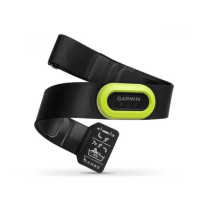
To use the HRM-Pro Plus, it must first be put on correctly. The electrodes on the back of the monitor should be wet to ensure a strong connection with the chest. The monitor is then wrapped around the chest, with the Garmin logo facing right-side up and the loop and hook connection on the right side. It should fit snugly to remain in place during activity.

Pairing the heart rate monitor is essential for data transmission. It can be paired with:

  • ANT+ devices: For most Garmin compatible devices, pairing involves bringing the device within 3 meters of the heart rate monitor and using the device menu to pair manually. Some devices may pair automatically when brought within 1 centimeter. It's recommended to stay 10 meters away from other ANT+ sensors during pairing. Once paired, the Garmin device automatically recognizes the monitor when activated and in range.
  • Bluetooth devices: The monitor can be paired with phones, tablets, smartwatches, or fitness equipment via Bluetooth. This involves putting on the monitor, bringing the device within 3 meters, opening the Bluetooth settings on the device, and selecting the HRM-Pro Plus from the list of available devices. Similar to ANT+ pairing, it's advisable to stay 10 meters away from other wireless sensors.
  • Garmin Connect™ App: Pairing with the Garmin Connect app enables activity tracking and software updates. After putting on the monitor, install and open the Garmin Connect app on your phone, bring the phone within 3 meters, and follow the on-screen instructions to add the device. If other devices are already paired, navigate to Garmin Devices > Add Device.

The HRM-Pro Plus can also link to compatible fitness equipment using either ANT+ or Bluetooth technology, allowing you to view your heart rate directly on the equipment console. Look for the ANT+LINK HERE or Bluetooth logos on the equipment.

Maintenance Features

Proper care of the HRM-Pro Plus is crucial for its longevity and accurate performance.

  • Cleaning: After every use, the heart rate monitor should be rinsed. After every seven uses or one pool swim, it should be hand washed using warm water (maximum 40°C/104°F) and a tiny amount of mild detergent, such as dishwashing liquid. Thorough rinsing is necessary to remove detergent residue that could cause skin irritation. It should never be put in a washing machine or dryer. Prolonged exposure to chlorine or other pool chemicals can damage the monitor, so hand washing after such exposure is important.
  • Drying: When drying, the heart rate monitor should be hung up or laid flat.
  • Storage: When storing the strap, hang it up or lay it flat. Avoid bending or tightly rolling the strap. The device should not be stored in direct sunlight or extreme temperatures. Minimize exposure to chemicals like sunscreen, bleach, mosquito repellent, certain deodorants, body washes, hand soaps, and first aid ointments, as ingredients like propylene glycol, dipropylene glycol, and ethylenediaminetetraacetic acid (EDTA) can damage the strap.
  • Battery Replacement: The battery is user-replaceable. To replace it, remove the sleeve from the heart rate monitor module. Rotate the battery door counter-clockwise from the locked to the unlocked position. Remove the battery door, pull the battery tab, and remove the old battery. Wait 30 seconds before inserting the new battery (CR2032, 3 V) with the negative side facing up. Replace the battery door, ensuring it is flush with the module, and then replace the sleeve.

Troubleshooting Tips

  • Erratic Heart Rate Data: If heart rate data is inconsistent or missing, reapply water to the electrodes and contact patches, tighten the strap, warm up for 5-10 minutes, follow care instructions, wear a cotton shirt (or thoroughly wet both sides of the strap), and move away from potential sources of interference (e.g., strong electromagnetic fields, 2.4 GHz wireless sensors, high-voltage power lines, electric motors, ovens, microwave ovens, 2.4 GHz cordless phones, and wireless LAN access points). Synthetic fabrics can create static electricity that interferes with signals.
  • Missing Running Dynamics Data: Ensure your Garmin device supports running dynamics. Re-pair the HRM-Pro Plus using ANT+ (not Bluetooth). If data shows only zeros, confirm the accessory is worn right-side up. Remember that ground contact time and balance only appear while running, not walking.

Garmin HRM-PRO PLUS Specifications

General IconGeneral
Stopwatch-
Product colorBlack
Measuring typeBreast
Bluetooth range3 m
Adjustable strapYes
Bluetooth version5.0
Strap adjustment range60 - 106 cm
Heart rate data transferBluetooth/ANT+
Operating temperature (T-T)0 - 40 °C
Battery life1 year(s)
Battery typeCR2032
Weight and Dimensions IconWeight and Dimensions
Depth53.7 mm
Width29.6 mm
Height8.6 mm
Weight52 g

Related product manuals