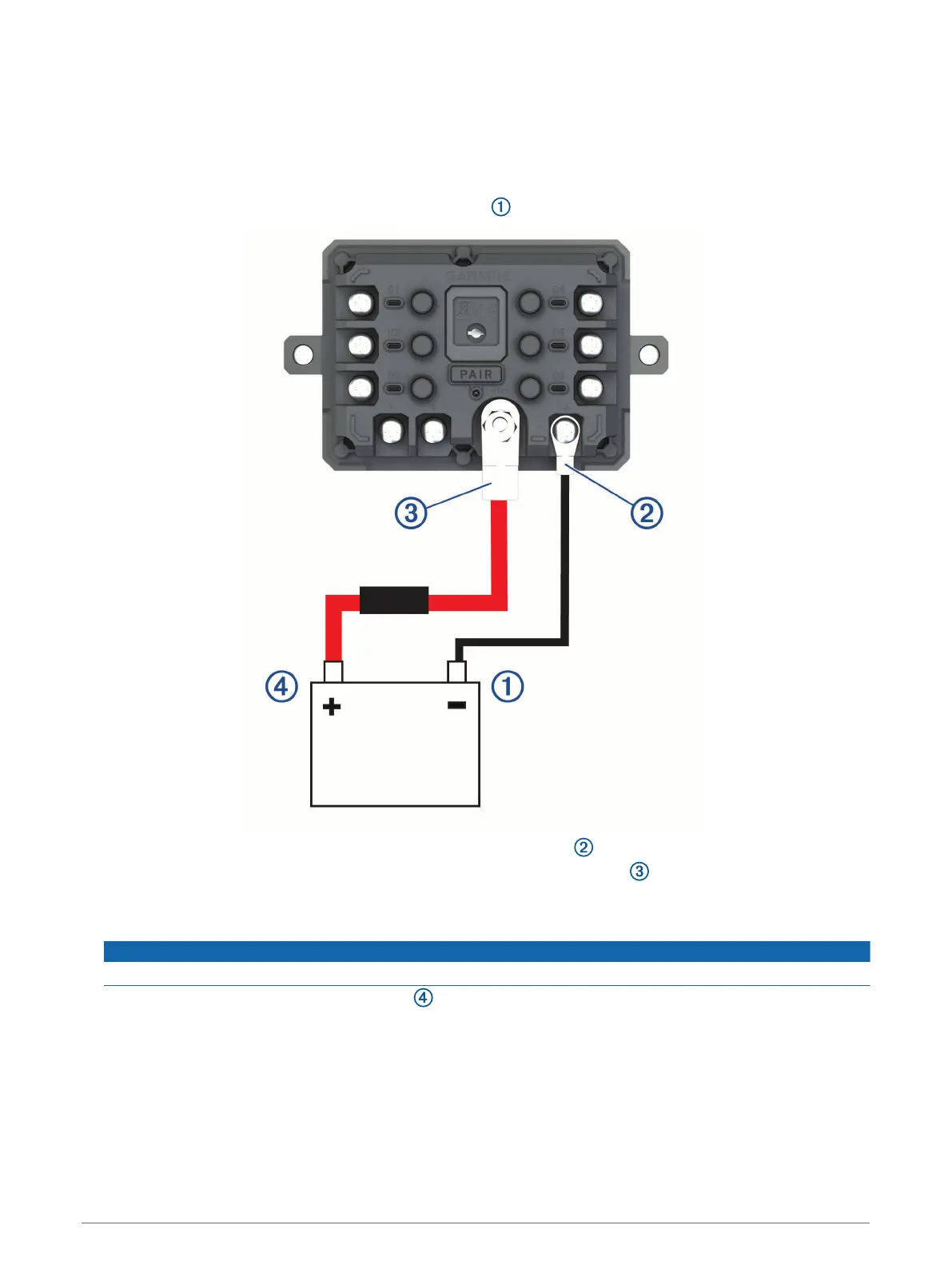
Connecting the Device to Vehicle Power
Before you can connect the device to vehicle power, you must remove the warning tag from the +12V terminal
on the device.
You should always confirm all electrical connections are secure and will not come loose while operating the
device.
1 Connect the large ring end of the included ground wire to the negative terminal on the vehicle battery.
2 Connect the small ring end of the ground wire to the GND terminal on the device.
3 Connect the small ring end of the included 12V cable to the +12V terminal on the device.
4 Tighten the
3
/
8
in. nut on the +12V terminal to a maximum torque specification of 4.52 N-m (40 lbf-in.).
You should confirm the nut cannot be loosened by hand.
NOTICE
Do not overtighten the +12V terminal to prevent damage to the terminal.
5 Connect the large ring end of the 12V cable to the positive terminal on the vehicle battery.
Installation 7



 To Next Page