Waypoints The Waypoint function allows you to manage
User-defined waypoints. You can transfer the User
waypoints to your computer that you have created in the
Apollo GPS. You can send User-defined waypoints from
your computer into your Apollo GPS. Using Notepad, or
another text editor, you can create or edit User waypoints.
See the section on Working with Data Files (page 27) for
more details on how to edit your files.
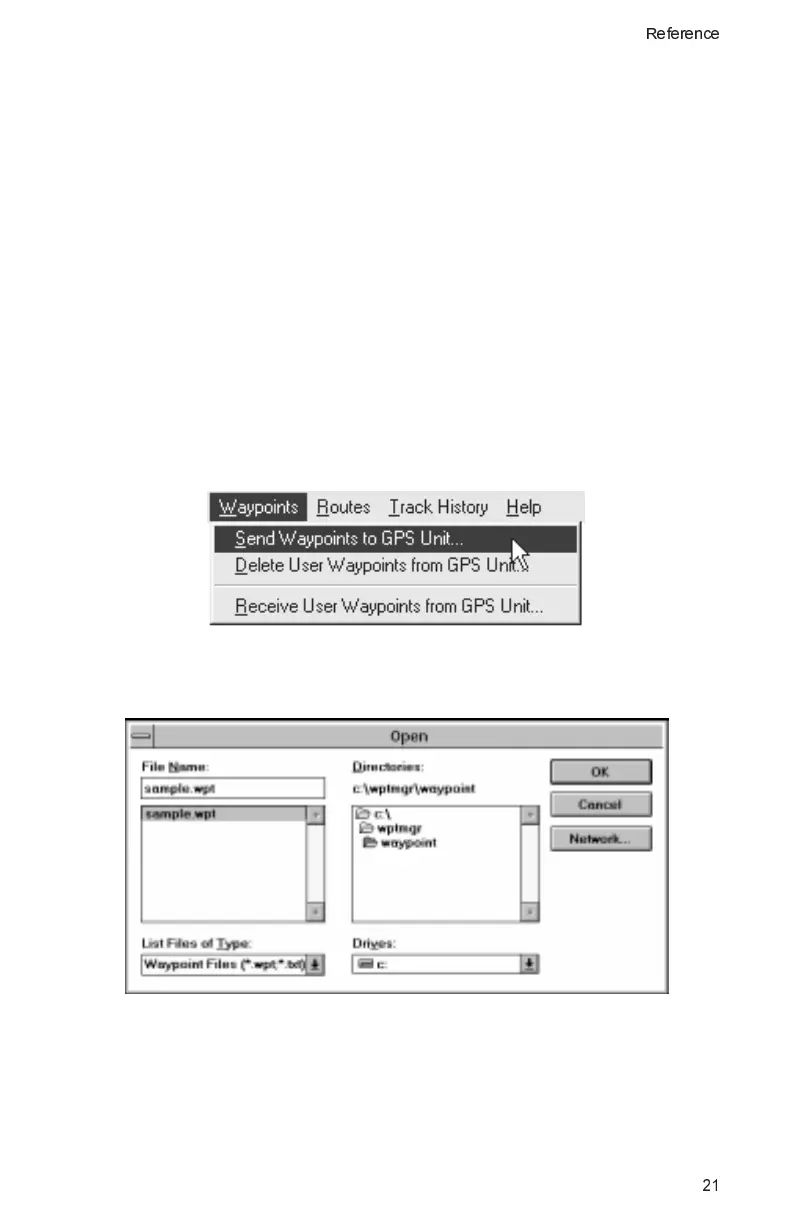
Send Waypoints to GPS Unit
Select a user waypoint file on your computer and send it to
your Apollo GPS.
1. Click on the Waypoints menu and then select “Send
Waypoints to GPS Unit.”
2. Choose the waypoint file that you want to send to your
Apollo GPS and then click on OK.
3. Then next time you start your Apollo GPS, the waypoints
you sent will be available as User waypoints.
21
Reference



 To Next Page