EasyManua.ls Logo

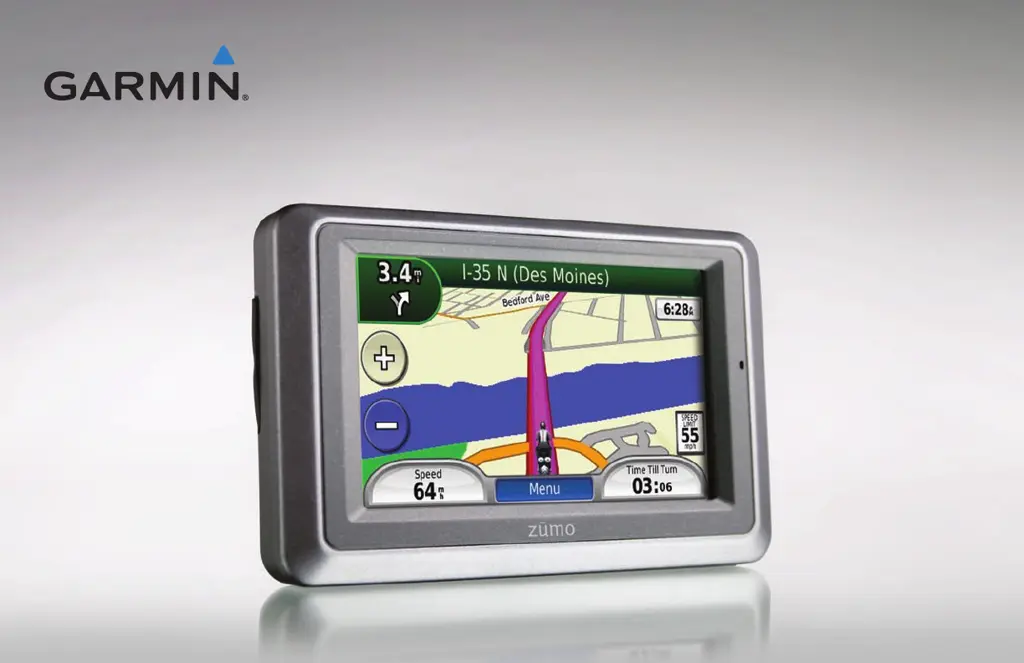
Garmin Zumo 660 - User Manual

Garmin Zumo 660
52 pages
Print Icon
To Next Page IconTo Next Page
Loading...
zūmo
®
600 series
owners manual
for use with the zūmo 660

Table of Contents

Other manuals for Garmin Zumo 660

Questions and Answers

  • J
    Jessica Haney MDAug 14, 2025
    Why is my Garmin z?mo GPS not charging in my car?
    • L
      leonsarahAug 14, 2025
      If your Garmin z?mo GPS is not charging in your vehicle, first check the fuse in the automotive power cable. Make sure that your vehicle is turned on and supplying power to the outlet. Also, the device can only charge between 32°F and 113°F (0°C and 45°C). Avoid placing the device in direct sunlight or hot environments, as this can prevent charging.
  • C
    Christopher DunnAug 17, 2025
    How to calibrate touchscreen on Garmin z?mo GPS?
    • L
      lauren98Aug 17, 2025
      If your Garmin z?mo GPS touchscreen is not responding correctly, turn off the device. Then, hold your finger on the screen while simultaneously pressing and holding the Power button until the calibration screen appears. Follow the on-screen instructions to calibrate the touchscreen.
  • C
    Christopher WhiteAug 20, 2025
    How to get satellite signals on Garmin z?mo GPS?
    • C
      Christine JohnsonAug 20, 2025
      To ensure your Garmin z?mo GPS receives satellite signals, move it away from obstructions like parking garages, tall buildings, and trees. Remain stationary for a few minutes to allow it to acquire the signals.
  • C
    coxheatherAug 25, 2025
    What to do if my Garmin z?mo GPS is frozen?
    • M
      Michelle SimpsonAug 25, 2025
      If your Garmin z?mo GPS freezes, try turning it off and then on again. If that doesn't work, press and hold the Power button for 8 seconds, then turn the device back on. This should restore normal operation.
  • C
    Christina PerezAug 27, 2025
    Why my computer doesn't recognize my Garmin z?mo GPS?
    • W
      wknightAug 27, 2025
      If your computer does not detect your Garmin z?mo GPS, unplug the USB cable from your computer. Turn off the z?mo. Then, plug the USB cable back into both your computer and the z?mo. The z?mo should automatically turn on and enter USB mass storage mode.
  • Y
    yhansenAug 30, 2025
    Why won't my phone connect to Garmin z?mo GPS?
    • C
      chase20Aug 30, 2025
      If your phone won't connect to your Garmin z?mo GPS, first go to Tools > Settings > Bluetooth on your z?mo and make sure that Bluetooth is enabled. Also, ensure that your phone is turned on and within 33 feet (10 meters) of your z?mo.
  • I
    irogersSep 3, 2025
    How to fix inaccurate battery gauge on Garmin z?mo GPS?
    • A
      April CollinsSep 3, 2025
      To ensure an accurate battery reading on your Garmin z?mo GPS, allow the unit to fully discharge completely, then fully charge it without interruption.
  • W
    williamcortezSep 6, 2025
    How to get traffic information on Garmin z?mo GPS?
    • S
      Shaun HarrisonSep 6, 2025
      To ensure your Garmin z?mo GPS receives traffic information, verify that you are in a coverage area. Also, confirm that the FM TMC Traffic receiver is properly connected to both the power connector on the cradle and a power outlet in your vehicle.
  • K
    Kathy HarmonSep 9, 2025
    Why can't I see removable drives for Garmin z?mo GPS?
    • C
      Courtney MurraySep 9, 2025
      If you cannot see new removable drives for your Garmin z?mo GPS, the issue might be that Windows is having trouble assigning drive letters because of several network drives mapped on your computer.

Summary

Introduction

Contact Garmin

Information on how to get support and contact Garmin for assistance.

Getting Started

Device Setup and Mounting

Instructions for installing the battery and mounting the device in a vehicle or on a motorcycle.

Navigation Basics

Overview of the menu page, usage modes, acquiring satellites, and initial navigation steps.

Finding Your Destination

Guide to searching for addresses, points of interest, and other locations.

Navigation Features

Route Following and Adjustments

How to follow routes, add stops, take detours, and adjust audio volume.

Location Search Options

Exploring the 'Where To?' menu for finding addresses, nearby places, and custom routes.

Main Navigation Displays

Understanding the Map, Turn List, Next Turn, Lane Assist, and Trip Computer pages.

Device Functionality

Hands-free Calling

Pairing devices, managing calls, and using the phone book for communication.

Traffic Information

Receiving, viewing, and avoiding traffic delays on your route.

Media Player Functions

Using the device to play music, audiobooks, and manage playlists.

Customization and Management

Managing Files

Loading, transferring, and deleting files like music, photos, and routes.

Using Device Tools

Accessing settings, location information, media player, and trip log management.

Customizing Settings

Adjusting system, navigation, display, language, map, and security settings.

Restoring and Clearing Data

How to reset all settings or clear user-entered data.

Appendix and Support

Appendix Content

Information on charging, software updates, accessories, device care, and specifications.

Troubleshooting

Solutions for common problems and device issues.

Garmin Zumo 660 Specifications

General IconGeneral
Display Size4.3 inches
Resolution480 x 272 pixels
TouchscreenYes
Battery LifeUp to 5 hours
Water RatingIPX7
Preloaded MapsYes
BluetoothYes
MP3 PlayerYes
Headphone JackYes
External MemorymicroSD card
Motorcycle-friendlyYes
Voice promptsYes
Lane assistYes
3D building viewNo
Photo viewerYes
Weight270 grams

Videos

How to Reset the Garmin zumo 660 and zumo 665 series

Related product manuals