INSTALLATION
8. In cases with external energy meter (for DLM function), connect
the energy meter communication terminals A- and B+ to TWIN+
Master station terminals 200 A-) and 201 (B+). The energy-
meters modbus adress must be set to #2. The modbus RS-485
communication settings is: Baud 9600, 8bit, 1 stop bit, no parity
9. Fill in the warranty form in the manual.
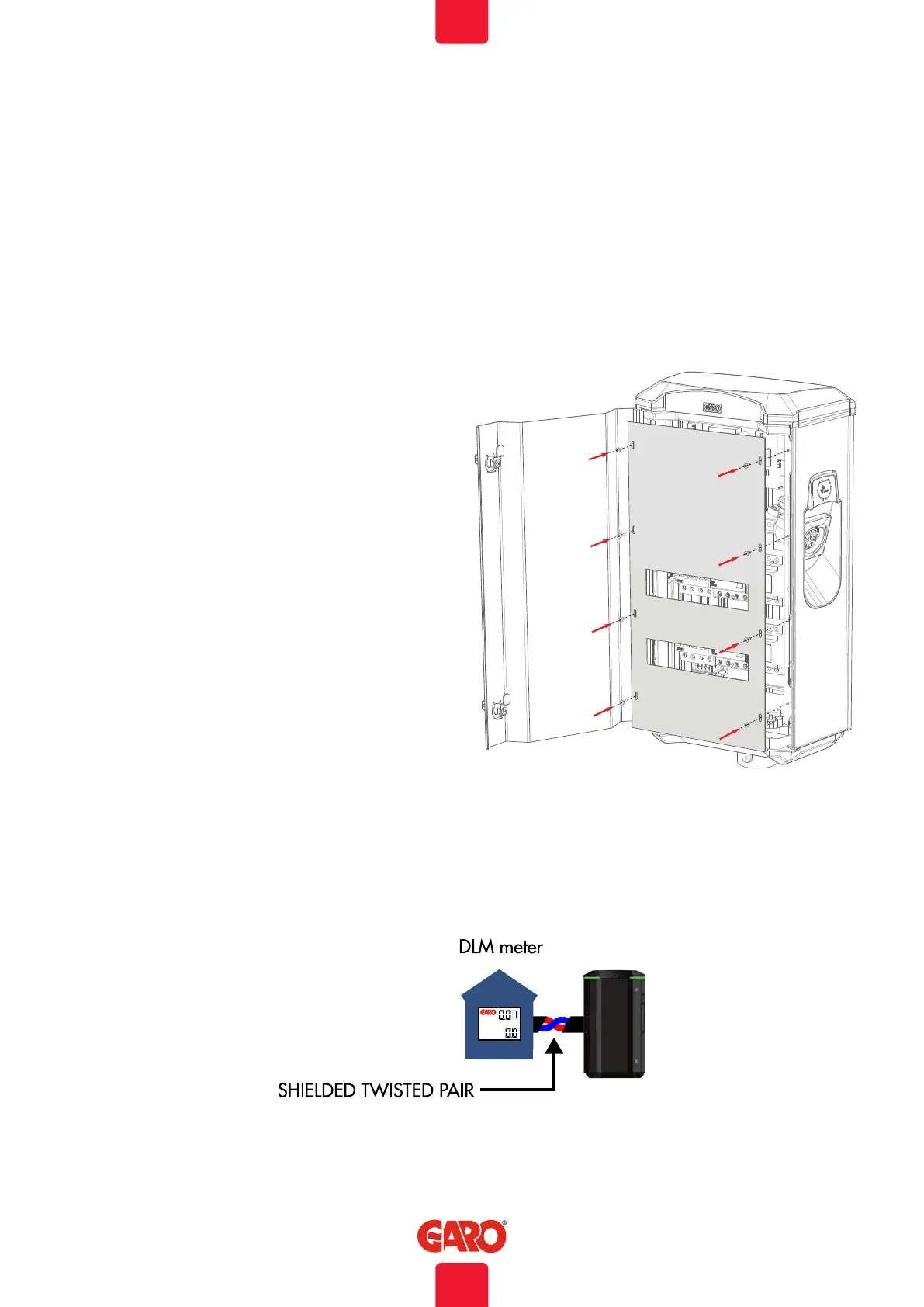
10. Assembly the protection cover and close the front door. Picture
11
11. Turn on electrical power.
12. Wait a few minutes until the TWIN+ have finished the startup
process and test both sides with a EVSE-tester or an EV. In cases
where authorization (by RFID tag or similar) is needed to start
charging please contact the backend administrator.
13. Doublecheck that the warranty form is completely filled. Sign
with name, date and company in order for the warranty to be
valid.
DLM meter installation
Modbus address #2
9600, 8, 1, no parity
Terminals:
#200 - A-
#201 - B+
(picture 11)
(picture 12)
10
EN


 To Next Page