Need help?
Do you have a question about the GarrettCom Magnum ES42 Series and is the answer not in the manual?
FCC compliance statement regarding radio frequency emissions.
Detailed technical parameters including port performance, network standards, and packet processing.
Overview of different ES42 series models, their configurations, and designations.
Guidance on checking contents and ensuring product integrity upon delivery.
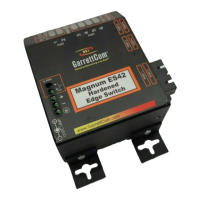
Overview of the Magnum ES42 Series, its design, and applications.
Explanation of the switch's store-and-forward mechanism and its impact on data flow.
Highlights key capabilities like high-speed switching and cost-effectiveness.
Discusses typical use cases and environments for the ES42 series.
Advice on choosing an optimal physical location for the switch unit.
Details on using the MC14-TRAY for 19" rack installations.
Instructions for mounting the switch using a DIN-Rail bracket.
Information on voltage inputs and compatible power supply types for ES42 series.
Procedures for connecting copper and fiber optic network cables to the switch ports.
Explanation of 10/100 Mbps auto-sensing and switching capabilities.
Details on MDIX, auto-negotiation, and speed detection features.
Description of front and side LEDs indicating port status, speed, and duplex.
Information on the hardware-based alarm for monitoring internal power supply status.
Steps to take before contacting support to diagnose issues.
Information to prepare before contacting GarrettCom support.
Process for returning products for repair or warranty service.
Terms and conditions of the manufacturer's warranty for ES42 products.
Instructions for safely packaging and shipping units for return.
 General
| Layer | Layer 2 |
|---|---|
| Port Types | 10/100Base-TX |
| Operating Temperature | -40°C to 75°C (-40°F to 167°F) |
| VLANs | IEEE 802.1Q VLAN support |
| Redundancy | RSTP |
| Management | Web, CLI, SNMP |
| Mounting | DIN Rail |
| Enclosure | Metal |
| Certifications | IEC 61850-3, IEEE 1613 |

 To Next Page