7
www.gateway.com
Adjusting monitor settings
Use the external controls (located on the monitor itself) and software controls (accessible
in Windows) to adjust the display image. For more information about software controls,
see “Software controls” on page 12.
External controls
These monitors feature an on-screen display (OSD) that lets you adjust and save contrast,
brightness, and other settings for the monitor. The monitor saves changes you make to
the settings, even if you turn off the monitor.
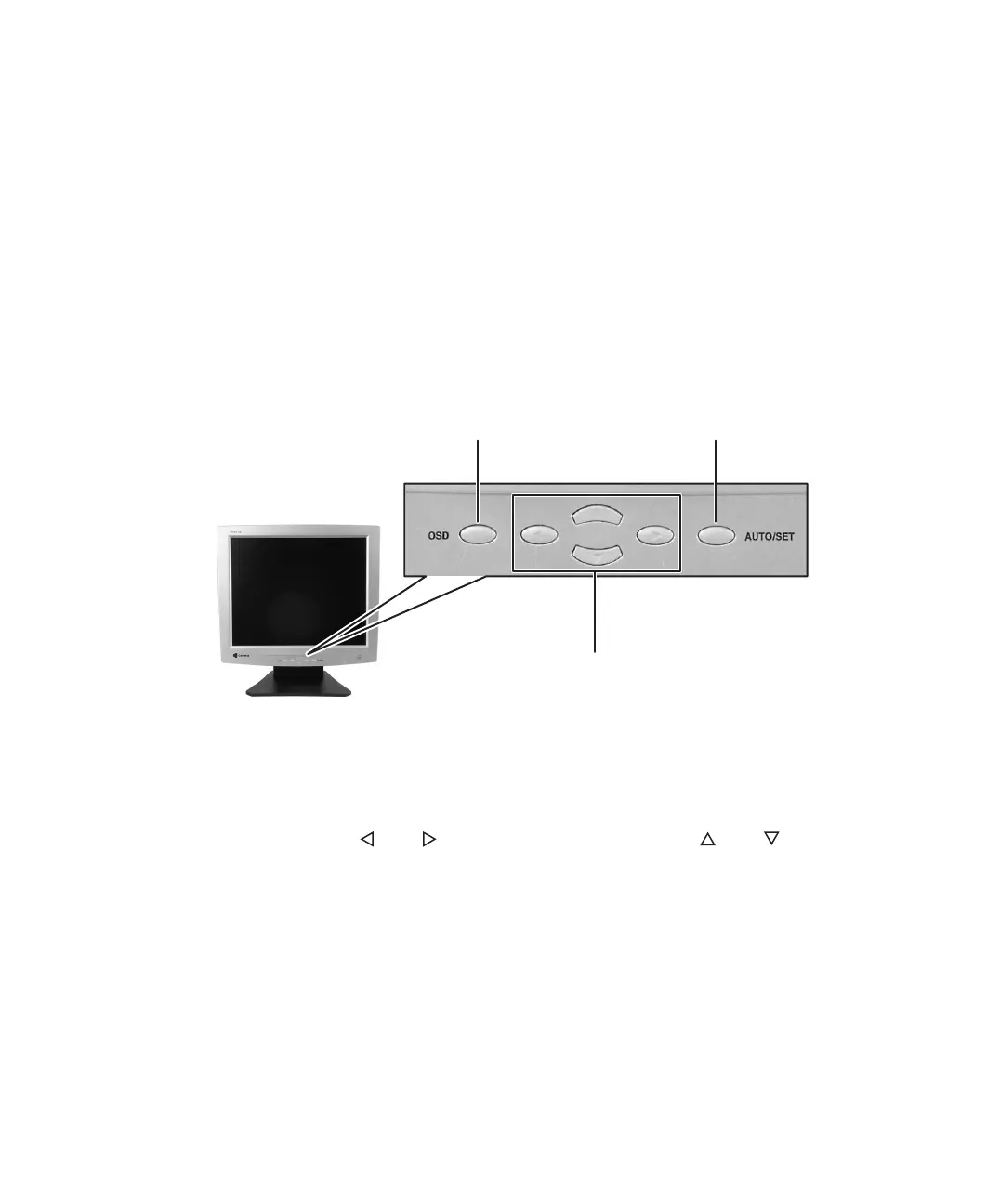
FPD 1530 and FPD 1730
■ OSD.
Press to open the OSD. Press again to exit.
■ Arrows.
OSD active: Press to select or adjust OSD options.
OSD inactive: Press and to adjust the contrast. Press and to adjust the
brightness.
■ AUTO/SET.
OSD active: Press to enter a selection in the OSD.
OSD inactive: Press to automatically optimize the monitor’s image position, clock, and
phase.
Menu selection arrows
OSD button
AUTO/SET button



 To Next Page