EasyManua.ls Logo

GBC GBC4250 - Page 14

GBC GBC4250
25 pages
Print Icon
To Next Page IconTo Next Page
To Previous Page IconTo Previous Page
Loading...
14
The
“Word
Finishing’’
People
8.
P
lace
the
roll
of
film
on
a
clean
stable
surface
in
front
of
the
laminator.
The
roll
of
film
must
be
positioned
to
unroll
in
same
direction
as
shown
on
threading
diagram
(figure
4)
or
threading
label
located
on
laminator.
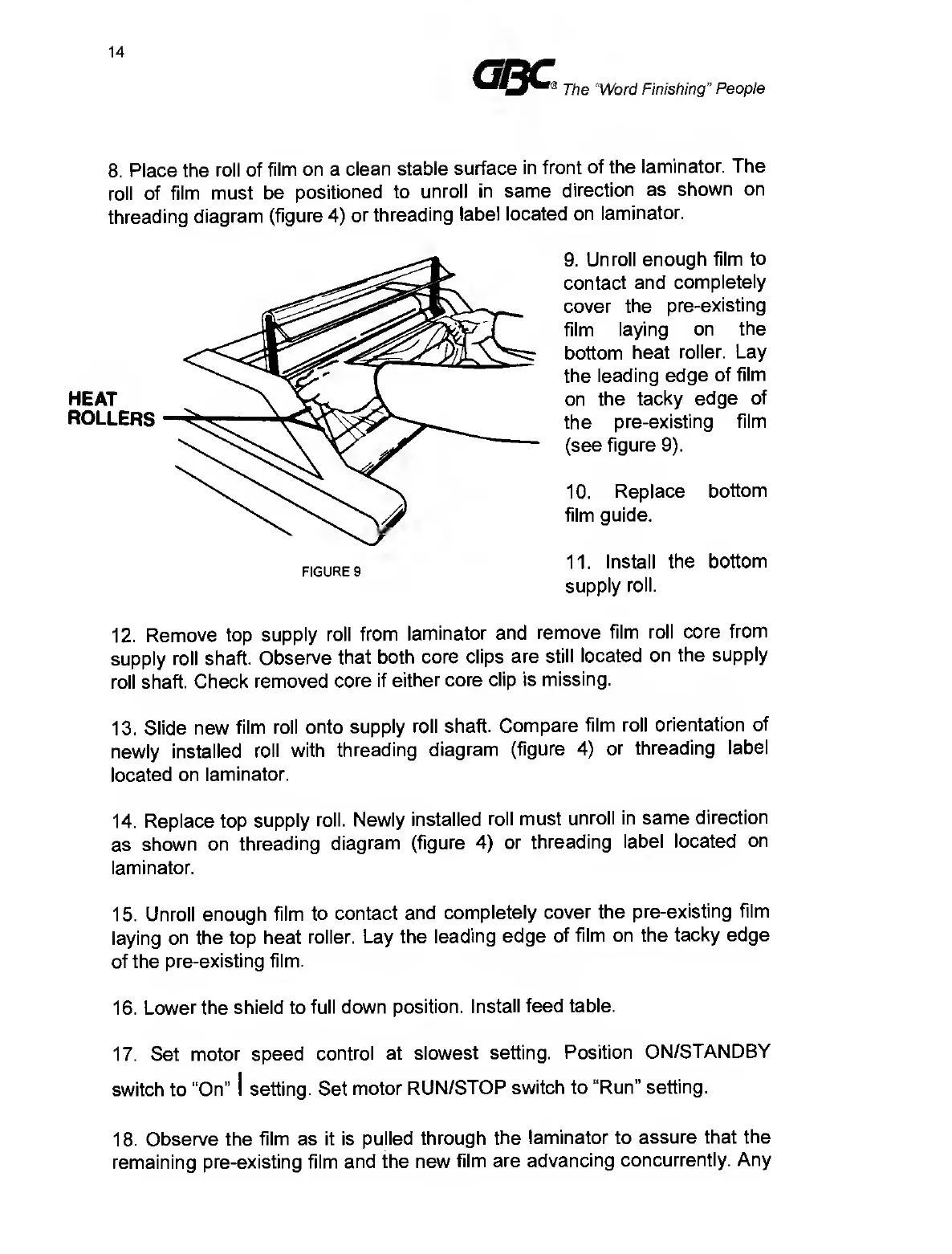
9.
Unroll
enough
film
to
contact
and
completely
cover
the
pre-existing
film
laying
on
the
bottom
heat
roller.
Lay
the
leading
edge
of
film
on
the
tacky
edge
of
the
pre-existing
film
(see
figure
9).
10.
Replace
bottom
film
guide.
11.
Install
the
bottom
supply
roll.
12.
Remove
top
supply
roll
from
laminator
and
remove
film
roll
core
from
supply
roll
shaft.
Observe
that
both
core
clips
are
still
located
on
the
supply
roll
shaft.
Check
removed
core
if
either
core
clip
is
missing.
13.
Slide
new
film
roll
onto
supply
roll
shaft.
Compare
film
roll
orientation
of
newly
installed
roll
with
threading
diagram
(figure
4)
or
threading
label
located
on
laminator.
14.
Replace
top
supply
roll.
Newly
installed
roll
must
unroll
in
same
direction
as
shown
on
threading
diagram
(figure
4)
or
threading
label
located
on
laminator.
15.
Unroll
enough
film
to
contact
and
completely
cover
the
pre-existing
film
laying
on
the
top
heat
roller.
Lay
the
leading
edge
of
film
on
the
tacky
edge
of
the
pre-existing
film.
16.
Lower
the
shield
to
full
down
position.
Install
feed
table.
17.
Set
motor
speed
control
at
slowest
setting.
Position
ON/STANDBY
switch
to
“On”
I
setting.
Set
motor
RUN/STOP
switch
to
“Run”
setting.
18.
Observe
the
film
as
it
is
pulled
through
the
laminator
to
assure
that
the
remaining
pre-existing
film
and
the
new
film
are
advancing
concurrently.
Any

Related product manuals