EasyManua.ls Logo

GBC GBC4250 - Trouble Shooting Guide

GBC GBC4250
25 pages
Print Icon
To Next Page IconTo Next Page
To Previous Page IconTo Previous Page
Loading...
22
The
“Word
Finishing’’
Peopie
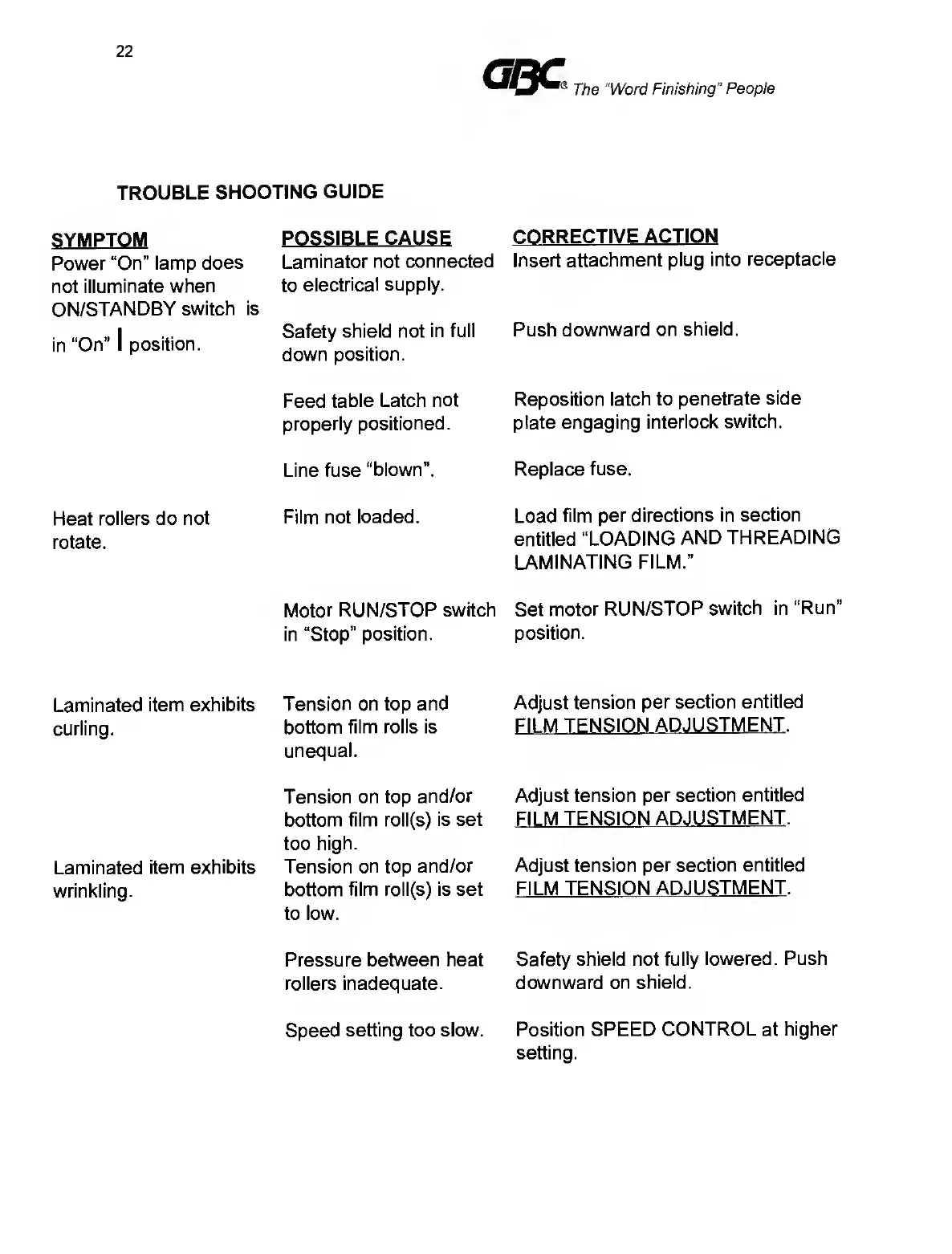
TROUBLE
SHOOTING
GUIDE
SYMPTOM
Power
“On”
lamp
does
not
illuminate
when
ON/STANDBY
switch
is
in
“On”
1
position.
POSSIBLE
CAUSE
Laminator
not
connected
to
electrical
supply.
Safety
shield
not
in
full
down
position.
CORRECTIVE
ACTION
Insert
attachment
plug
into
receptacle
Push
downward
on
shield.
Feed
table
Latch
not
properly
positioned.
Reposition
latch
to
penetrate
side
plate
engaging
interlock
switch.
Line
fuse
“blown”.
Replace
fuse.
Heat
rollers
do
not
rotate.
Film
not
loaded.
Load
film
per
directions
in
section
entitled
“LOADING
AND
THREADING
LAMINATING
FILM.”
Motor
RUN/STOP
switch
in
“Stop”
position.
Set
motor
RUN/STOP
switch
in
“Run"
position.
Laminated
item
exhibits
curling.
Tension
on
top
and
bottom
film
rolls
is
unequal.
Adjust
tension
per
section
entitled
Fll
M
TENSION
ADJUSTMENT.
Laminated
item
exhibits
wrinkling.
Tension
on
top
and/or
bottom
film
roll(s)
is
set
too
high.
Tension
on
top
and/or
bottom
film
roll(s)
is
set
to
low.
Adjust
tension
per
section
entitled
FILM
TENSION
ADJUSTMENT.
Adjust
tension
per
section
entitled
FILM
TENSION
ADJUSTMENT.
Pressure
between
heat
rollers
inadequate.
Safety
shield
not
fully
lowered.
Push
downward
on
shield.
Speed
setting
too
slow.
Position
SPEED
CONTROL
at
higher
setting.

Related product manuals