Pg 10
Slicing
1. For slcing, we recommend PrusaSlicer, Cura or Simplify3d. View our forum at forum.gcreate.com, our
YouTube channel youtube.com/gcreate3d or the respecve slicing program websites for more informa-
on.
2. Simplify3D may have older gMax configuraƟons built-in. Use the configuraon files on the SD card or
download them directly from our forum for the latest versions.
Cura (Free)
PrusaSlicer (Free)
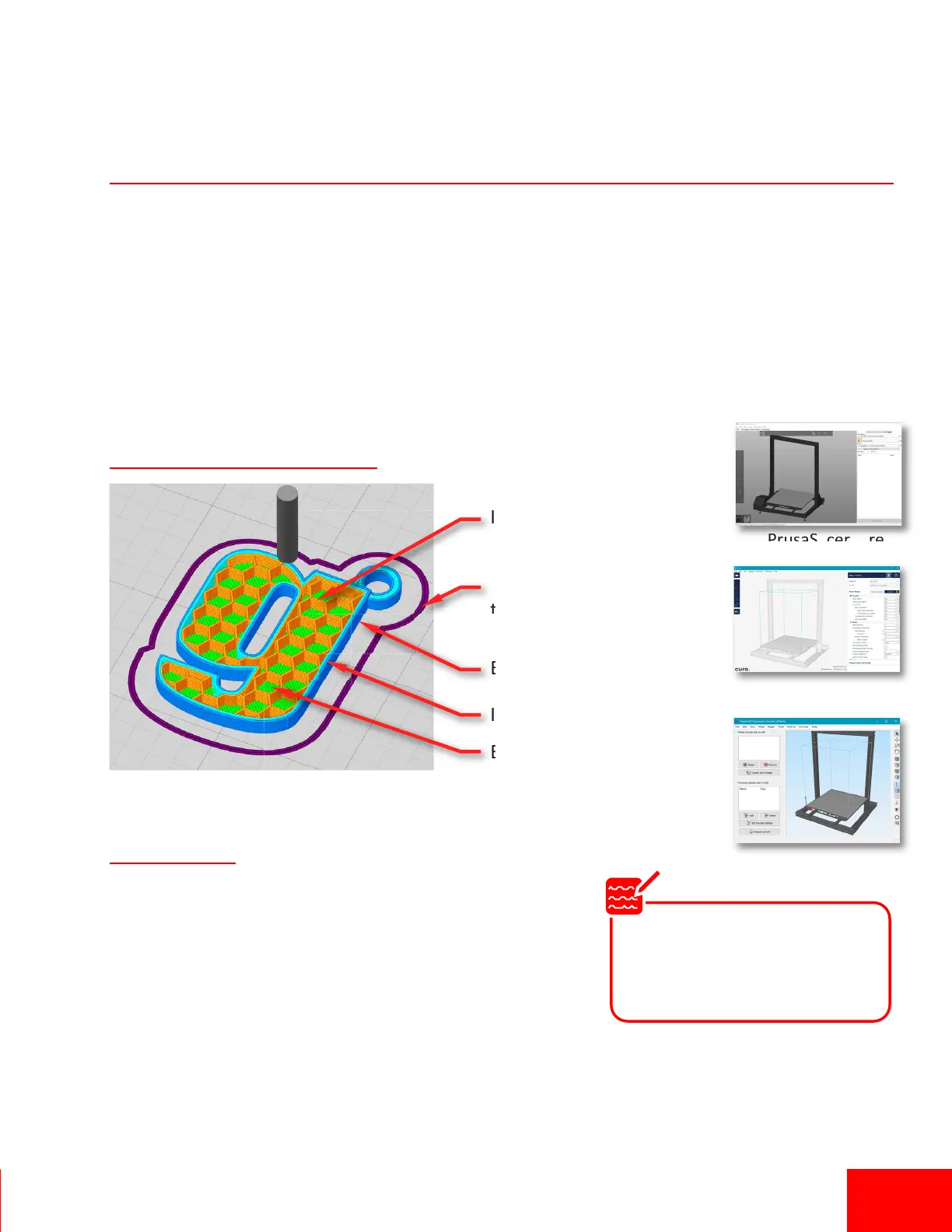
Exterior Perimeter
Interior Perimeter
Infill
Boom Surface
Skirt (Brim if it’s
touching the model)
Slicing Tips
• Depending on your 3d model and filament type you should
oen change several main sengs. The majority of print quality
issues can be fixed by changing slicing seƫngs.
• Print speeds, layer height, exterior wall thickness (or perime-
ter count), infill density, support material sengs, hotend
temperature and fan cooling are the typical sengs to modify. Refer to the Cura and Simplify3d
websites and forum.gcreate.com for many useful tutorials.
• Always use high-quality filament to reduce issues and improve your results.
Basic Anatomy of Slicing
Simplify3D
Note
Slicing is one of the most important parts of the 3d printing process. The proper settings can result in a great print
however many settings are usually model-specific. Taking the time to learn the best settings will result in a better
printing experience.
Always download the latest
configuration files from us to
ensure you have the correct
settings.


 To Next Page