Your First Print (Required)
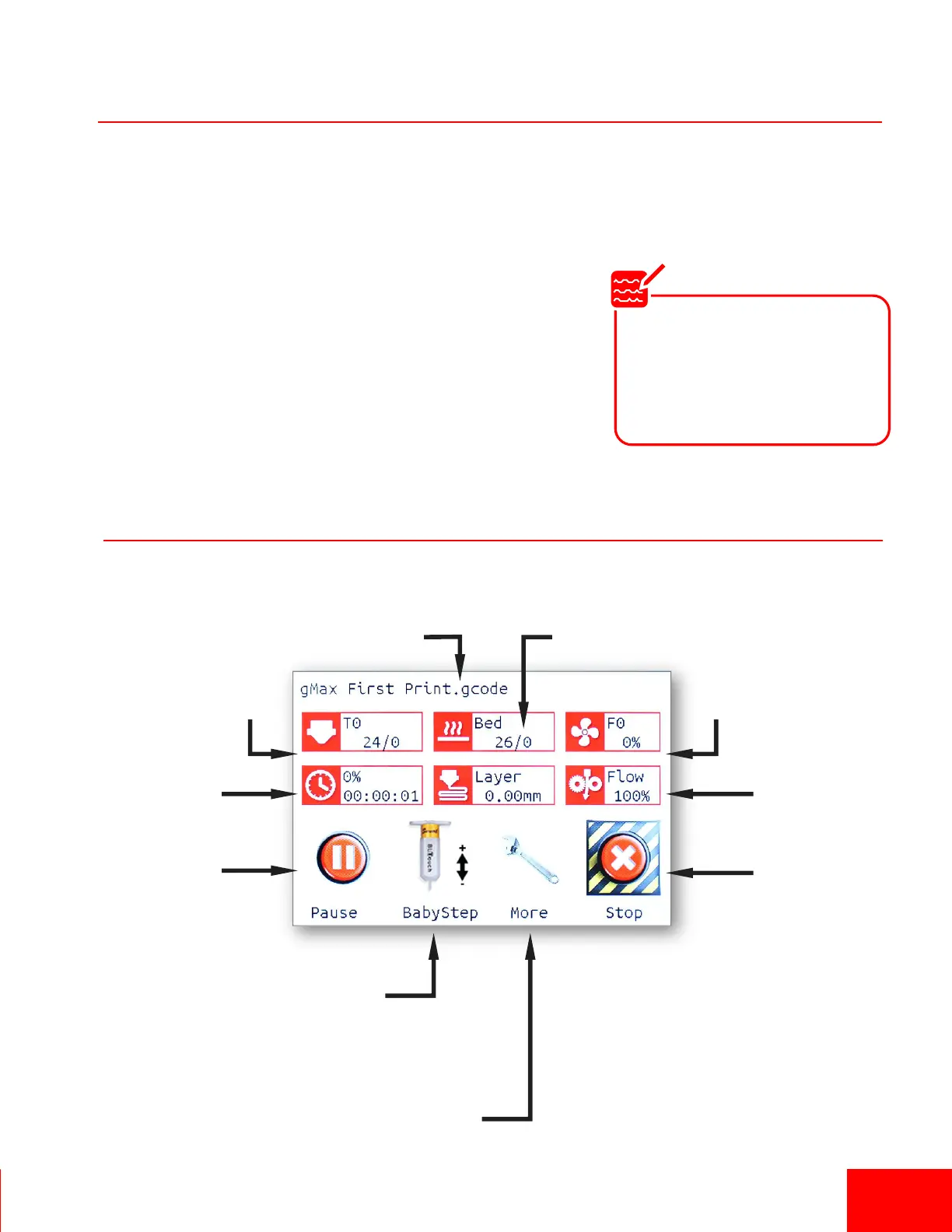
Printing Status Screen
1. Aer conducng the Inial Run and leveling the arm, this first print will confirm that your gMax is
running the same as when it le the manufacturing facility. This is a necessary and useful print.
Make sure to run it with the supplied filament and on the cold acrylic bed.
2. Go to “Print > TFT SD >Your First Print”. As the prinng
begins, you will need to adjust the first layer height using the
Babystepping feature since it is set intenonally high from the
manufacturing facility so as not to damage the bed. Refer to
the next page for more informaon.
Pg 7
Current Temp /
Target Temp
Print
Progress
Fan
Speed
Print Flow
/ Feed Rate
Cancel Print
Filename
Pause Print
Babystep Menu
(Displays model
thumbnail if acvated)
Bed Temp
More Menu
(Adjust printer sengs)
Note
The printer bed probe is
intentionally set high when
leaving our facility. You will
have to babystep the printer
on your first print.


 To Next Page