Connecting Your TV
Antenna/Cable Information
Most modem TV antennas receive both
VHF (Very High Frequency) and UHF
(Ultra High Frequency) channels. Chan-
nels 2-13 areV]-IFchannels, and channels
14-69 are UHF channels.
Typ_aJ
Indoor
Antenna
Typ_aJ
Outdoor
Antenna
In most situations you will get better
picture quality if you use an outdoor
antenna or connect your TV to a cable-TV
system. If this is not possible, connect the
indoor antenna supplied with your TV.
Cable-TV delivers both VHF and UHF
channels andother channels not available
from your antenn&
Shown below are two basic types of
antenna cables. Signals from ahome
antenna may be conducted through either
type. Cable-TV signals, however, are
always conducted through round, 75-ohm
coaxial cable.
Types of Antenna Cables
Flat300-ohm
twin-leadcable
Round 75-ohm
coaxial cable
Slip-on End
Screw-on End
Use the connector shown below to connect
your antenna or cable-TV system to the
back of the TV. _Washer
Antenna _
Connector_ Nut
IMPORTANT NOTE: Antenna
connector, nut, and washer must be
in place when TV is in use.
* Follow the instructions below if you
intend to connect the indoor antenna
supplied with your TV.
-or-
* Follow the instructions on page 14 if
you intend to connect an indoor or
outdoor antenna to your "IV.
-Or-
* Follow the instructions on page 15 if-
you intend to connect a cable- TV
system to your TV.
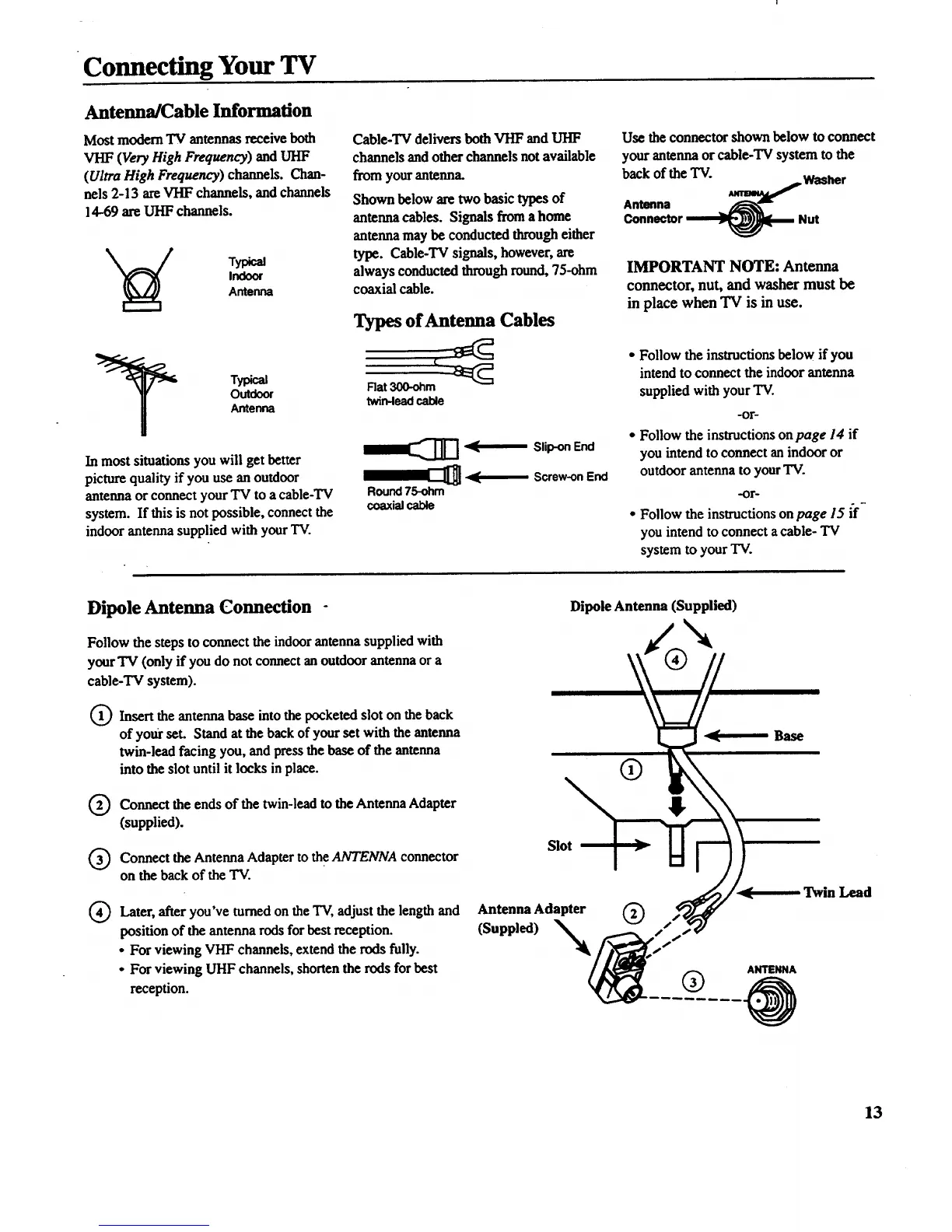
Dipole Antenna Connection -
Follow the steps to connect the indoor antenna supplied with
your TV (only if you do not connect an outdoor antenna or a
eable-TV system).
0)
Insert the antenna base into the pocketed slot on the back
of yo_ set. Stand at the backof your set with the antenna
twin-lead facing you, and press the base of the antenna
into the slot until it locks in place.
Q Connect the ends of the twin-lead to the Antenna Adapter
(supplied).
Q onnect the Antenna Adapter to the ANTENNA connector
on the back of the TV.
®
Later, after you've turned on the TV, adjust the length and
position of the antenna rods for best reception.
• For viewing VHF channels, extend the rods fully.
• For viewing UHF channels, shorten the rods for best
reception.
Dipole Antenna (Supplied)
Slot
_" Base
Antenna Adapter
(Suppled) N_
®
@
ANTENNA
Twin Lead
13



 To Next Page