Connecting Your TV
Home Antenna Connections
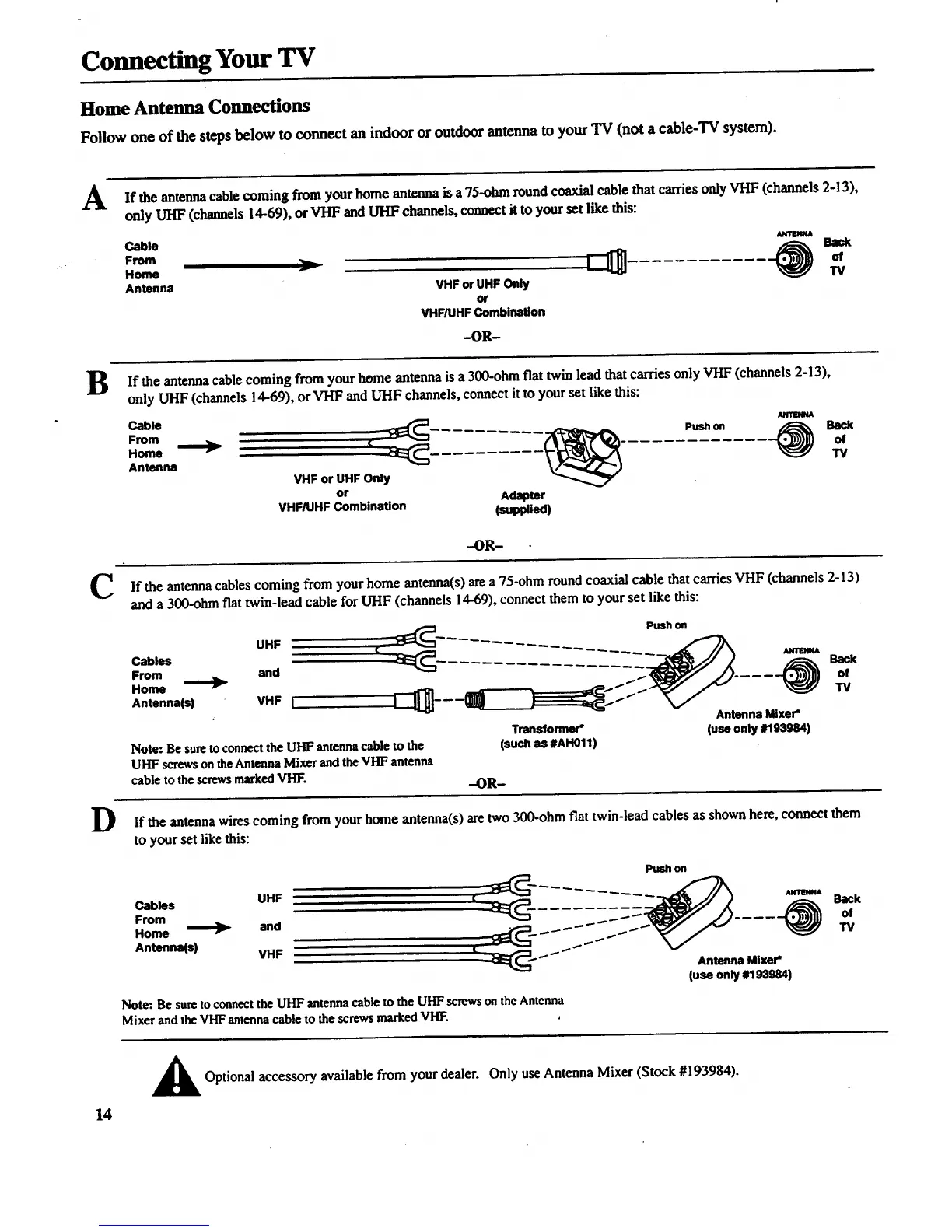
Follow one of the steps below to connect an indoor or outdoor antenna to your TV (not a cable-TV system).
A If the antennacable coming from your home antenna is a 75-ohm round coaxial cable that carries only VI-IF(channels 2-13),
only UHF (channels 14-69), or VHF and UHF channels, connect it to your set like this:
Cable Amm_
Home F I of
TV
Antenna VHF or UHF Only
or
VHF/UHFCombination
-OR-
B If the antenna cable from home antenna is a 300-ohm fiat twin lead thatcarries only VHF (channels 2-13),
coming
your
only UHF (channels 14-69), orVHF and UHF channels, connect it to your set like this:
C
D
From ......... Push on Back
Home ; of
Antenna TY
VHF or UHF Only
or Adapter
VHFIUHF Combination (supplied)
-OR-
If the antenna cables coming from your home antenna(s) area 75-ohm round coaxial cable that carriesVHF (channels 2-13)
and a 300-ohm flat twin-lead cable for UHF (channels 14-69), connect them to your set like this:
UHF
Cables
From and
Home
Antenna(s) VHF L
Push on
Note: Be sure to connect the UHF antenna cable to the
UHF screws on the Antenna Mixer and the VHF antenna
cable to the screws marked VHF.
Antenna Mixer"
Transformer" (use only #193984)
(such as #AH011)
-OR-
If the antenna wires coming from your home antenna(s) are two 300-ohm flat twin-lead cables as shown here, connect them
to your set like this:
Push on
Cables UHF | ........ ,_i..,
From of
Home and _ - _ _ _ _"
Antenna(s) VHF I[ _=_:_ _ _ _ _"
TV
--_E_-- AntennaMixer"
(useonly#193984)
Note: Be sure to connect the UHF antenna cable to the UHF screws on the Antenna
Mixer and the VHF antenna cable to the screwsmarked vI-rF.
14
Optional accessory available from your dealer. Only useAntenna Mixer (Stock #193984).



 To Next Page