2
Caller ID Features
IMPORTANT: In order to use this unit’s Caller ID features, you must
subscribe to either the standard Name/Number Caller ID Service or
Call Waiting Caller ID Service. To know who is calling while you are
on the phone, you must subscribe to Call Waiting Caller ID Service.
This unit receives and displays CID information transmitted by your local telephone
company. This information can include the phone number, date and time; or the
name, phone number, and date and time.
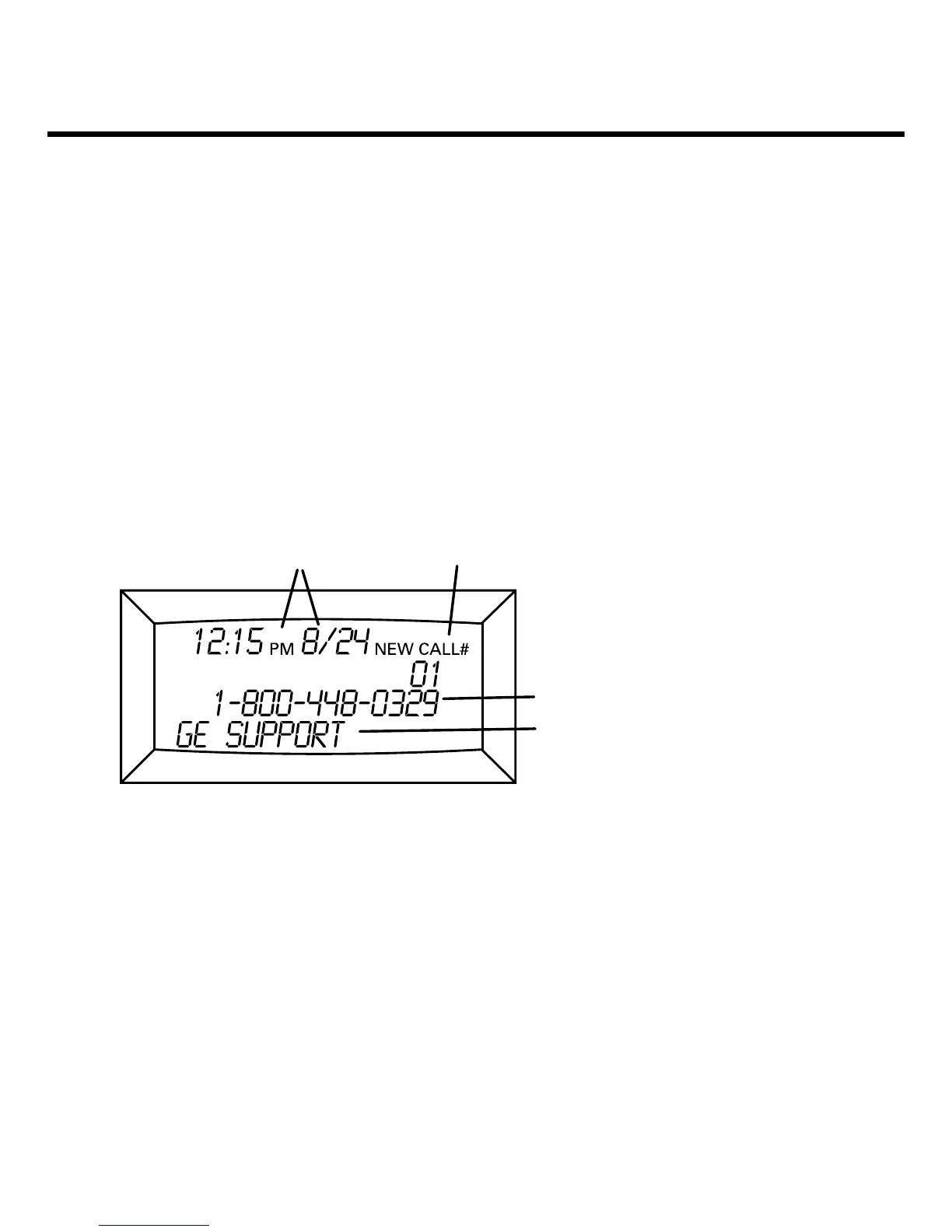
Summary Screen
The summary screen shows the current time, current date and number of new
calls to be reviewed. It is displayed until any button is pressed. Within 10 seconds of
receiving a new call, the summary screen is displayed.
Message date-time stamp
Message number
Call ID phone number (if any)
Call ID name (if any)
Caller ID with Call Waiting
Provided you subscribe to Call Waiting Caller ID service from your phone company; if
you receive an incoming call and you are already on the phone, a beep indicates the
presence of a Call Waiting call on the line. Only the handset that is in use at the time
of the call will display and store the Call Waiting Caller ID information.
• When you hear the call waiting beep in the handset receiver, press the
FLASH/EXIT
button to put the current call on hold and answer the incoming call. Press the
FLASH/EXIT button again to return to the original call.



 To Next Page