13
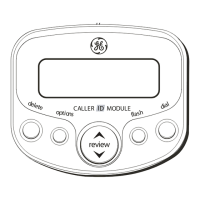
2. Press the up or down arrow button until
10
DIGIT AC's
appears.
3. Press the options button to show the current
regional area code. The default is --- --- ---. The
first digit flashes, indicating it is ready to
accept the area code entry.
4. Press the down arrow button to choose 9-0 for
the first digit.
5. When the desired number is flashing, press the
up arrow button to advance to the next digit.
6. Repeat steps 4 and 5 until all the digits for your
regional area code are correct.
7. Press options again to store the regional area
code and return to the
10 DIGIT AC's
display.
NOTE: If you make a mistake while setting the 10-
digit AC's, you can delete the selected set of the
area code by pressing the delete button.
EXITING THE OPTIONS MENU
1. Press the up or down arrow button until
EXIT SETUP
appears.
2. Press the options button to exit the options
menu.
OPERATION
RECEIVING CALLS
This unit has a built-in real time clock that
accurately keeps the current time and date. The
clock is automatically set and updated each time
Caller ID information is received.
IMPORTANT: Allow at least two rings to occur
prior to answering calls. This will assure that the
unit will receive the Caller ID information correctly.
• When the telephone is not in use and a new
call is received, the display displays the phone
number, the caller’s name, and time and date
of the call for 20 seconds. The
NEW
(new call)
symbol comes on.
• The red NEW CALL indicator comes on,
confirming new calls have been received.


 To Next Page