16
CHANGING THE NUMBER FORMAT
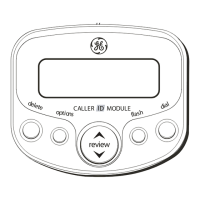
The options button lets you change the format of
the displayed number. The available formats are
as follows.
7-digit 7-digit telephone number.
10-digit 3-digit area code+ 7-digit telephone
number.
11-digit long distance code “1” + 3-digit area
code + 7-digit telephone number.
1. Use the arrow buttons to scroll to the number
you want to call back.
2. Press the dial button. If the number is 7, 10, or
11 digits,
ADJUST
shows in the display.
NOTE: If the number does not dial as shown, press
the options button. Repeat if necessary, until the
correct number of digits is shown.
3. If the phone is off the hook, the display counter
counts down from three to zero seconds. During
this time you may press the options button and
adjust the number format. When you are
fininshed the number automatically dials.
IMPORTANT: All phones on the line must be on
the hook for this feature to work.
4. If the phone is on the hook, the counter counts
down from ten to zero seconds. During this
time, you may press the options button to
adjust the number format. Pick up the handset
before the phone turns to idle mode and the
phone number automatically dials.
5. Press the flash button to exit and return to
review mode.
CALLER ID MESSAGES
The following special messages indicate the
status of a message or the unit:
NO CALLS
The call record log is empty.
UNKNOWN
The incoming call does not
CALLER
have Caller ID service or its
service area is not linked to
yours. If
UNKNOWN CALLER
appears along with a calling
number, the name
information for that number
is not available.


 To Next Page